6 Proven Methods for Seniors to Stay Updated with Modern Technology Trends
Are you finding it challenging to keep up with the rapid pace of technology? The ever-evolving world of consumer electronics and software can indeed be overwhelming for seniors trying to stay tech-savvy.
As a life coach, I’ve seen many retirees struggle with this very issue. However, I’ve also witnessed the joy and empowerment that comes with mastering new tech skills, including digital literacy for older adults and using smart home devices for the elderly.
In this article, you’ll discover effective strategies to stay updated with modern technology trends. From local workshops to online resources, we’ll cover practical tips tailored for you, including social media for seniors and online safety tips for older generations.
Let’s dive in and explore how seniors can stay tech-savvy in today’s digital world.

The Challenge of Keeping Up with Technology
Navigating the fast-paced world of technology can be overwhelming for many retirees. The constant updates and new gadgets can leave you feeling out of touch, making it difficult for seniors to stay tech-savvy.
In my experience, people often find it daunting to stay current with new trends, which can affect their confidence and independence. For instance, several clients struggle to use smartphones effectively, missing out on essential features and senior-friendly technology.
This digital gap can lead to feelings of isolation and frustration. Yet, staying updated is crucial for maintaining connectivity, safety, and personal independence. Digital literacy for older adults is becoming increasingly important in today’s connected world.
But, don’t worry. There are ways to bridge this gap effectively and help seniors stay tech-savvy.

Effective Strategies to Stay Updated with Technology
Overcoming this challenge requires a few key steps for seniors to stay tech-savvy. Here are the main areas to focus on to make progress with digital literacy for older adults:
- Attend Local Tech Workshops for Seniors: Research and sign up for community tech workshops focused on senior-friendly technology.
- Join Online Forums for Technology Discussions: Register on senior-friendly tech forums to enhance digital literacy for older adults.
- Use Smartphone Apps to Learn New Tech Skills: Download and use learning apps designed for seniors to stay tech-savvy.
- Follow Tech Blogs Tailored for Older Adults: Subscribe to and read relevant tech blogs covering topics like smart home devices for the elderly.
- Practice with Family on Video Call Platforms: Schedule regular video calls to practice new skills and explore social media for seniors.
- Explore Senior-Friendly Device Accessibility: Adjust device settings for better usability, including virtual assistants for older users.
Let’s dive in!
1: Attend local tech workshops for seniors
Attending local tech workshops can significantly enhance your tech skills and confidence, helping seniors stay tech-savvy in today’s digital world.
Actionable Steps:
- Research local workshops: Look for tech workshops at community centers or libraries. Use local community boards or websites to find these events focused on digital literacy for older adults.
- Bring a friend: Attend the workshop with a friend or family member. This will provide moral support and make learning more enjoyable, especially when exploring senior-friendly technology.
- Take notes: Jot down new tips and tricks in a tech journal. Practice these skills at home to reinforce your knowledge, including online safety tips for older generations.
Explanation: Engaging in local tech workshops provides a hands-on learning experience, which is crucial for mastering new technology and helping seniors stay tech-savvy.
These events also offer the chance to ask questions and interact with others who share similar interests in smart home devices for the elderly and social media for seniors.
According to the National Council on Aging, senior centers often offer such educational programs, which are tailored to meet the unique needs of older adults, including topics on tech gadgets for aging populations.
Participating in these workshops can bridge the digital gap and boost your confidence in using mobile apps for seniors and virtual assistants for older users.
Benefits of attending local tech workshops:
- Hands-on learning experience with wearable technology for the elderly
- Opportunity to ask questions in person about digital health solutions for seniors
- Social interaction with like-minded individuals interested in staying tech-savvy
Taking these steps will set a strong foundation for staying updated with technology and helping seniors stay tech-savvy.
2: Join online forums for technology discussions
Joining online forums for technology discussions can help seniors stay tech-savvy, connect with others who share their interests, and keep updated on senior-friendly technology.
Actionable Steps:
- Register on senior-friendly tech forums: Sign up on platforms like Senior Planet or Reddit communities focused on digital literacy for older adults. Start with a simple introduction post to break the ice and get involved.
- Participate in discussions: Engage in at least one discussion per week. Ask questions about new tech trends, smart home devices for the elderly, and share your experiences with social media for seniors.
- Follow and connect: Use the forum’s private messaging feature to build a network of tech-savvy friends. This will make the experience more collaborative and enjoyable, especially when discussing online safety tips for older generations.
Explanation: Engaging in online forums offers a supportive environment for seniors to stay tech-savvy and learn about tech gadgets for aging populations. These platforms provide a wealth of knowledge about mobile apps for seniors and a sense of community.
According to the Business.com, using multiple sources, such as online forums, is essential for staying informed about industry trends. Building connections with other seniors who have similar interests in virtual assistants for older users or wearable technology for the elderly can also enhance your learning experience.
Participating in these discussions will help seniors stay tech-savvy, connected, and informed about digital health solutions for seniors.

3: Use smartphone apps to learn new tech skills
Using smartphone apps can make learning new tech skills convenient and engaging, helping seniors stay tech-savvy.
Actionable Steps:
- Download learning apps: Install apps like Coursera or Duolingo for tech courses. Schedule daily reminders to spend 15 minutes learning on these mobile apps for seniors.
- Watch tutorial videos: Use YouTube to watch step-by-step tech guides. Subscribe to channels specifically geared towards digital literacy for older adults.
- Practice regularly: Explore and use new apps weekly to build confidence and proficiency. Create a list of must-try apps to keep track, focusing on senior-friendly technology.
Explanation: Engaging with smartphone apps provides a flexible and interactive way for seniors to stay tech-savvy and learn new tech skills.
According to Business.com, using multiple sources, such as apps and video tutorials, is essential for staying informed about industry trends.
Practicing regularly ensures you build and retain new skills, boosting your confidence and independence with technology for aging populations.
These steps will help you master technology at your own pace, enhancing digital literacy for older adults.
4: Follow tech blogs tailored for older adults
Reading tech blogs tailored for older adults can be a simple yet effective way for seniors to stay tech-savvy and updated with the latest trends.
Actionable Steps:
- Subscribe to newsletters: Sign up for newsletters from tech blogs that focus on digital literacy for older adults. Allocate a specific day of the week to catch up on these newsletters.
- Bookmark favorite blogs: Use a digital tool like Pocket to bookmark and organize your favorite tech blogs about senior-friendly technology. Set aside time each week to read through them.
- Discuss articles with friends: Share and discuss interesting articles about smart home devices for the elderly with friends or family. Start a tech discussion group to share insights and experiences on social media for seniors.
Explanation: Keeping up with tech blogs provides a continuous learning opportunity and helps seniors stay tech-savvy about new trends and tools, including online safety tips for older generations.
According to Business.com, using multiple sources like blogs is essential for staying updated. Discussing these articles with others can reinforce your learning and ensure you stay engaged with tech gadgets for aging populations.
Key benefits of following tech blogs:
- Stay informed about latest tech trends, including mobile apps for seniors
- Learn at your own pace about virtual assistants for older users
- Access curated content relevant to seniors, such as wearable technology for the elderly
This method ensures seniors stay tech-savvy and connected with digital health solutions for seniors with ease.

5: Practice with family on video call platforms
Practicing with family on video call platforms can significantly enhance your familiarity with modern technology, helping seniors stay tech-savvy.
Actionable Steps:
- Schedule regular video calls: Arrange weekly video calls with family members to practice using platforms like Zoom or Skype. Host virtual game nights to make the experience enjoyable and boost digital literacy for older adults.
- Experiment with features: During these calls, explore different features such as screen sharing or virtual backgrounds. Assign a family tech guru to guide you through new functionalities, promoting senior-friendly technology use.
- Record calls for review: With permission, record your calls to review and learn from any mistakes. Create a checklist of features to explore during each session, enhancing online safety tips for older generations.
Explanation: Engaging in regular video calls with family helps seniors stay tech-savvy, becoming more comfortable with technology and enhancing confidence and independence.
According to the National Council on Aging, staying connected through technology is crucial for maintaining social ties and reducing feelings of isolation.
Practicing with family also provides a supportive environment to learn and improve, fostering digital literacy for older adults.
These steps will help you stay connected and proficient with modern tech tools, including smart home devices for the elderly and social media for seniors.
6: Explore senior-friendly device accessibility
Exploring senior-friendly device accessibility is crucial for enhancing usability and ensuring seniors stay tech-savvy and can enjoy technology confidently.
Actionable Steps:
- Adjust device settings: Increase text size or enable voice commands on your device. Follow online step-by-step guides to customize these settings for digital literacy for older adults.
- Utilize built-in accessibility features: Practice using features like screen readers or magnifiers. Test one new accessibility feature each week to find what works best for you, enhancing senior-friendly technology use.
- Explore specialized devices: Visit local tech stores for hands-on demos of senior-friendly devices like simplified smartphones or tablets, which can help seniors stay tech-savvy.
Explanation: Utilizing senior-friendly device accessibility features can significantly enhance your tech experience. These features make devices more user-friendly and can help you stay connected and independent, which is essential for seniors to stay tech-savvy.
According to the National Council on Aging, adapting your technology to your needs is essential for maintaining independence.
Common accessibility features to explore:
- Text-to-speech functionality
- Adjustable font sizes and contrast
- Voice command options, similar to virtual assistants for older users
Taking these steps will help you use technology more effectively and comfortably, ensuring seniors stay tech-savvy in the digital age.
Partner with Alleo on Your Tech Journey
We’ve explored the challenges of helping seniors stay tech-savvy and shared practical strategies. But did you know you can work directly with Alleo to make this journey easier and faster for older adults seeking digital literacy?
Setting up an account with Alleo is simple. After creating your profile, Alleo will generate a personalized tech-learning plan tailored to your needs, including senior-friendly technology options and smart home devices for the elderly.
The AI coach will guide you through each step, ensuring you stay on track with reminders and progress updates, helping seniors stay tech-savvy in today’s digital world.
Alleo offers affordable, tailored coaching support, similar to a human coach. You’ll receive continuous follow-up on your progress, adjustments based on your feedback, and accountability through text and push notifications. This approach helps older generations navigate social media, learn online safety tips, and explore tech gadgets for aging populations.
Ready to get started for free? Let me show you how to begin your journey to help seniors stay tech-savvy!
Step 1: Log In or Create Your Account
Log in to your existing Alleo account or create a new one to start your personalized tech-learning journey and receive tailored guidance from our AI coach.

Step 2: Choose “Building better habits and routines”
Click on “Building better habits and routines” to start developing consistent tech-learning practices that will help you stay updated with modern technology more effectively and comfortably.

Step 3: Selecting the life area you want to focus on
Choose “Personal” as your focus area to enhance your technology skills and stay updated with modern trends, boosting your confidence and independence in using digital tools.

Step 4: Starting a Coaching Session
Begin your tech learning journey with Alleo by scheduling an initial intake session, where you’ll discuss your technology goals and receive a personalized plan to guide your progress.

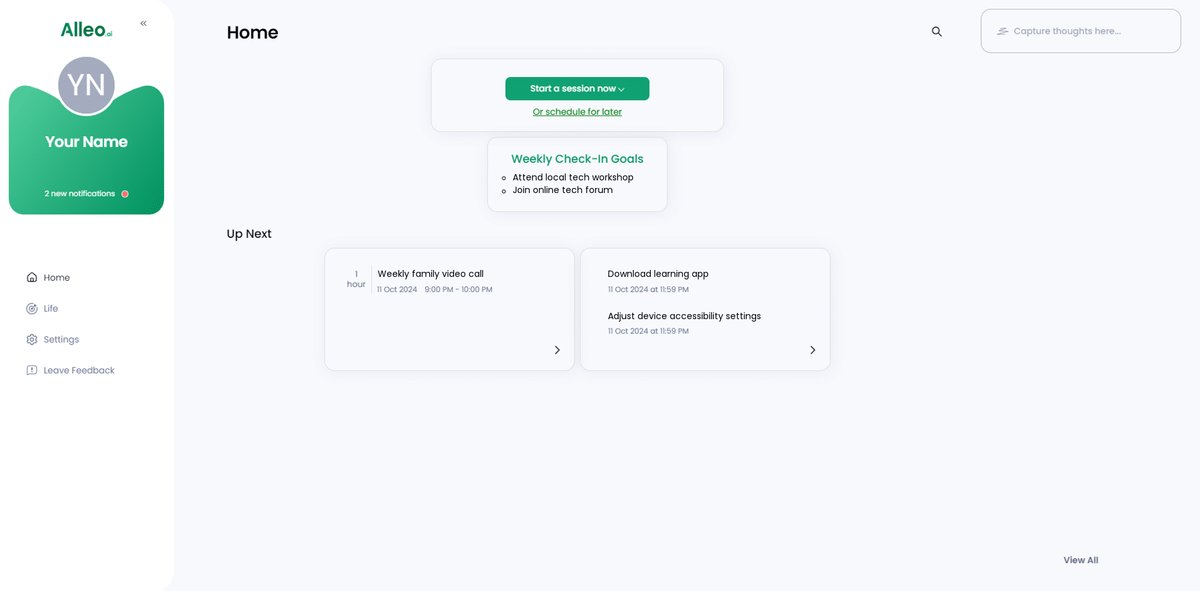
Step 5: Viewing and Managing Goals After the Session
After your coaching session, open the Alleo app and check your home page to see the goals you discussed, allowing you to easily track and manage your progress in mastering new tech skills.
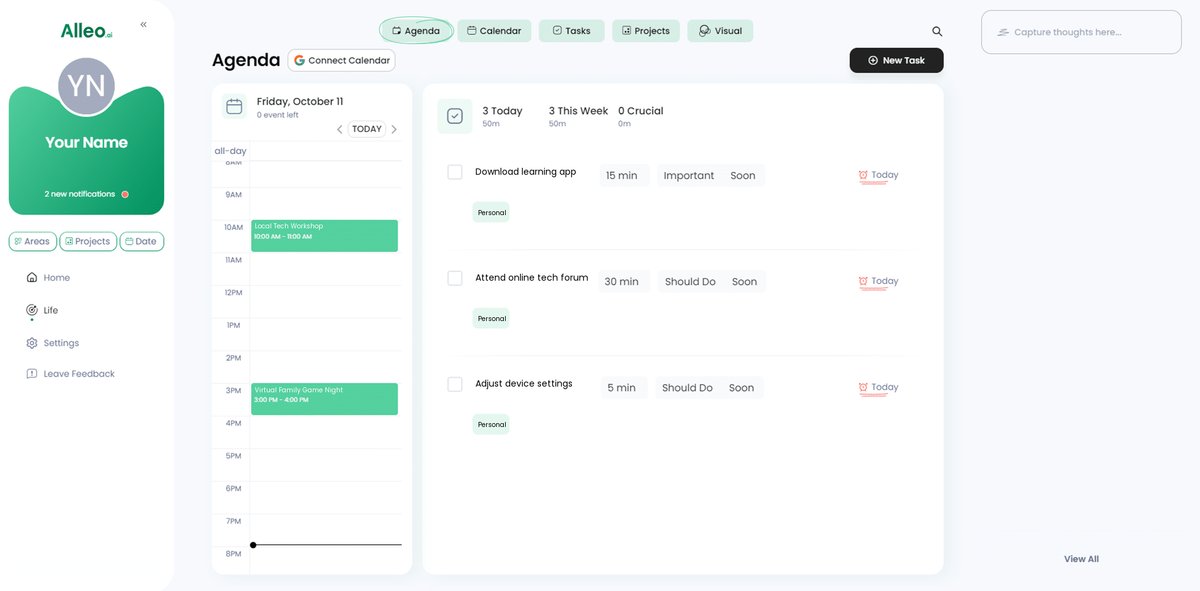
Step 6: Adding events to your calendar or app
Use Alleo’s calendar feature to add tech workshops, video calls with family, or practice sessions, helping you track your progress and stay accountable in your journey to master new technology skills.
Embrace Your Tech Journey with Confidence
As you practice these strategies, you’ll find yourself becoming more comfortable with technology. Embracing community resources and online tools can make a significant difference in helping seniors stay tech-savvy.
Remember, staying updated with technology enhances your connectivity and independence. You don’t have to navigate this journey alone, especially when it comes to mastering digital literacy for older adults.
Alleo is here to support you every step of the way. By using Alleo, you can receive personalized guidance tailored to your needs, including assistance with smart home devices for the elderly and social media for seniors.
Take the first step today. Sign up for Alleo and start mastering new tech skills with confidence, from online safety tips for older generations to exploring tech gadgets for aging populations.
It’s never too late to learn and thrive with technology, whether it’s mobile apps for seniors or wearable technology for the elderly.