7 Proven Techniques to Boost Your Personal Brand with LinkedIn Photo Posts
Ever wondered how some LinkedIn profiles stand out effortlessly while others blend into the background? It’s time to explore effective LinkedIn photo branding strategies.
As a life coach, I’ve helped many professionals navigate these challenges. In my experience helping clients stand out in competitive industries, I often encounter the same issue: balancing professionalism with personal engagement on LinkedIn. Visual storytelling on LinkedIn plays a crucial role in creating a lasting impression.
In this post, you’ll discover proven strategies to effectively use photos in LinkedIn posts for personal branding. You’ll learn how to capture attention, build connections, and enhance your professional image through optimizing LinkedIn post images. We’ll explore LinkedIn image best practices and professional photo selection for LinkedIn to help you create consistent visual branding on your profile.
Let’s dive into these LinkedIn photo branding strategies.

Navigating the Visual Dilemma on LinkedIn
Many young professionals struggle to find the sweet spot between maintaining a professional image and showcasing personal engagement on LinkedIn. This balancing act can feel overwhelming, especially when poorly managed LinkedIn photo branding strategies can make your profile blend into the background.
In my experience, the inconsistency in visual content often leaves a lasting negative impression. Several clients report feeling uncertain about whether to use personal photos, fearing it might come off as unprofessional. This uncertainty about personal branding through visuals can be paralyzing.
This uncertainty can be paralyzing, causing you to miss out on opportunities to engage and connect.
You might wonder if sharing photos from your personal life will dilute your professional brand. However, it’s not just about the photos but how you use them for visual storytelling on LinkedIn.
By strategically incorporating high-quality images and following LinkedIn image best practices, you can enhance your professional image while making your profile relatable.
It’s a delicate balance, but with the right approach to optimizing LinkedIn post images, you can turn this dilemma into an advantage.

Effective Strategies for Using Photos in LinkedIn Posts
Overcoming this challenge requires a few key steps. Here are the main areas to focus on to make progress with LinkedIn photo branding strategies.
- Choose high-quality, professional profile photo: Invest in a professional photoshoot or use AI headshot generators for optimal personal branding through visuals.
- Use personal photos to showcase work environment: Capture candid moments, events, and behind-the-scenes shots to enhance engagement with LinkedIn photos.
- Create consistent visual style for all posts: Develop a visual theme using tools like Canva, focusing on creating consistent visual branding on LinkedIn.
- Utilize LinkedIn Carousels for multiple images: Create mini-stories and interactive content using carousels, optimizing LinkedIn post images.
- Strategically arrange photos to tell a story: Plan narratives and highlight key moments for effective visual storytelling on LinkedIn.
- Incorporate both professional and personal images: Balance content to humanize your profile, adhering to LinkedIn image best practices.
- Add short, engaging captions to posted photos: Write concise captions that add context and value, considering LinkedIn image size and dimensions.
Let’s dive in to explore these LinkedIn photo branding strategies!
1: Choose high-quality, professional profile photo
An impactful LinkedIn profile starts with a professional photo that aligns with your personal branding through visuals. Implementing effective LinkedIn photo branding strategies is crucial for making a strong first impression.
Actionable Steps:
- Hire a professional photographer to capture your headshot, optimizing LinkedIn post images.
- Use AI tools like BetterPic for affordable, high-quality headshots, following LinkedIn image best practices.
- Ensure your attire and background reflect your professional persona, enhancing engagement with LinkedIn photos.
Explanation:
These steps are crucial because your profile photo is often the first impression you make on LinkedIn, making professional photo selection for LinkedIn essential.
A professional photo can significantly enhance your profile’s credibility and engagement, contributing to visual storytelling on LinkedIn.
According to statistics, larger, high-quality images can lead to a 38% higher click-through rate in ads. Understanding LinkedIn image size and dimensions is key.
Investing in a professional image sets the stage for creating consistent visual branding on LinkedIn.
Your photo is your visual handshake; make it count by leveraging LinkedIn photo branding strategies effectively.
2: Use personal photos to showcase work environment
Using personal photos to showcase your work environment can make your LinkedIn profile more engaging and relatable, serving as an effective LinkedIn photo branding strategy.
Actionable Steps:
- Capture candid moments in your workspace.
- Snap photos of yourself engaging in tasks or collaborating with colleagues, optimizing LinkedIn post images.
- Highlight events and workshops you attend.
- Share images with brief descriptions of the event and your role, enhancing engagement with LinkedIn photos.
- Showcase behind-the-scenes moments.
- Use photos to give a peek into your daily professional life, leveraging visual storytelling on LinkedIn.
Explanation:
These steps are essential because they humanize your profile, making it more relatable to your audience. Capturing candid moments and behind-the-scenes activities can showcase your professional environment authentically, contributing to personal branding through visuals.
Furthermore, sharing photos from events and workshops can highlight your active participation in the industry. According to Buffer, sharing personal experiences and workplace insights can significantly boost engagement on LinkedIn. This approach helps build a connection with your audience, fostering trust and engagement while creating consistent visual branding on LinkedIn.

3: Create consistent visual style for all posts
Creating a consistent visual style for all your LinkedIn posts is crucial for building a recognizable and professional personal brand through visuals. This is a key aspect of LinkedIn photo branding strategies.
Actionable Steps:
- Develop a visual theme for your posts.
- Choose a color scheme, fonts, and style that reflect your brand consistently, adhering to LinkedIn image best practices.
- Use tools like Canva to maintain consistency.
- Create templates for regular post types (e.g., achievements, tips), optimizing LinkedIn post images.
- Regularly review and adjust your visual strategy.
- Analyze engagement metrics to see what works best and make improvements, enhancing engagement with LinkedIn photos.
Explanation:
These steps are essential because a unified visual style helps your content stand out and become more memorable. Consistency in your posts’ appearance can increase recognition and trust among your audience, which is crucial for creating consistent visual branding on LinkedIn.
According to LinkedIn Helper, a consistent visual style makes your content more recognizable and impactful. Regularly reviewing and adjusting your strategy ensures you stay relevant and effective in your visual storytelling on LinkedIn.
Your consistent visual style will make your LinkedIn profile visually appealing and professional, leveraging infographics in LinkedIn posts and applying professional photo selection for LinkedIn.

4: Utilize LinkedIn Carousels for multiple images
Using LinkedIn Carousels for multiple images can enhance engagement and visual storytelling on LinkedIn, contributing to effective LinkedIn photo branding strategies.
Actionable Steps:
- Create mini-stories with carousels.
- Plan a sequence of images that tell a cohesive story, optimizing LinkedIn post images.
- Showcase step-by-step processes.
- Break down a project or achievement into multiple slides, leveraging infographics in LinkedIn posts.
- Engage viewers with interactive content.
- Encourage comments and discussions on carousel posts, enhancing engagement with LinkedIn photos.
Explanation:
These steps matter because they make your content more interactive and visually appealing. Carousels allow you to share detailed stories and processes in a more engaging format, supporting personal branding through visuals.
According to Bardeen, posts with multiple images can drive up to 20% more engagement. Utilizing carousels strategically helps you connect with your audience on a deeper level, aligning with LinkedIn image best practices.
Key benefits of using LinkedIn Carousels include:
- Increased engagement through interactive storytelling
- Enhanced visual appeal with multiple related images, creating consistent visual branding on LinkedIn
- Opportunity to showcase detailed processes or projects
Experiment with different carousel themes to see what resonates best with your connections, while adhering to professional photo selection for LinkedIn and LinkedIn image size and dimensions guidelines.
5: Strategically arrange photos to tell a story
Strategically arranging photos to tell a story can make your LinkedIn profile more engaging and memorable, serving as a key LinkedIn photo branding strategy.
Actionable Steps:
- Plan your narrative before posting.
- Use a storyboard to outline the message each photo conveys, focusing on personal branding through visuals.
- Mix professional and candid shots.
- Combine formal photos with casual, relatable images to create a balanced story, adhering to LinkedIn image best practices.
- Highlight key moments and achievements.
- Arrange photos to lead viewers through your professional journey step by step, optimizing LinkedIn post images.
Explanation:
These steps are crucial because they help you create a compelling visual story. Planning your photo narrative ensures each image contributes to your overall message, enhancing engagement with LinkedIn photos.
Mixing different types of photos can make your profile more relatable. According to Bardeen, strategic photo arrangement can boost engagement by up to 20%, emphasizing the importance of professional photo selection for LinkedIn.
Highlighting key moments helps showcase your professional journey effectively, contributing to visual storytelling on LinkedIn.
This approach turns your LinkedIn profile into a dynamic visual story, capturing attention and fostering connections while creating consistent visual branding on LinkedIn.
6: Incorporate both professional and personal images
Incorporating both professional and personal images can humanize your LinkedIn profile and make it more relatable, which is a key aspect of effective LinkedIn photo branding strategies.
Actionable Steps:
- Share photos of hobbies or activities that demonstrate skills relevant to your career, enhancing your personal branding through visuals.
- For example, post images of you speaking at industry events or participating in team-building activities, optimizing LinkedIn post images for engagement.
- Balance your content by aiming for a mix of 70% professional and 30% personal photos, following LinkedIn image best practices.
- This ensures your profile remains professional while adding a personal touch, creating consistent visual branding on LinkedIn.
- Share stories that showcase your personality and values through visual storytelling on LinkedIn.
- Use photos to illustrate these stories, making your profile more engaging and relatable while leveraging infographics in LinkedIn posts.
Explanation:
These steps are essential because they help create a well-rounded and authentic LinkedIn profile. Balancing professional and personal images makes your profile more engaging and relatable, which is crucial for professional photo selection for LinkedIn.
According to LinkedIn Pulse, personal photos can increase engagement and make your content more memorable. This approach helps build a connection with your audience and fosters trust, while enhancing engagement with LinkedIn photos.
By humanizing your LinkedIn profile through effective LinkedIn photo branding strategies, you can stand out in a professional yet approachable manner.
7: Add short, engaging captions to posted photos
Adding short, engaging captions to your photos is vital for capturing attention and providing context in LinkedIn posts, serving as a key LinkedIn photo branding strategy.
Actionable Steps:
- Write concise captions that offer insights or tips, following LinkedIn image best practices.
- Start with a hook, provide a middle informative part, and end with a call to action, enhancing engagement with LinkedIn photos.
- Use storytelling techniques for visual storytelling on LinkedIn.
- Share a brief story that relates to the photo and adds value, optimizing LinkedIn post images.
- Provide personal reflections to support personal branding through visuals.
- Include your thoughts or feelings about the content depicted in the photo, creating consistent visual branding on LinkedIn.
Explanation:
These steps matter because they make your posts more engaging and relatable. Captions provide context, making your photos more meaningful and supporting your LinkedIn photo branding strategies.
According to LinkedIn Pulse, personal reflections can increase engagement and help build connections with your audience. Using storytelling techniques and actionable tips can also make your captions more interesting and valuable, aligning with professional photo selection for LinkedIn.
Tips for writing engaging photo captions:
- Keep it concise and to the point
- Use emotion to connect with your audience
- Include a call-to-action when appropriate
Short, engaging captions will enhance your photos and make your LinkedIn profile stand out, contributing to effective LinkedIn photo branding strategies.
Partner with Alleo to Elevate Your LinkedIn Personal Branding
We’ve explored the challenges of effectively using photos in LinkedIn posts for personal branding. Did you know you can work directly with Alleo to make this journey easier and faster, especially when it comes to mastering LinkedIn photo branding strategies?
Alleo provides affordable, tailored coaching support to help you master this skill, including LinkedIn image best practices and optimizing LinkedIn post images. With full coaching sessions like any human coach, Alleo offers a free 14-day trial, requiring no credit card.
Here’s how to get started:
- Set Up Your Account: Create your Alleo account in minutes.
- Personalized Plan: Develop a customized LinkedIn photo strategy with Alleo’s AI coach, focusing on professional photo selection for LinkedIn and visual storytelling on LinkedIn.
- Ongoing Support: The coach follows up on your progress, handles changes, and keeps you accountable via text and push notifications, helping you create consistent visual branding on LinkedIn.
Ready to get started for free and enhance your personal branding through visuals on LinkedIn?
Let me show you how!
Step 1: Log In or Create Your Alleo Account
To begin enhancing your LinkedIn personal branding with Alleo’s AI coach, Log in to your account or create a new one in just a few clicks.

Step 2: Choose “Building better habits and routines”
Select “Building better habits and routines” to develop a consistent approach for creating and sharing impactful visual content on LinkedIn, helping you establish a strong personal brand and stand out professionally.

Step 3: Select “Career” as Your Focus Area
Choose the “Career” life area in Alleo to align your coaching with your LinkedIn personal branding goals, helping you effectively use photos to enhance your professional image and stand out in your industry.

Step 4: Starting a coaching session
Begin your journey with Alleo by scheduling an intake session, where you’ll collaborate with the AI coach to create a personalized plan for enhancing your LinkedIn photo strategy and personal branding.

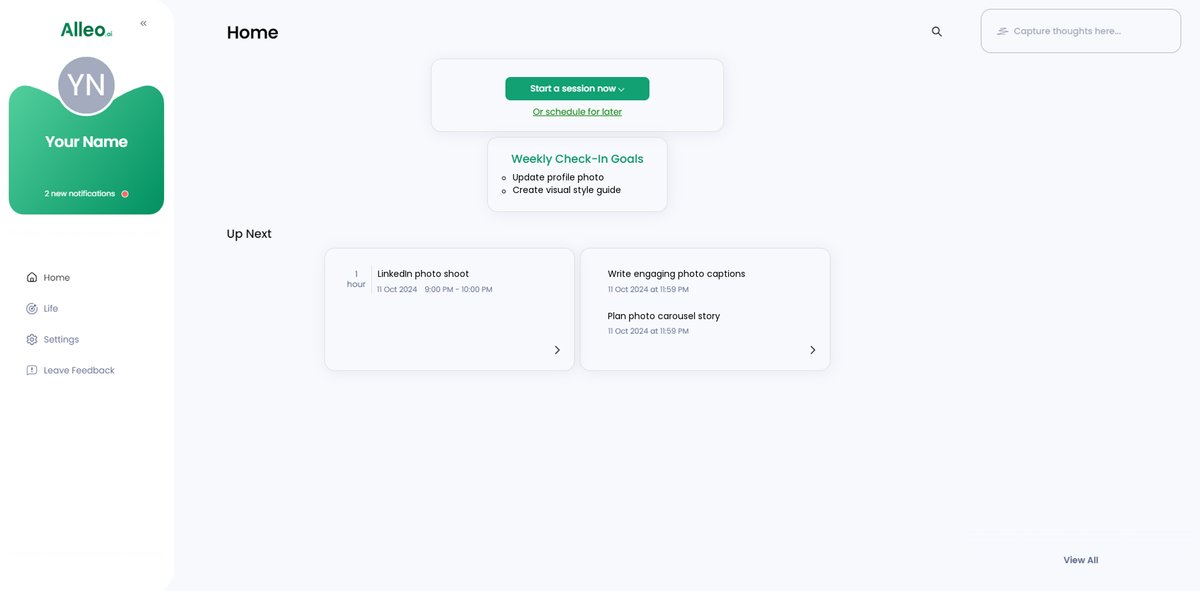
Step 5: Viewing and managing goals after the session
After your coaching session, check the app’s home page to review and manage the LinkedIn photo strategy goals you discussed with Alleo, ensuring you stay on track with implementing your personal branding tactics.
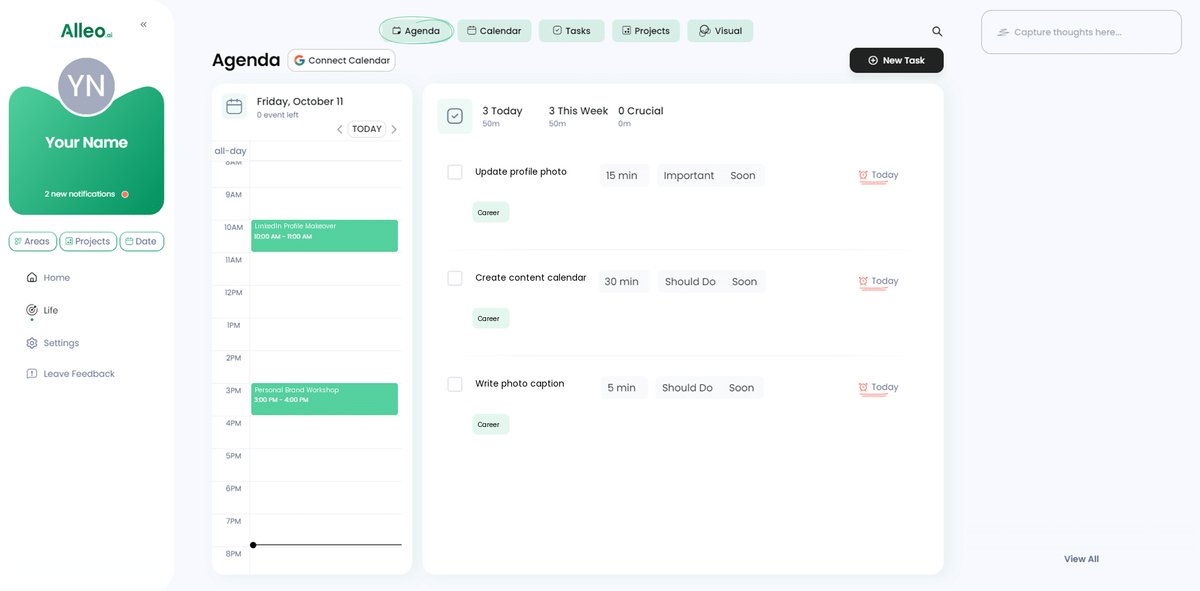
Step 6: Adding events to your calendar or app
Use Alleo’s calendar and task features to schedule and track your LinkedIn photo strategy implementation, allowing you to monitor your progress and stay accountable as you enhance your personal brand on the platform.
Wrapping Up Your LinkedIn Visual Strategy
You’ve learned how to effectively use photos in LinkedIn posts for personal branding through LinkedIn photo branding strategies.
Balancing professionalism with personal engagement doesn’t have to be daunting. By following these LinkedIn image best practices, you can create a compelling, relatable profile.
Remember, start with a high-quality profile photo, showcase your work environment, and maintain a consistent visual branding on LinkedIn.
Don’t forget to use LinkedIn Carousels and arrange photos strategically to tell your story through visual storytelling on LinkedIn.
Incorporate both professional and personal images, and add engaging captions to bring your photos to life, enhancing engagement with LinkedIn photos.
Finally, partnering with Alleo can make this journey of optimizing LinkedIn post images smoother.
Try Alleo for free and transform your LinkedIn personal branding through visuals today.