Balancing Tech News and Work: 3 Essential Strategies for Success
Ever feel like you’re drowning in tech news while trying to stay on top of your core job responsibilities? Balancing tech news and work can be a challenge for many professionals in the digital age.
As a life coach, I’ve helped many professionals navigate these challenges. In my experience, staying updated with tech trends is crucial for career advancement, but it’s equally important to manage information overload and maintain work-life balance for IT workers.
In this article, you’ll discover strategies to balance tech news consumption with work. We’ll explore actionable steps like scheduling dedicated time, using RSS feeds and tech news curation tools, and discussing trends in meetings. These productivity hacks for tech professionals can help you efficiently manage your time and stay informed without compromising your core tasks.
Let’s dive in and explore effective ways of balancing tech news and work while prioritizing work tasks vs. staying informed.

The Challenge of Information Overload
Navigating the tech industry can be overwhelming. Information overload is a real struggle for many professionals, making balancing tech news and work a significant challenge.
Not staying updated can lead to missed opportunities and stunted career growth. However, efficient news consumption habits are crucial for success.
Switching between work and news constantly causes stress and productivity loss. Implementing digital detox techniques and time management strategies can help mitigate these issues.
In my experience, many clients initially struggle with finding a balance. This challenge can be particularly painful in fast-paced corporate environments, where prioritizing work tasks vs. staying informed is essential for tech professionals.
Tackling Tech News Overload: A Structured Strategy
Overcoming this challenge requires a few key steps. Here are the main areas to focus on to make progress in balancing tech news and work.
- Schedule dedicated tech news time blocks daily: Set specific times to consume tech news without disruptions, implementing time management in the digital age.
- Use RSS feeds to curate relevant news efficiently: Subscribe to key sources and organize feeds by priority, utilizing tech news curation tools for information overload management.
- Discuss tech trends in work meetings regularly: Propose a “tech trends” segment in team meetings for shared learning, helping IT workers maintain work-life balance while staying informed.
Let’s dive in to explore these productivity hacks for tech professionals!
1: Schedule dedicated tech news time blocks daily
Setting specific times to consume tech news is crucial for balancing tech news and work responsibilities while staying informed.
Actionable Steps:
- Set specific times each day for tech news, like 30 minutes in the morning and afternoon.
- Use calendar reminders to create a habit of consuming tech news at these times.
- Keep a tech news journal to jot down important insights and ideas.
Explanation: Taking these steps ensures you stay informed without constant disruptions. By scheduling dedicated time and using reminders, you embed this practice into your daily routine, enhancing focus and time management in the digital age.
Keeping a tech news journal helps you retain and apply new information effectively, which can be crucial for career growth and staying ahead in the industry. This practice also aids in information overload management.
Benefits of scheduling tech news time:
- Improves time management skills for tech professionals
- Reduces information overload
- Enhances work-life balance for IT workers

2: Use RSS feeds to curate relevant news efficiently
Using RSS feeds can streamline your tech news consumption, making it easier to stay informed without wasting time, which is crucial for balancing tech news and work.
Actionable Steps:
- Subscribe to key tech news sources via RSS feeds. Choose reputable websites that consistently provide valuable content, helping you manage information overload.
- Organize feeds by priority and topic. This way, you can focus on the most relevant news first, a vital productivity hack for tech professionals.
- Set up alerts for breaking news on critical topics. Stay informed about major developments without constant monitoring, enhancing your time management in the digital age.
Explanation: These steps help you manage information overload efficiently. By subscribing to key sources and organizing your feeds, you enhance focus and save time, essential for work-life balance for IT workers.
Setting up alerts ensures you don’t miss important updates. This structured approach keeps you ahead in your career while balancing tech news and work effectively.

3: Discuss tech trends in work meetings regularly
Regularly discussing tech trends in work meetings can keep your team informed and collaborative while balancing tech news and work responsibilities.
Actionable Steps:
- Propose a “tech trends” segment in team meetings. Suggest dedicating a few minutes each meeting to discuss the latest tech news, promoting efficient news consumption habits.
- Create a rotating schedule for team members to present on tech trends. This encourages participation and diverse viewpoints, helping with information overload management.
- Use meeting insights to identify actionable tasks or projects. Transform new knowledge into practical steps that benefit your team, aiding in prioritizing work tasks vs. staying informed.
Key advantages of discussing tech trends in meetings:
- Fosters a culture of continuous learning
- Encourages cross-team collaboration
- Keeps everyone aligned on industry developments while maintaining work-life balance for IT workers
Explanation: These steps ensure everyone stays up-to-date with tech developments, fostering a learning culture.
Proposing a segment and rotating presenters keeps meetings engaging and informative, serving as productivity hacks for tech professionals.
Using insights to drive actionable tasks helps translate knowledge into tangible career advancements and team success, contributing to time management in the digital age.
This approach not only keeps your team informed but also boosts overall productivity and innovation while balancing tech news and work demands.

Partner with Alleo to Balance Tech News and Work
We’ve discussed balancing tech news and work and how it benefits your career. But did you know you can work directly with Alleo to make this journey easier and faster?
Alleo offers affordable, tailored coaching support to help you stay updated with tech news while managing information overload. You get full coaching sessions like any human coach, focusing on efficient news consumption habits.
Plus, there’s a free 14-day trial with no credit card required.
Here’s how to get started:
- Set up an account: Sign up on the Alleo website to create your profile.
- Create a personalized plan: Alleo’s AI coach will help you set up a tailored plan to manage your tech news consumption and improve work-life balance for IT workers.
- Work with the coach: The AI coach will follow up on your progress, help you handle changes, and keep you accountable via text and push notifications, incorporating productivity hacks for tech professionals.
Using Alleo, you can streamline your tech news consumption, making it efficient and stress-free while prioritizing work tasks vs. staying informed.
Ready to get started for free?
Let me show you how!
Step 1: Log In or Create Your Account
Log in to your account or create a new one to start balancing your tech news consumption with Alleo’s AI coaching support.

Step 2: Choose “Building better habits and routines”
Select “Building better habits and routines” to develop a structured approach for consuming tech news efficiently, helping you stay informed without compromising your work productivity.

Step 3: Select “Career” as Your Focus Area
Choose “Career” as your focus area to align with your goal of balancing tech news consumption and work responsibilities, enabling Alleo’s AI coach to provide targeted strategies for professional growth and efficient information management in the tech industry.

Step 4: Starting a coaching session
Begin your journey with Alleo by scheduling an intake session, where you’ll work with your AI coach to create a personalized plan for managing tech news consumption and balancing it with your work responsibilities.

Step 5: Viewing and Managing Goals After the Session
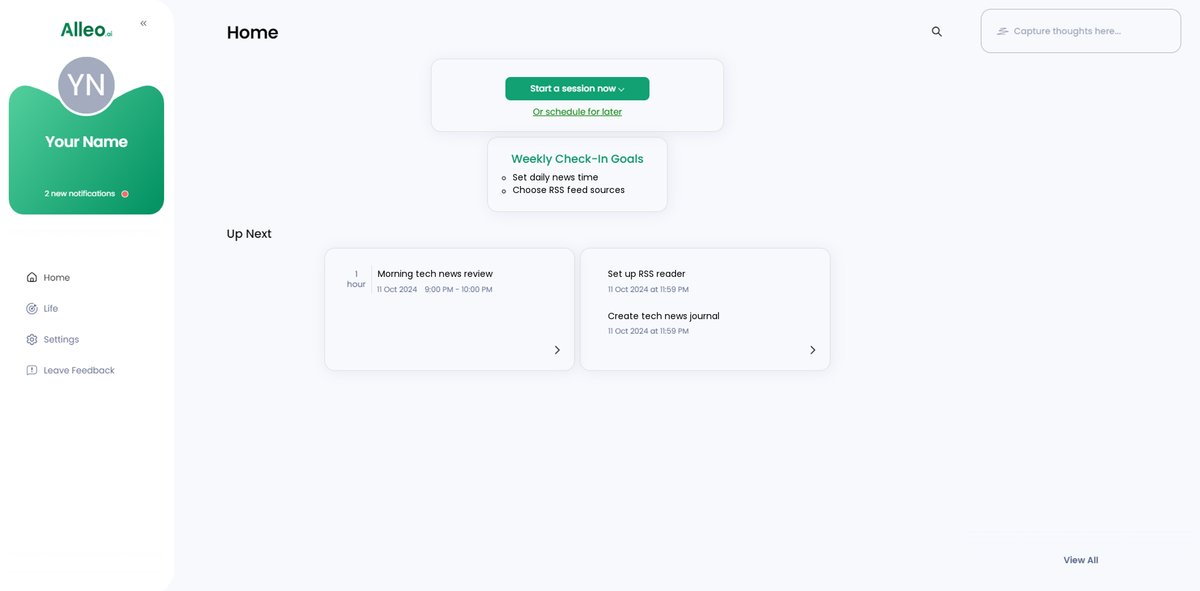
After your coaching session, open the Alleo app to find your discussed tech news management goals displayed on the home page, allowing you to easily track and adjust your progress.
Step 6: Adding events to your calendar or app
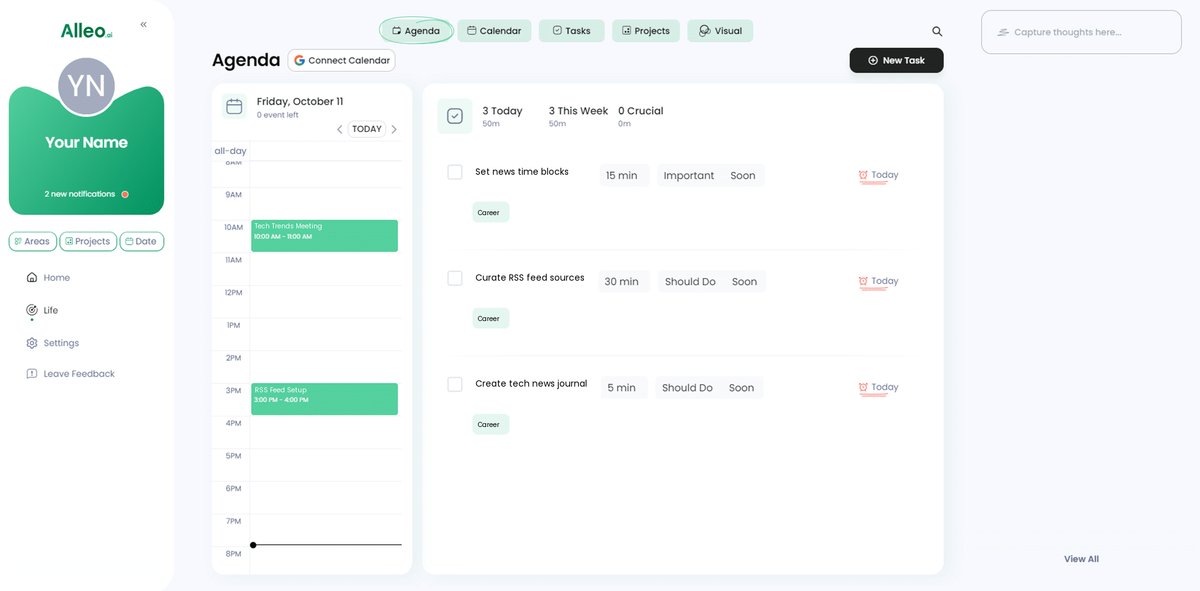
Use the Alleo app to add scheduled tech news time blocks to your calendar, allowing you to track your progress in balancing news consumption with work tasks and stay accountable to your goals.
Wrapping It All Up: Stay Informed, Stay Productive
Balancing tech news and work responsibilities is challenging but achievable.
Implementing these strategies can transform your approach to tech news consumption and help manage information overload.
Remember, setting dedicated time blocks helps you stay updated without constant disruptions, a key aspect of time management in the digital age.
Using RSS feeds and tech news curation tools makes your news consumption efficient and focused.
Discussing trends in meetings fosters a culture of shared learning and innovation, enhancing productivity for tech professionals.
I’ve seen clients succeed with these methods for balancing tech news and work, and you can too.
Don’t forget, Alleo is here to help you every step of the way in maintaining work-life balance for IT workers.
With Alleo, you can streamline this process of balancing tech news and work and take advantage of the free 14-day trial.
Stay informed, stay productive, and take control of your career growth today by effectively balancing tech news and work!