How Busy Parents Can Stay Updated on Streaming Services for Family Movie Nights: A Comprehensive Guide
Are you struggling to keep up with the latest streaming services for family movies? Finding efficient movie selection for families can be challenging.
As a life coach, I’ve seen many parents face this challenge. Balancing work, family, and staying updated on new family releases on popular platforms can be overwhelming.
In this article, you’ll discover practical strategies to simplify the process of choosing streaming services for families. We’ll cover tools like Common Sense Media for quick streaming recommendations for kids and setting up Family Sharing to manage parental controls on streaming platforms.
Ready to make family movie nights stress-free with time-saving movie night tips?
Let’s dive into this busy parent entertainment guide.

The Struggle of Staying Updated
Balancing a busy life can leave you feeling overwhelmed. Managing work, family, and daily responsibilities is already a challenge.
Add keeping up with the latest streaming services for family movies, and it can feel impossible.
Many parents struggle with burnout and the anxiety of missing out on family bonding. Imagine planning a movie night only to realize there’s nothing appropriate to watch on your streaming services for families.
It’s frustrating and disheartening.
I’ve seen several clients overwhelmed by new technologies and family-friendly content updates. They often miss valuable family moments due to outdated or irrelevant content, struggling with efficient movie selection for families.
This leads to missed opportunities for connection and relaxation.
But it doesn’t have to be this way.

Steps to Stay Updated on Streaming Services for Family Movie Nights
Overcoming this challenge requires a few key steps. Here are the main areas to focus on to make progress with streaming services for family movies.
- Use Common Sense Media for quick reviews: Check reviews weekly and create a family media wish list for efficient movie selection for families.
- Set up Family Sharing for streaming services: Enable Family Sharing on Apple services and personalize profiles, enhancing streaming services for families.
- Create a weekly family movie night schedule: Choose a specific night and involve the family in movie selections, balancing screen time and family bonding.
- Enable parental controls and kid-friendly profiles: Configure controls and set up profiles on platforms like Disney+ and Netflix, utilizing parental controls on streaming platforms.
- Subscribe to streaming service newsletters: Subscribe to newsletters and share updates with your family for family-friendly content updates.
- Join online parent groups for recommendations: Participate in forums for quick streaming recommendations for kids and families.
Let’s dive in!
1: Use Common Sense Media for quick reviews
One effective way to stay updated on family-friendly content and streaming services for family movies is by using Common Sense Media.
Actionable Steps:
- Set a weekly reminder: Allocate time each week to check Common Sense Media for new movie and TV show reviews, including streaming services for families.
- Create a family media wish list: Use the site’s recommendations to build a list of potential picks, incorporating time-saving movie night tips.
- Discuss with family: Share these reviews and discuss them during family time to decide on the next movie night feature, balancing screen time and family bonding.
Explanation: These steps ensure you’re always aware of age-appropriate content and quick streaming recommendations for kids. By involving your family in the process, you enhance engagement and make well-informed choices.
Research supports creating steady points of connection through shared activities (source).
Key benefits of using Common Sense Media for streaming services for family movies:
- Reliable age-based ratings and parental controls on streaming platforms
- Detailed content descriptions for efficient movie selection for families
- Educational value assessments for family-friendly content updates
This approach keeps family movie nights exciting and current, serving as a busy parent entertainment guide.

2: Set up Family Sharing for streaming services
Setting up Family Sharing for streaming services ensures that each family member has personalized recommendations and access to shared content, making it easier to find streaming services for family movies.
Actionable Steps:
- Enable Family Sharing: Go to your device settings and activate Family Sharing on Apple services for efficient movie selection for families.
- Create individual profiles: Set up unique profiles for each family member to keep their viewing experience tailored and manage parental controls on streaming platforms.
- Schedule monthly updates: Regularly update family preferences and explore new family releases on popular platforms together.
Explanation: These steps are crucial for maintaining a personalized and enjoyable viewing experience for everyone using streaming services for families.
By setting up individual profiles, you ensure that recommendations are relevant and engaging, providing quick streaming recommendations for kids.
Monthly updates also help in discovering new content together, supporting a busy parent entertainment guide. Learn more about setting up Family Sharing on Apple’s official support page here.
This setup reduces the hassle and keeps family movie nights organized and fun, offering time-saving movie night tips and balancing screen time and family bonding.

3: Create a weekly family movie night schedule
Creating a consistent family movie night schedule using streaming services for family movies is crucial for bonding and relaxation.
Actionable Steps:
- Choose a specific night: Pick a night that works for everyone and make it a recurring event for streaming services for families.
- Involve the family: Let each member take turns choosing movies or TV shows for the weeks ahead, using quick streaming recommendations for kids.
- Set up a shared calendar: Use a digital or physical calendar to track the movie night schedule and build excitement for new family releases on popular platforms.
Explanation: Having a regular movie night ensures you spend quality time together, balancing screen time and family bonding.
By involving the whole family in the selection process, you keep everyone engaged and excited about family-friendly content updates.
Consistent scheduling also helps reduce stress and manage expectations, creating an efficient movie selection for families.
Research supports creating steady points of connection through shared activities (source).
This approach makes family movie nights a delightful and anticipated tradition, utilizing streaming services for family movies.

4: Enable parental controls and kid-friendly profiles
Enabling parental controls and kid-friendly profiles ensures that your children have access to age-appropriate content on streaming services for family movies.
Actionable Steps:
- Configure parental controls: Set up parental controls on streaming platforms for families to filter out unsuitable content.
- Create kid-friendly profiles: Establish profiles for your children on streaming services for families like Disney+ and Netflix to tailor their viewing experiences.
- Regularly review settings: Periodically update the parental controls and profiles as your children grow and their preferences change, ensuring efficient movie selection for families.
Explanation: These steps help in managing screen time and ensuring a safe viewing environment for your children. By using parental controls on streaming platforms, you can prevent exposure to inappropriate content.
Setting up kid-friendly profiles personalizes their experience and makes it easier to find suitable shows. Regularly reviewing the settings keeps the controls relevant to their age and provides quick streaming recommendations for kids.
According to First Things First, managing screen time is crucial for young children’s development.
Benefits of kid-friendly profiles on streaming services for family movies:
- Age-appropriate content recommendations
- Easier content navigation for children
- Separate viewing history from adult profiles
Taking these steps will help you create a safe and enjoyable viewing experience for your family, balancing screen time and family bonding while using streaming services for families.

5: Subscribe to streaming service newsletters
Staying updated on new content is easier when you subscribe to streaming services for family movies newsletters.
Actionable Steps:
- Identify and subscribe: Find newsletters from your favorite streaming services for families and subscribe to them.
- Create a dedicated email folder: Set up a folder in your email for these newsletters to keep family-friendly content updates organized.
- Share interesting updates: Use a family group chat or meeting to share new family releases on popular platforms and updates.
Explanation: These steps help you stay informed about the latest shows and movies, making it easier to plan family movie nights and provide quick streaming recommendations for kids.
By organizing newsletters in a dedicated folder, you won’t miss important updates on streaming services for family movies.
Sharing updates with your family fosters excitement and anticipation for upcoming movie nights, helping with efficient movie selection for families.
According to The Invisible Toolbox, consistent communication and shared activities strengthen family bonds.
This approach keeps your family movie nights fresh and engaging, balancing screen time and family bonding.

6: Join online parent groups for recommendations
Joining online parent groups can help you find family-friendly content and get valuable recommendations for streaming services for family movies.
Actionable Steps:
- Find relevant groups: Look for parent communities or forums focused on family-friendly content and streaming services for families.
- Participate in discussions: Engage in conversations and ask for show recommendations based on your family’s interests, including time-saving movie night tips.
- Share experiences: Share your own recommendations and experiences to build a supportive community, including efficient movie selection for families.
Explanation: These steps matter because they connect you with other parents who share similar interests and challenges in finding streaming services for family movies.
By participating in discussions, you can discover new content suitable for your family and get quick streaming recommendations for kids. According to The Invisible Toolbox, consistent communication and shared activities strengthen family bonds.
Benefits of joining parent groups:
- Diverse content recommendations and streaming service comparison for parents
- Shared parenting experiences and family-friendly content updates
- Up-to-date information on new family releases on popular platforms
This approach ensures you stay updated on the best family-friendly content and streaming services for family movies while balancing screen time and family bonding.

Partner with Alleo for Effortless Family Movie Nights
We’ve explored the challenges of keeping up with streaming services for family movies. Did you know you can work directly with Alleo to make this journey easier?
Setting up an account is simple. Visit our website and sign up for a free 14-day trial—no credit card required. Our streaming service comparison for parents helps you find the best options.
Create a personalized plan with Alleo’s AI coach. The coach will guide you through the steps to stay updated on streaming services for families and provide time-saving movie night tips.
Alleo’s coach will send you reminders and updates through text and push notifications. This ensures you never miss a family movie night and helps with balancing screen time and family bonding.
Ready to get started for free? Let me show you how to access quick streaming recommendations for kids and efficient movie selection for families!
Step 1: Log In or Create Your Account
To start simplifying your family movie nights, log in to your Alleo account or create a new one to access personalized streaming recommendations and reminders.

Step 2: Choose “Building better habits and routines”
Click on “Building better habits and routines” to create a structured approach for managing streaming services and organizing family movie nights, helping you stay consistent and reduce stress in your daily life.

Step 3: Select “Personal” as Your Focus Area
Choose “Personal” as your life area to focus on improving your family movie nights, as this will help you manage your time, reduce stress, and create meaningful connections with your loved ones through shared entertainment experiences.

Step 4: Starting a Coaching Session
Begin your journey with Alleo by scheduling an intake session, where our AI coach will help you create a personalized plan to stay updated on streaming services for stress-free family movie nights.

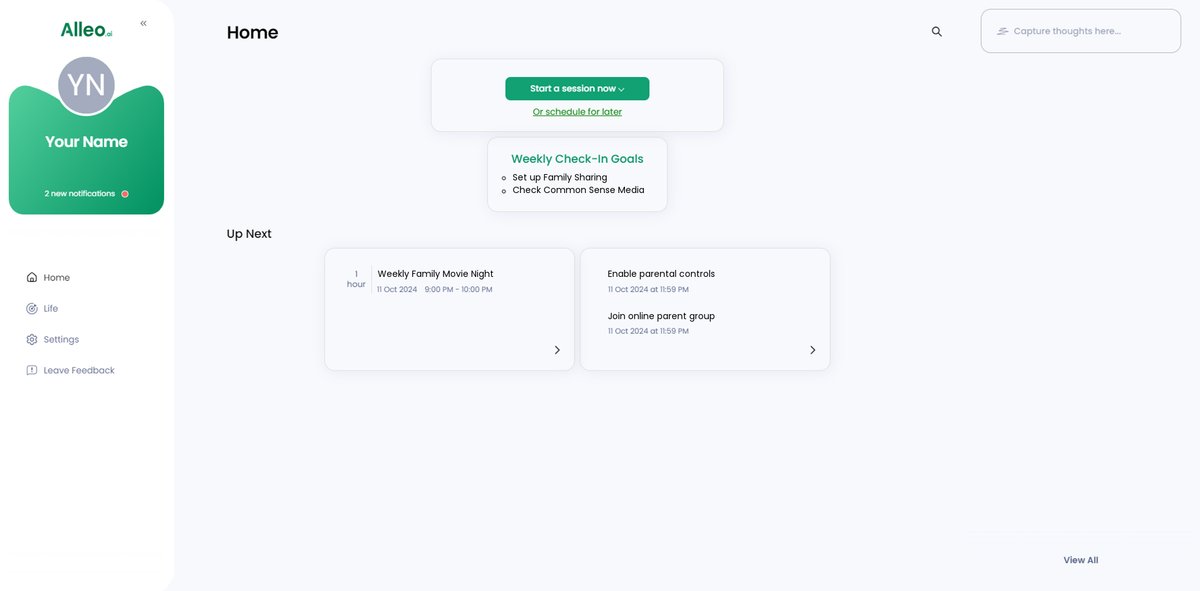
Step 5: Viewing and Managing Goals After the Session
After your coaching session on streamlining family movie nights, check the Alleo app’s home page to review and manage the personalized goals you discussed, helping you stay on track with implementing strategies like using Common Sense Media and setting up Family Sharing.
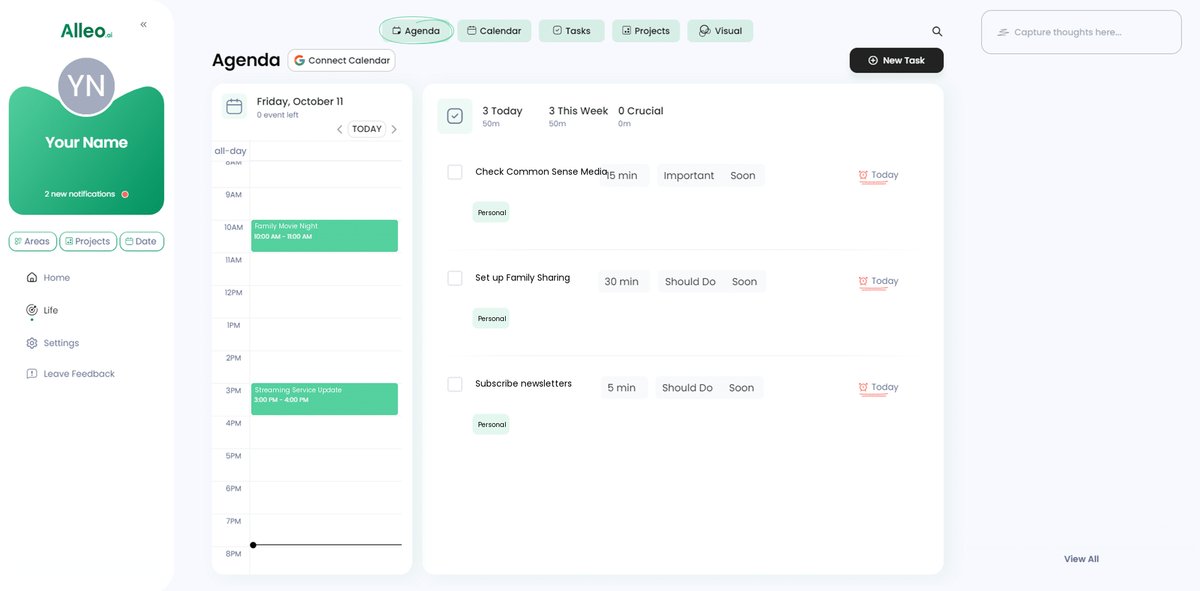
Step 6: Adding events to your calendar or app
Use the Alleo app’s calendar and task features to add your weekly family movie nights, ensuring you can easily track your progress in staying updated on streaming services and maintaining consistent family time.
Bringing It All Together for Stress-Free Family Movie Nights
Balancing work and family life is a tough job, especially when trying to stay updated on streaming services for family movies.
But remember, you’re not alone.
By using Common Sense Media, setting up Family Sharing, and subscribing to newsletters, you can simplify this process and get quick streaming recommendations for kids.
Creating a weekly movie night schedule and joining online parent groups can help you stay organized with time-saving movie night tips.
You got this.
And don’t forget, Alleo is here to support you every step of the way in finding efficient movie selections for families.
Give it a try and see how Alleo can transform your family movie nights and help with balancing screen time and family bonding.
Sign up for a free trial today and start making the most of your family time with streaming services for families.