5 Proven Methods to Master Time Management Apps for Overwhelmed Parents
Are you a busy parent struggling to juggle multiple responsibilities while searching for the best time management apps for parents?
As a life coach, I’ve helped many parents find balance amidst their hectic schedules using productivity apps for moms and dads. I understand the frustration of sifting through countless time-saving tools for busy parents, only to find that they don’t quite meet your needs.
In this article, you’ll discover effective strategies and tools to manage your time better. I’ll share tips on using shared family calendars, breaking tasks into smaller steps, setting digital reminders, implementing the Pomodoro Technique, and utilizing visual aids for household management. We’ll explore work-life balance apps for parents and task management for families to help you stay organized.
Let’s dive in to find the best time management apps for parents.

The Overwhelming Struggle of Busy Parents with Time Management
Managing time effectively can be a daunting task for busy parents. Many clients initially struggle with finding the right tools to keep everything organized, including the best time management apps for parents.
The frustration of trying multiple productivity apps for moms and dads only to find they fall short is a common issue.
In my experience, parents often feel overwhelmed and stressed when balancing work, family, and personal commitments. This can lead to wasted time and increased anxiety, highlighting the need for effective time-saving tools for busy parents.
Evaluating and choosing suitable time management apps for parents can seem like an endless task.
Imagine the relief of finally finding an app that works for you. With the right strategies, like a shared family scheduling software and breaking tasks into smaller steps, you can regain control over your schedule.
Let’s explore these solutions further to help you thrive amidst the chaos, including digital planners for household management and work-life balance apps for parents.

Key Steps to Effective Time Management for Busy Parents
Overcoming this challenge requires a few key steps. Here are the main areas to focus on to make progress using the best time management apps for parents:
- Use a shared family calendar app for coordination: Select and set up a family scheduling software to keep everyone on the same page.
- Break tasks into smaller, manageable steps: Divide larger tasks into smaller actions for easier management using productivity apps for moms and dads.
- Set up digital reminders for important deadlines: Use reminders in work-life balance apps for parents to ensure you never miss key events.
- Implement the Pomodoro Technique for focus: Work in focused intervals with scheduled breaks using time-blocking tools for parental duties.
- Utilize visual aids like to-do lists for clarity: Use to-do list apps for overwhelmed caregivers to visualize and prioritize tasks effectively.
Let’s dive in!
1: Use a shared family calendar app for coordination
Using a shared family calendar app can greatly help in managing and coordinating everyone’s schedules, making it one of the best time management apps for parents.
Actionable Steps:
- Research and select a family calendar app: Compare features and read reviews of apps like Cozi or Maple. Choose one of the best time management apps for parents that fits your family’s needs.
- Set up the app and invite family members: Add email addresses of family members and set permissions for each person. This family scheduling software streamlines household management.
- Schedule regular family meetings: Hold a weekly meeting to sync schedules and plan ahead using your chosen productivity app for moms and dads.
Explanation:
These steps help ensure that everyone in the family is on the same page, reducing the chances of missed appointments or double-bookings. Time-saving tools for busy parents are essential for maintaining work-life balance.
According to Keiser University, using digital tools for time management can significantly aid in balancing various commitments.
Key benefits of using a shared family calendar app include:
- Improved communication among family members
- Reduced scheduling conflicts and misunderstandings
- Easy access to everyone’s schedules from any device
Coordinating schedules effectively using parenting organization apps will lead to a smoother, more organized household.

2: Break tasks into smaller, manageable steps
Breaking tasks into smaller, manageable steps is essential for reducing overwhelm and boosting productivity, especially for parents seeking the best time management apps.
Actionable Steps:
- Create a master task list: List all major tasks and projects using a digital tool or a notebook, such as family scheduling software or parenting organization apps.
- Divide tasks into subtasks: Use a task management app like Todoist, one of the best time management apps parents can leverage, to break down major tasks into smaller, actionable steps.
- Prioritize using the Eisenhower Matrix: Categorize tasks based on urgency and importance to focus on what matters most, a technique supported by many productivity apps for moms and dads.
Explanation:
These steps matter because they help you tackle tasks more efficiently and avoid feeling overwhelmed. Breaking down tasks makes them more manageable and boosts your confidence as you check off each completed step, which is why time-saving tools for busy parents are so valuable.
According to Capital Area Pediatrics, organizational skills can significantly reduce stress and improve time management. This approach helps you stay on top of your responsibilities and feel more in control, which is crucial for achieving work-life balance with apps for parents.
Try implementing these steps to regain control over your schedule and reduce stress, utilizing the best time management apps parents can find to support your efforts.
3: Set up digital reminders for important deadlines
Setting up digital reminders using the best time management apps for parents ensures you never miss key events and deadlines.
Actionable Steps:
- Identify important dates: Mark key deadlines and events in your mobile calendar app for parents.
- Program reminders: Set alerts for 1 week, 1 day, and 1 hour before each event using productivity apps for moms and dads.
- Review and update reminders: Check your reminders weekly and adjust as needed using family scheduling software.
Explanation:
These steps matter because they help you stay organized and timely, reducing the mental load of remembering everything. Time-saving tools for busy parents can significantly improve household management.
According to Relational Psych Group, using digital reminders can significantly aid in managing time blindness and adhering to schedules. Parenting organization apps are essential for maintaining work-life balance.
You’ll find relief in knowing you won’t miss important deadlines, helping you feel more in control. To-do list apps for overwhelmed caregivers can be a game-changer in managing parental duties.
Let’s move on to the next strategy.
4: Implement the Pomodoro Technique for focus
The Pomodoro Technique can enhance your productivity by helping you focus on tasks within set intervals, making it one of the best time management apps for parents.
Actionable Steps:
- Set a timer for 25 minutes: Use a Pomodoro timer app like Focus Booster, a popular productivity app for moms and dads, to time your work sessions.
- Work without interruptions: Turn off notifications and find a quiet space to concentrate fully on the task at hand, utilizing time-blocking tools for parental duties.
- Take a 5-minute break: After each session, stretch, walk, or grab a quick snack before starting the next cycle, a crucial aspect of work-life balance apps for parents.
Explanation:
These steps matter because they help you maintain focus and productivity. By breaking work into intervals, you can avoid burnout and stay motivated, similar to how task management for families operates.
According to the Relational Psych Group, structured breaks can significantly improve time management and reduce feelings of overwhelm, which is why many to-do list apps for overwhelmed caregivers incorporate this technique.
Benefits of using the Pomodoro Technique include:
- Increased focus and concentration
- Reduced procrastination and distractions
- Better time awareness and productivity
This approach can help you make steady progress on tasks while managing your time effectively, much like digital planners for household management.

5: Utilize visual aids like to-do lists for clarity
Using visual aids like to-do lists can greatly enhance your organizational skills and provide clarity in managing tasks, especially when using the best time management apps for parents.
Actionable Steps:
- Create a daily to-do list: Use a visual task management tool like Trello or a whiteboard to list all your tasks and appointments. Many productivity apps for moms and dads offer this feature.
- Organize tasks by priority: Color-code tasks or use labels to easily identify high-priority items and deadlines. Family scheduling software often includes these options.
- Check off completed tasks: Physically mark off tasks to visualize your accomplishments and track progress. Digital planners for household management make this process seamless.
Explanation:
These steps matter because they help you stay organized and focused. Visualizing tasks reduces overwhelm and ensures you prioritize effectively, which is crucial for work-life balance apps for parents.
According to Capital Area Pediatrics, organizational skills can significantly reduce stress. Using visual aids makes it easier to manage your time and responsibilities, which is why time-saving tools for busy parents are so valuable.
Tips for effective to-do list management:
- Keep lists short and realistic for daily goals
- Review and update your list regularly using mobile calendar apps for parents
- Break larger tasks into smaller, actionable items, a feature often found in task management for families apps
This method can help you feel more in control and less stressed, especially when using to-do list apps for overwhelmed caregivers.
Partner with Alleo for Effective Time Management
We’ve explored the challenges of managing time as a busy parent. But did you know you can work directly with Alleo, one of the best time management apps for parents, to make this journey easier and faster?
Setting up an account is simple. Create a personalized plan with Alleo’s AI coach tailored to your needs, offering time-saving tools for busy parents and family scheduling software.
Alleo, a top productivity app for moms and dads, will follow up on your progress, handle changes, and keep you accountable via text and push notifications.
Alleo offers full coaching sessions, just like a human coach, plus a free 14-day trial with no credit card required. It’s an ideal digital planner for household management and parenting organization.
Ready to get started for free with this work-life balance app for parents?
Let me show you how!
Step 1: Log In or Create Your Account
To begin your journey towards better time management, log in to your account or create a new one to access Alleo’s AI coaching tailored for busy parents.

Step 2: Choose “Building better habits and routines”
Click on “Building better habits and routines” to start creating a structured daily schedule that will help you manage your time more effectively as a busy parent, addressing the challenges of juggling multiple responsibilities discussed in the article.

Step 3: Select “Personal” as Your Focus Area
Choose “Personal” as your focus area in Alleo to tackle time management challenges head-on, helping you streamline your daily routines and create a better work-life balance as a busy parent.

Step 4: Starting a Coaching Session
Begin your journey with Alleo by scheduling an intake session, where you’ll discuss your time management goals and create a personalized plan to help you balance your busy parent life more effectively.

Step 5: Viewing and managing goals after the session
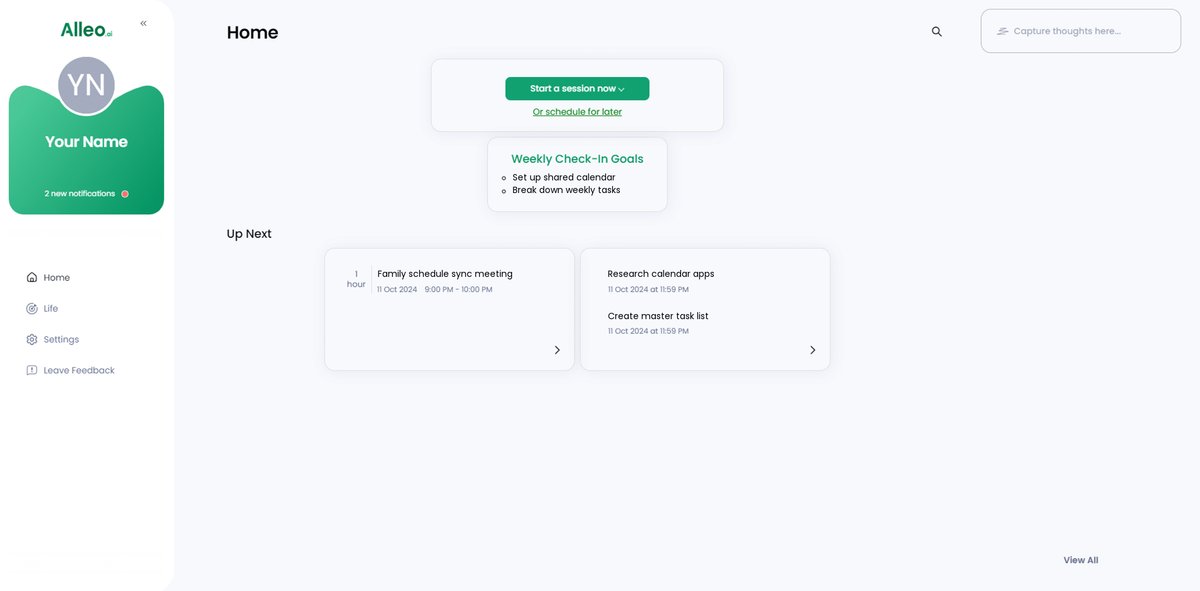
After your coaching session, open the Alleo app to find your discussed goals conveniently displayed on the home page, allowing you to easily track and manage your progress towards better time management as a busy parent.
Step 6: Adding events to your calendar or app
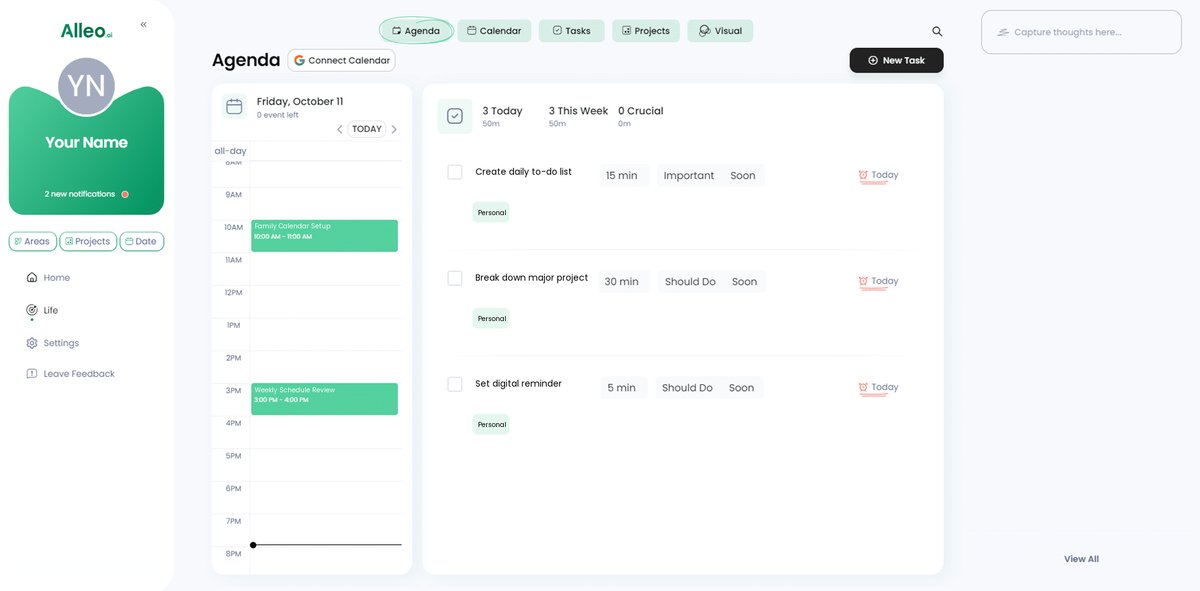
Open your chosen calendar app, tap the “+” icon, and enter event details like title, date, time, and any necessary reminders to keep your schedule organized and visible. With Alleo, you can easily track your progress in solving time management challenges using the app’s calendar and task features, helping you stay on top of your commitments and goals.
Take Control of Your Time with Confidence
Finding effective time management solutions can transform your life as a busy parent. The best time management apps for parents offer invaluable support in this journey.
You now have practical strategies to help you manage your time. Shared family calendars, breaking tasks into smaller steps, digital reminders, the Pomodoro Technique, and visual aids can all make a huge difference. These time-saving tools for busy parents can significantly boost your productivity.
Remember, you don’t have to do this alone.
Alleo is here to help you implement these strategies with ease. Our AI life coach can guide you through each step, providing personalized support. As one of the best time management apps for parents, Alleo offers comprehensive family scheduling software.
Try Alleo for free and see how it can simplify your life. Experience the benefits of a top-tier productivity app for moms and dads firsthand.
You’ve got this!