5 Essential Best Practices for Teachers Responding to Student Messages While on Leave
Imagine you’re finally taking a well-deserved leave, but your inbox is flooded with student messages. Managing student messages during leave can be a challenge for educators.
As a life coach, I’ve helped many educators navigate these challenges. I understand the delicate balance between supporting students and maintaining professional boundaries, especially when it comes to teacher-student communication during leave.
In this article, you’ll discover strategies for effective student communication while on leave. We’ll cover setting up out-of-office message templates for educators, designating contacts for student support during teacher absence, and more. These tips will help you in managing student expectations while absent.
Let’s dive into these remote teaching communication strategies.

Understanding the Challenges of Student Communication During Leave
Managing student messages during leave is a delicate balance. Many educators struggle to determine the right approach for teacher-student communication during leave.
Unclear communication can lead to frustration for both you and your students. Missed messages can result in confusion and delays in learning progress, making it crucial to focus on managing student expectations while absent.
Moreover, the emotional toll is significant. You want to support your students, but you also need to protect your personal time, highlighting the importance of balancing personal time and student needs.
In my experience, educators often face these dilemmas without clear guidelines. It’s essential to establish boundaries to maintain your well-being, which includes setting boundaries for teacher availability.
By understanding these challenges, you can better prepare for your leave. Let’s explore actionable strategies to address these issues effectively, including remote teaching communication strategies and digital communication tools for absent teachers.
Key Steps to Managing Student Communication During Leave
Overcoming this challenge of managing student messages during leave requires a few key steps. Here are the main areas to focus on to make progress in teacher-student communication during leave:
- Set up a clear out-of-office message: Craft a professional message with essential details and set it to activate automatically, utilizing out-of-office message templates for educators.
- Designate a point of contact for urgent matters: Identify a trusted colleague and inform students, helping with delegating student inquiries during leave.
- Prepare asynchronous materials in advance: Create pre-recorded lectures and detailed assignment guidelines, implementing remote teaching communication strategies.
- Establish communication guidelines with students: Set boundaries and encourage self-reliance, balancing personal time and student needs while maintaining professionalism in absence responses.
- Check department policies on leave protocol: Review and comply with official guidelines for managing student expectations while absent.
Let’s dive in to explore these strategies for managing student messages during leave!
1: Set up a clear out-of-office message
Setting up a clear out-of-office message is crucial for managing student messages during leave and maintaining effective teacher-student communication during leave.
Actionable Steps:
- Craft a professional and concise message: Include your return date, reason for absence, and an alternative contact person for managing student expectations while absent.
- Use automated email tools: Schedule your out-of-office message to activate on specific dates, helping with balancing personal time and student needs.
- Provide sample message templates: Offer out-of-office message templates for educators for different types of leaves to ensure consistency.
Explanation:
By setting up a clear out-of-office message, you help manage expectations and reduce the stress of missed communications. This step ensures students know when you’ll be back and who to contact in urgent situations, supporting student support during teacher absence.
For more tips on crafting these messages, visit Grammarly’s guide on out-of-office messages.
Key elements of an effective out-of-office message for managing student messages during leave:
- Clear return date
- Alternative contact information
- Brief explanation of absence
Taking these steps makes your leave smoother and keeps communication clear, setting boundaries for teacher availability and maintaining professionalism in absence responses.

2: Designate a point of contact for urgent matters
It’s essential to designate a point of contact for urgent matters to ensure students have support while you are on leave, which is crucial for managing student messages during leave.
Actionable Steps:
- Identify a trusted colleague or administrator: Choose someone reliable and brief them on potential issues that might arise, maintaining teacher-student communication during leave.
- Set clear expectations with the point of contact: Define what constitutes an urgent matter and how they should handle these situations, helping to manage student expectations while absent.
- Communicate the point of contact to students: Include their information in your out-of-office message templates for educators so students know who to reach out to.
Explanation:
By designating a point of contact, you ensure that urgent student needs are addressed promptly, reducing any potential disruptions while balancing personal time and student needs.
This step helps maintain the flow of communication and provides a safety net for students, supporting effective remote teaching communication strategies.
For more insights on handling instructor absences, check out Stanford’s guidance on instructor and TA absences.
Taking these steps ensures that your absence does not negatively impact student support and helps in setting boundaries for teacher availability.

3: Prepare asynchronous materials in advance
Preparing asynchronous materials in advance ensures your students continue learning smoothly while you’re on leave, effectively managing student messages during leave.
Actionable Steps:
- Create pre-recorded lectures or tutorials: Use tools like Canvas or EdDiscussion to make and upload engaging content, supporting remote teaching communication strategies.
- Develop detailed assignment guidelines and FAQs: Anticipate common questions and provide clear instructions to guide students, managing student expectations while absent.
- Schedule automated release of materials: Utilize your LMS to release content on specific dates, ensuring a consistent learning pace and maintaining professionalism in absence responses.
Explanation:
Taking these steps is crucial for maintaining continuity in your students’ learning experience while you’re away. Pre-recorded content and detailed guidelines help manage student expectations and reduce confusion, supporting student support during teacher absence.
Automating material release keeps the course structure consistent. For further insights, visit Stanford’s guidance on instructor and TA absences.
Benefits of asynchronous materials:
- Flexible access for students
- Consistent learning pace
- Reduced need for real-time communication, aiding in balancing personal time and student needs
By preparing these materials in advance, you can ensure your students stay on track even in your absence, effectively managing student messages during leave.

4: Establish communication guidelines with students
Establishing communication guidelines with students is essential to ensure smooth and respectful interaction while managing student messages during leave. This approach helps in balancing personal time and student needs effectively.
Actionable Steps:
- Set clear communication boundaries: Define acceptable times and channels for students to reach out. This helps manage student expectations while absent.
- Teach students self-reliance: Encourage them to use available resources and FAQs before contacting you. This fosters independence and supports student support during teacher absence.
- Provide a communication plan: Outline how and when you will check messages, if at all. This keeps everyone informed and aids in setting boundaries for teacher availability.
Explanation:
Setting these guidelines is crucial for maintaining structured and respectful teacher-student communication during leave. Clear boundaries help students understand when and how they can contact you, reducing unnecessary stress and supporting remote teaching communication strategies.
Encouraging self-reliance and providing a communication plan supports your well-being and students’ independence. For more tips on managing student messages during leave, explore Edutopia’s guide on avoiding teacher burnout.
Following these steps ensures effective communication and a balanced professional boundary, essential for maintaining professionalism in absence responses.
5: Check department policies on leave protocol
Understanding department policies on leave protocol is crucial to ensure compliance and smooth operations, especially when managing student messages during leave.
Actionable Steps:
- Review school or district policies: Familiarize yourself with official guidelines to ensure you follow the correct procedures for teacher-student communication during leave.
- Discuss with department leadership: Seek clarity on expectations and available support from your supervisors for managing student expectations while absent.
- Document your leave plan: Share your communication and absence plan with relevant parties to keep everyone informed about student support during teacher absence.
Explanation:
These steps help you stay compliant and maintain transparency with your department. By understanding the policies, you can align your leave plan with institutional expectations, minimizing disruptions and effectively managing student messages during leave.
For further insights, visit CPS leave policy guidelines.
Important aspects of leave protocol:
- Notification timelines
- Documentation requirements
- Substitute arrangements
Taking these steps ensures a well-coordinated and stress-free leave while balancing personal time and student needs.

Partner with Alleo for Seamless Leave Management
We’ve explored managing student messages during leave. But did you know Alleo can make this journey of teacher-student communication during leave smoother?
Set up your Alleo account with ease. Create a personalized plan tailored to your needs, including strategies for balancing personal time and student needs.
Alleo’s coach will help you set goals and remind you about key tasks in managing student expectations while absent. They’ll follow up on your progress, handle changes, and keep you accountable via text and push notifications, acting as one of the digital communication tools for absent teachers.
Ready to get started for free? Let me show you how to maintain professionalism in absence responses!
Step 1: Logging in or Creating an Account
To begin managing your leave with Alleo, log in to your existing account or create a new one if you’re a first-time user.

Step 2: Choose “Building better habits and routines”
Click on “Building better habits and routines” to start developing a structured approach for managing your work-life balance and student communications while on leave, helping you establish clear boundaries and maintain productivity.

Step 3: Selecting the Life Area You Want to Focus On
Choose “Career” as your focus area to address your leave management challenges effectively. By selecting this life area, you’ll receive tailored guidance on setting professional boundaries, managing student expectations, and maintaining work-life balance during your time off, ensuring a stress-free leave experience.

Step 4: Starting a coaching session
Begin your Alleo journey with an intake session, where you’ll collaborate with your AI coach to create a personalized plan for managing student communication during your leave, ensuring a stress-free and well-organized absence.

Step 5: Viewing and managing goals after the session
After your coaching session, check the Alleo app’s home page to view and manage the goals you discussed, allowing you to track your progress and stay accountable while on leave.

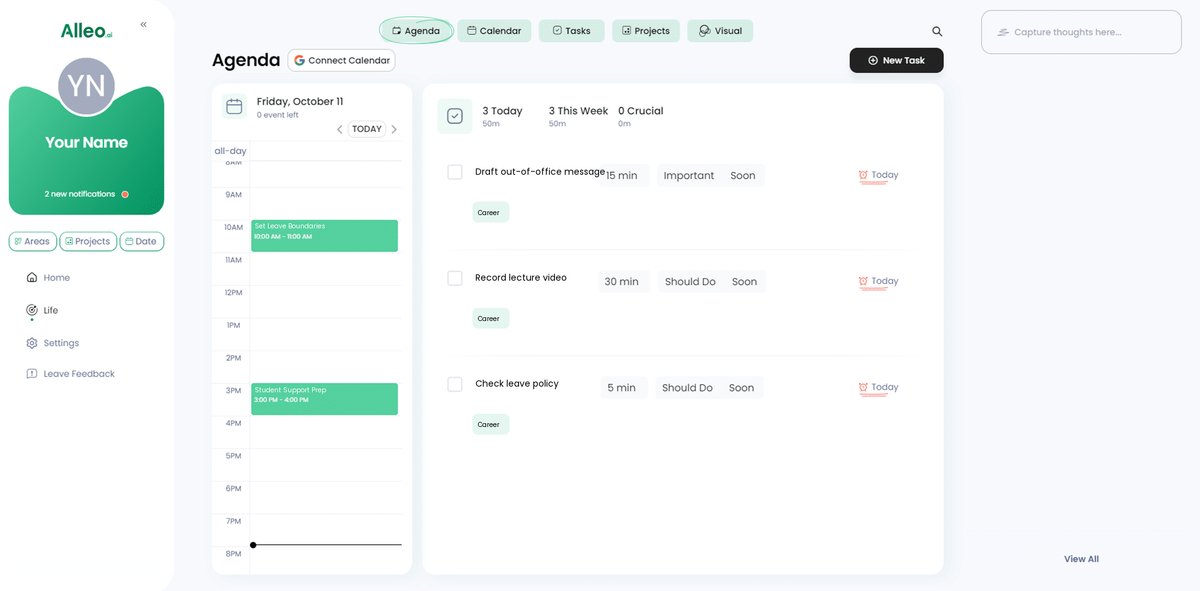
6: Adding events to your calendar or app
Use Alleo’s calendar and task features to easily add and track events related to your leave, such as important deadlines or check-ins with your designated point of contact, allowing you to monitor your progress in managing student communication while away.
Wrapping Up: Balance and Boundaries for a Stress-Free Leave
As we conclude, remember the importance of setting boundaries for your well-being when managing student messages during leave. You are not alone in this challenge of balancing personal time and student needs.
Taking these steps will ensure a smooth leave and effective teacher-student communication during leave. It’s all about preparation and clarity in maintaining professionalism in absence responses.
Feel empowered to implement these strategies for managing student expectations while absent. They will help you maintain balance and support your students through remote teaching communication strategies.
Lastly, partner with Alleo for seamless leave management and student support during teacher absence. Alleo can guide you through every step, including using digital communication tools for absent teachers.
Ready to make your leave stress-free and master managing student messages during leave? Try Alleo for free and experience the difference in setting boundaries for teacher availability.