How Freelancers Can Customize Productivity Apps: 3 Fundamental Principles for a Unique Workflow
Imagine a world where your productivity apps are tailored specifically to your needs, making your freelance work seamless and efficient. This is the power of customizing productivity apps for freelancers.
As a life coach, I’ve helped many professionals navigate these challenges. In my experience assisting clients, I often encounter the struggle of generic productivity tools for freelancers that don’t quite fit their unique workflow.
In this article, you’ll discover strategies to customize productivity apps for freelancers. We’ll explore no-code platforms for personalized workflow systems, time tracking with invoicing for efficient freelance businesses, and AI-powered task prioritization to boost productivity for self-employed professionals.
Let’s dive into these tailored productivity solutions for flexible schedules.

Why One-Size-Fits-All Productivity Tools Fall Short
Freelancers often find that generic productivity tools don’t quite fit their unique needs. These tools might lack the flexibility to handle diverse workflows or specific project requirements, highlighting the importance of customizing productivity apps for freelancers.
In my experience, several clients report struggling with rigid interfaces. They find it hard to tailor these tools to their working style, leading to frustration. This underscores the need for customizable project management platforms that cater to freelance-specific productivity hacks.
Imagine juggling multiple clients and projects without a system that adapts to your workflow. It can be chaotic and overwhelming, especially for self-employed professionals seeking efficient time management apps.
One-size-fits-all tools often fail to integrate seamlessly with other apps freelancers use. This lack of integration forces constant context-switching, which hampers productivity. Freelancers need digital organization tools that support solo entrepreneurs in optimizing their workflow.
Many freelancers I’ve worked with feel their productivity apps don’t support their specific needs. This mismatch can lead to inefficiencies and even missed deadlines, emphasizing the importance of personalized workflow systems for gig workers.
Such issues highlight the need for customizable solutions. Tools that adapt to your workflow can transform how you manage tasks and projects, offering tailored productivity solutions for flexible schedules that truly benefit freelance businesses.

Key Strategies to Customize Your Productivity Apps
Overcoming this challenge requires a few key steps. Here are the main areas to focus on to customize productivity apps for freelancers and make progress:
- Choose no-code platforms for custom app creation: Identify your needs, explore platforms like Glide, and build your custom app to optimize workflow for independent contractors.
- Integrate time tracking with invoicing systems: Select tools like Harvest, set up your system, and automate invoicing, enhancing time management apps for self-employed professionals.
- Utilize AI-powered task prioritization tools: Choose AI tools like Alleo, train the AI on your workflow, and implement AI recommendations to boost efficiency for freelance businesses.
Let’s dive into these tailored productivity solutions for flexible schedules!
1: Choose no-code platforms for custom app creation
Customizing productivity apps for freelancers with no-code platforms can significantly streamline your workflow and boost efficiency for independent contractors.
Actionable Steps:
- Identify your needs: Create a detailed list of specific features you require in a productivity app for freelancers. Ensure each requirement is clear and quantifiable.
- Explore no-code platforms: Research and compare platforms like Glide, Asana, and Trello. Choose one that aligns with your skill level and project needs for freelance-specific productivity hacks.
- Build your custom app: Use the chosen platform to create a tailored app. Focus on incorporating essential features like task management, project tracking, and client communication for self-employed professionals.
Explanation:
These steps matter because they empower you to create tools tailored to your specific needs as a freelancer. By using no-code platforms, you can quickly build and adjust productivity tools for freelancers without extensive technical skills.
According to Glide, no-code platforms are increasingly popular for their ease of use and flexibility in creating customizable project management platforms.
Taking these steps will set you up for a more efficient and personalized workflow. Consider the following benefits of custom productivity apps for freelancers:
- Increased efficiency through tailored features for remote workers
- Better alignment with your unique workflow as a solo entrepreneur
- Flexibility to adapt as your needs change in your freelance business
2: Integrate time tracking with invoicing systems
Combining time tracking with invoicing is crucial for streamlined project management and accurate billing when you customize productivity apps for freelancers.
Actionable Steps:
- Choose a tool: Select a comprehensive tool like Harvest that combines time tracking and invoicing, ideal for productivity tools for freelancers.
- Configure your system: Set up the tool to fit your workflow, including client profiles, project categories, and billing rates, optimizing your workflow for independent contractors.
- Automate invoicing: Enable automatic invoice generation based on tracked hours and completed tasks, a key feature in time management apps for self-employed professionals.
Explanation:
These steps matter because they help freelancers manage their time and finances efficiently. Tools like Harvest offer features that simplify the billing process, ensuring you get paid accurately and on time when you customize productivity apps for freelancers.
Integrating these systems reduces the risk of errors and saves valuable time, which is essential for task organization software for remote workers.
Implementing these strategies will enhance your productivity and financial management, making them crucial productivity hacks for freelance-specific needs.

3: Utilize AI-powered task prioritization tools
Implementing AI-powered task prioritization tools can revolutionize how you customize productivity apps for freelancers and manage your workload.
Actionable Steps:
- Select an AI tool: Research and choose an AI-powered productivity tool for freelancers with task prioritization features, such as Alleo.
- Train the AI: Feed the AI tool with data about your tasks, deadlines, and priorities to optimize its recommendations for your freelance business.
- Follow AI recommendations: Regularly review and implement the AI’s task prioritization suggestions to enhance your workflow efficiency as a self-employed professional.
Explanation:
These steps matter because they help you leverage technology to streamline and prioritize tasks. AI tools, like Alleo, can integrate with your existing apps and optimize your task management, offering tailored productivity solutions for flexible schedules.
According to ClickUp, AI integration is key to enhancing productivity. By following these steps, you’ll achieve a more efficient and personalized workflow system for gig workers.
This approach ensures your tasks are prioritized effectively, allowing you to focus on what truly matters. Key advantages of AI-powered task prioritization include:
- Smarter decision-making based on data analysis for freelance-specific productivity hacks
- Reduction of human bias in task prioritization for independent contractors
- Continuous learning and improvement of workflow optimization for remote workers

Partner with Alleo to Customize Your Productivity Apps
We’ve explored the challenges freelancers face with generic productivity tools. But did you know you can work directly with Alleo to customize productivity apps for freelancers, making this journey easier and faster?
Setting Up with Alleo:
- Create an Account: Sign up for Alleo and start your free 14-day trial. No credit card required.
- Personalize Your Plan: Work with Alleo’s AI coach to identify your unique productivity needs and optimize your workflow as an independent contractor.
- Customized Coaching: Receive tailored coaching sessions and actionable advice just like a human coach, focusing on time management for self-employed professionals.
- Stay Accountable: Get regular follow-ups, text, and push notifications to keep you on track with your task organization as a remote worker.
Ready to get started for free with our customizable project management platform?
Let me show you how to boost your freelance business efficiency!
Step 1: Log in or Create Your Alleo Account
To begin customizing your productivity apps with Alleo’s AI coach, simply Log in to your account or create a new one to start your free 14-day trial without needing a credit card.

Step 2: Choose to Work on Building Better Habits and Routines
Click on “Building better habits and routines” to focus your AI coaching on creating a more structured and efficient workflow, directly addressing the productivity challenges freelancers face with generic tools.

Step 3: Select “Career” as Your Focus Area
Choose “Career” as your primary life area to focus on with Alleo’s AI coach, allowing you to tackle productivity challenges specific to your freelance work and receive tailored strategies for optimizing your workflow and professional growth.

Step 4: Starting a coaching session
Begin your AI coaching journey with an initial intake session, where you’ll collaborate with Alleo to establish your personalized productivity plan and set the foundation for future sessions.

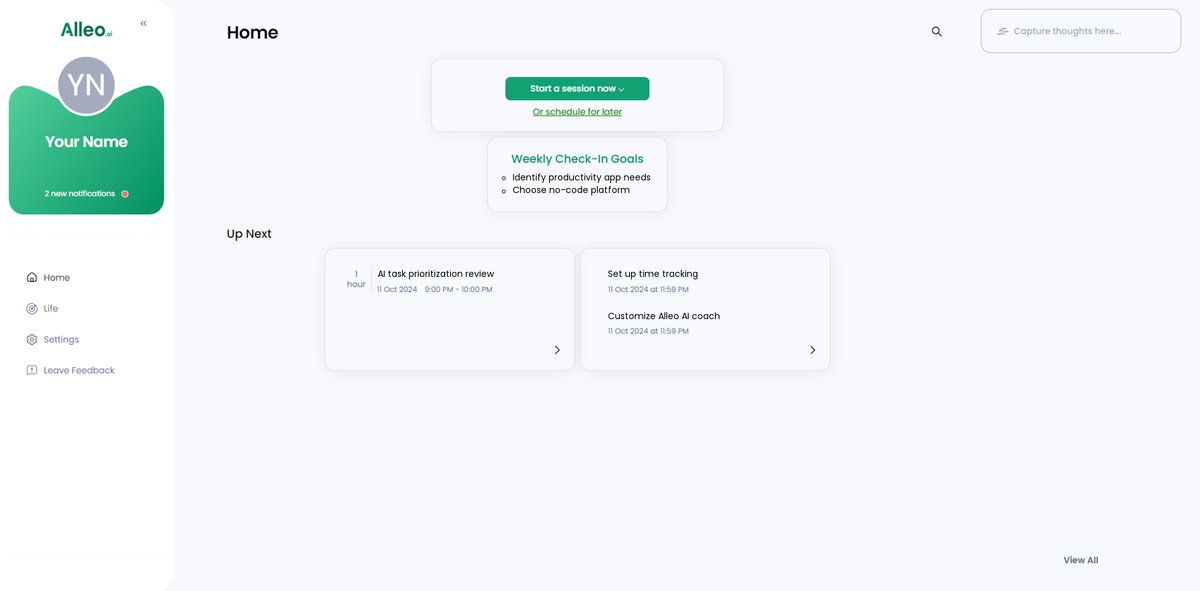
Step 5: Viewing and Managing Goals After the Session
After your coaching session, open the Alleo app and find your discussed goals conveniently displayed on the home page, allowing you to easily track and manage your progress.
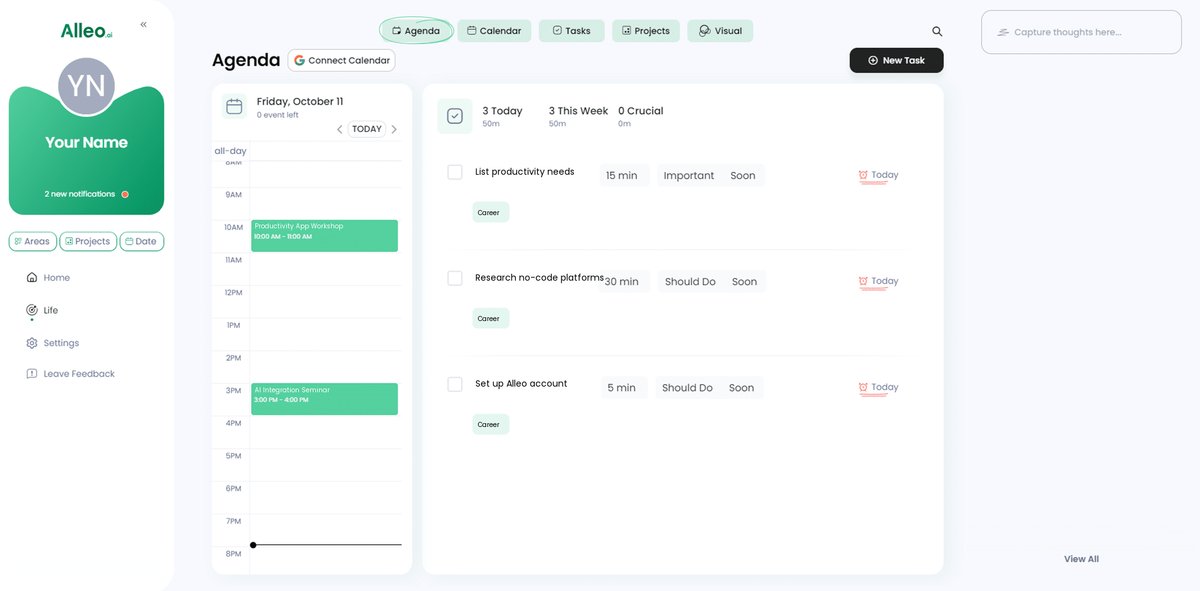
Step 6: Adding events to your calendar or app
Use Alleo’s integrated calendar and task features to add events and deadlines, allowing you to easily track your progress in solving productivity challenges and managing your freelance workflow more effectively.
Transform Your Freelance Workflow Today
As we’ve explored, customizing your productivity apps for freelancers can make a world of difference in your work life.
Generic tools often fall short, but with the right strategies, you can tailor your productivity tools for freelancers to fit your unique needs as an independent contractor.
Remember to choose no-code platforms, integrate time management apps for self-employed professionals with invoicing, and utilize AI for task organization and prioritization.
These steps will help you achieve a more efficient and personalized workflow system for gig workers.
I know the struggle firsthand and have seen these workflow optimization solutions work wonders for freelancers.
Alleo is here to help you on this journey to customize productivity apps for freelancers.
Try Alleo for free and see how it can transform your freelance productivity with tailored productivity solutions for flexible schedules.
Take control of your workflow today.