How Project Managers Can Revolutionize Client Task Updates: A Comprehensive Guide
Are you struggling to streamline client project updates and keep your clients informed on task progress?
As a life coach, I’ve helped many professionals navigate these challenges. I understand how crucial it is to maintain seamless communication and timely task updates with clients using effective project management tools and client communication strategies.
In this article, you’ll discover specific strategies to streamline client project updates, enhance communication, and improve project outcomes. We’ll explore task tracking software, automated progress reports, and client collaboration platforms that can transform your project management process and enable real-time project updates.
Let’s dive in and explore efficient workflow management techniques.
Understanding the Challenges of Client Task Updates
Often, project managers face miscommunication and lack of visibility when trying to streamline client project updates. Many clients initially struggle with understanding where their projects stand, leading to frustration and mistrust. This highlights the need for effective client communication strategies and project status dashboards.
Additionally, manual updates can be incredibly time-consuming. In my experience, this often results in delays and missed deadlines. Implementing task tracking software and automated progress reports can help address these issues.
These challenges can severely impact client relationships and overall project success. For instance, without real-time project updates, clients may feel left in the dark, causing unnecessary anxiety. Utilizing client collaboration platforms can help mitigate these concerns.
How can we address these issues?
By focusing on how project managers can streamline client project updates, we can transform communication and efficiency. Adopting agile project management practices and efficient workflow management techniques can significantly improve the update process.
Effective Strategies to Streamline Client Task Updates
Overcoming this challenge requires a few key steps. Here are the main areas to focus on to streamline client project updates and make progress.
- Implement Client Portal with Task Dashboard: Choose a client collaboration platform that integrates with existing project management tools and customize project status dashboards for key metrics.
- Automate Task Status Updates via Integrations: Set up automated workflows to update task statuses in real-time, enhancing efficient workflow management.
- Create Customized Client Task Templates: Develop and refine task tracking software templates tailored to each client’s needs.
- Set Up Automated Client Notification System: Configure automatic notifications for task updates and milestones, improving client communication strategies.
- Use Collaborative Gantt Charts for Visibility: Implement Gantt charts for real-time project updates and progress tracking.
- Establish Regular Client Check-In Meetings: Schedule regular meetings to discuss progress, gather feedback, and refine task prioritization techniques.
Let’s dive in!
1: Implement client portal with task dashboard
Implementing a client portal with a task dashboard is crucial for enhancing communication and visibility, helping to streamline client project updates effectively.
Actionable Steps:
- Choose a client portal software that integrates well with your current project management tools and supports efficient workflow management.
- Customize the task dashboard to reflect key metrics and tasks that clients need to see, incorporating project status dashboards for real-time project updates.
- Train clients on how to use the portal effectively, ensuring they can navigate and interact with the task lists and utilize task prioritization techniques.
Explanation:
These steps matter because they streamline client project updates and the process of sharing progress, which is vital for maintaining strong client communication strategies.
By using a client portal, project managers can enhance transparency and ensure clients always have access to the latest information through automated progress reports.
This approach aligns with industry trends, such as the increasing use of client portal software for improved communication and project management.
Key benefits of implementing a client portal include:
- Enhanced client communication through client collaboration platforms
- Improved project transparency with real-time project updates
- Streamlined information sharing using task tracking software
This foundation will set the stage for further automation and efficiency improvements in agile project management.

2: Automate task status updates via integrations
Automating task status updates via integrations can significantly improve efficiency and streamline client project updates, ensuring clients always have the latest information.
Actionable Steps:
- Identify key project management tools: Determine the project management tools you currently use and find automation integrations with your client collaboration platforms.
- Set up automated workflows: Configure workflows that automatically update task statuses in real-time as progress is made on each task, utilizing efficient workflow management techniques.
- Regularly review automation rules: Ensure automation rules are aligned with project needs and client expectations, making adjustments when necessary to maintain effective task prioritization techniques.
Explanation:
These steps are essential because they help eliminate manual updates, saving time and reducing the risk of errors. By integrating your task tracking software and automating updates, you can provide clients with real-time project updates and visibility into their project status through project status dashboards.
According to industry trends, automating task management improves workflow efficiency and client satisfaction.
This approach sets a solid foundation for further improvements in client communication strategies and agile project management.
3: Create customized client task templates
Creating customized client task templates is essential for tailoring project management to streamline client project updates and meet specific client needs.
Actionable Steps:
- Develop tailored task templates: Analyze each client’s needs and workflows to create task templates that are specific to their projects, enhancing efficient workflow management.
- Utilize AI-driven tools: Use AI tools to review past projects and identify common tasks and patterns. This helps in refining templates accurately and improving task prioritization techniques.
- Continuously refine templates: Collect client feedback regularly and adjust templates to improve efficiency and relevance, supporting real-time project updates.
Explanation:
These steps matter because they help ensure that task templates are highly relevant and efficient for each client. By using AI-driven project management tools, you can automate the analysis process, enhancing accuracy.
Continuously refining templates based on feedback improves client satisfaction and project outcomes. According to industry trends, customized task templates are crucial for dynamic project management and improved client communication strategies.
This foundation will help in setting up automated notifications effectively, supporting automated progress reports and streamlining client project updates.
4: Set up automated client notification system
Setting up an automated client notification system is crucial for streamlining client project updates and ensuring clients are always informed about task progress.
Actionable Steps:
- Configure automatic notifications: Set up the client collaboration platform to send notifications for task updates, deadlines, and milestones.
- Personalize notification settings: Adjust notification preferences based on each client’s needs and project requirements using task tracking software.
- Monitor effectiveness: Regularly review the notification system to ensure it meets client expectations and avoids information overload while streamlining client project updates.
Explanation:
These steps matter because they keep clients updated in real-time, improving transparency and trust through efficient workflow management.
According to industry trends, automation in task management significantly enhances workflow efficiency and client satisfaction. For more insights, check out this article on task automation in construction software.
Key aspects of an effective notification system include:
- Timely updates on project milestones using project management tools
- Customizable alert preferences for real-time project updates
- Integration with existing client communication strategies
This foundation will help ensure that clients remain informed and engaged throughout the project, utilizing project status dashboards and automated progress reports to streamline client project updates.

5: Use collaborative Gantt charts for visibility
Using collaborative Gantt charts is essential for increasing project transparency and ensuring clients are aware of progress, helping to streamline client project updates effectively.
Actionable Steps:
- Implement Gantt chart software: Select project management tools that support real-time collaboration and integrate with your existing task tracking software.
- Assign task dependencies and milestones: Clearly define these in the Gantt chart to provide a visual timeline of project progress and facilitate efficient workflow management.
- Encourage client interaction: Train clients to use the Gantt chart so they can monitor timelines and spot any potential delays, enhancing client communication strategies.
Explanation:
These steps are crucial because they help maintain project transparency and foster client trust. By using collaborative Gantt charts as client collaboration platforms, clients can easily track project milestones and dependencies.
This approach aligns with the trend of integrating Gantt charts with agile project management methodologies for flexible project management. For more insights, check out this article on Gantt chart usage.
This method ensures clients stay informed and engaged throughout the project, effectively streamlining client project updates.
6: Establish regular client check-in meetings
Regular client check-in meetings are essential for maintaining communication and ensuring project alignment to streamline client project updates.
Actionable Steps:
- Schedule consistent meetings: Set a regular schedule for client check-ins, whether weekly or bi-weekly, to keep everyone informed on progress using project management tools.
- Prepare a focused agenda: Create an agenda that highlights key updates, tasks, and any concerns. Share it with clients ahead of time to improve client communication strategies.
- Document discussions: Take notes during meetings and share a summary with clients afterward to ensure clarity and accountability, utilizing task tracking software.
Explanation:
These steps help maintain transparency and build trust with your clients. Regular meetings provide an opportunity to address issues promptly and adjust plans as needed, supporting efficient workflow management.
According to industry insights, consistent communication is a cornerstone of successful project management. By keeping clients in the loop, you can foster stronger relationships and achieve better project outcomes through real-time project updates.
Benefits of regular client check-ins:
- Proactive issue resolution
- Increased client satisfaction
- Improved project alignment
This approach ensures ongoing collaboration and client satisfaction, effectively streamlining client project updates.

Partner with Alleo to Streamline Client Project Updates
We’ve explored challenges and solutions for keeping clients updated. But did you know you can work directly with Alleo to streamline client project updates and enhance your client communication strategies?
Setting up an Alleo account is simple. Create a personalized plan and start working with our AI coach right away to improve your project management tools and task tracking software.
Alleo provides tailored coaching support to streamline client project updates and optimize your efficient workflow management.
Our AI coach will follow up on your progress, handle changes, and keep you accountable via text and push notifications, acting as your real-time project updates assistant. Plus, enjoy a 14-day free trial with no credit card required to explore our client collaboration platform.
Ready to get started for free and revolutionize your project status dashboards?
Let me show you how!
Step 1: Log In or Create Your Alleo Account
To begin streamlining your client task updates, log in to your existing Alleo account or create a new one to access our AI coach and start improving your project management process.

Step 2: Choose “Building better habits and routines”
Select “Building better habits and routines” to develop a structured approach for streamlining client task updates and improving project management efficiency.

Step 3: Select “Career” as Your Focus Area
Choose “Career” as your focus area to address challenges in client task updates and project management, aligning with the strategies discussed in the article to improve your professional efficiency and client relationships.

Step 4: Starting a coaching session
Begin your journey with Alleo by scheduling an intake session, where our AI coach will help you create a personalized plan to streamline your client task updates and project management processes.

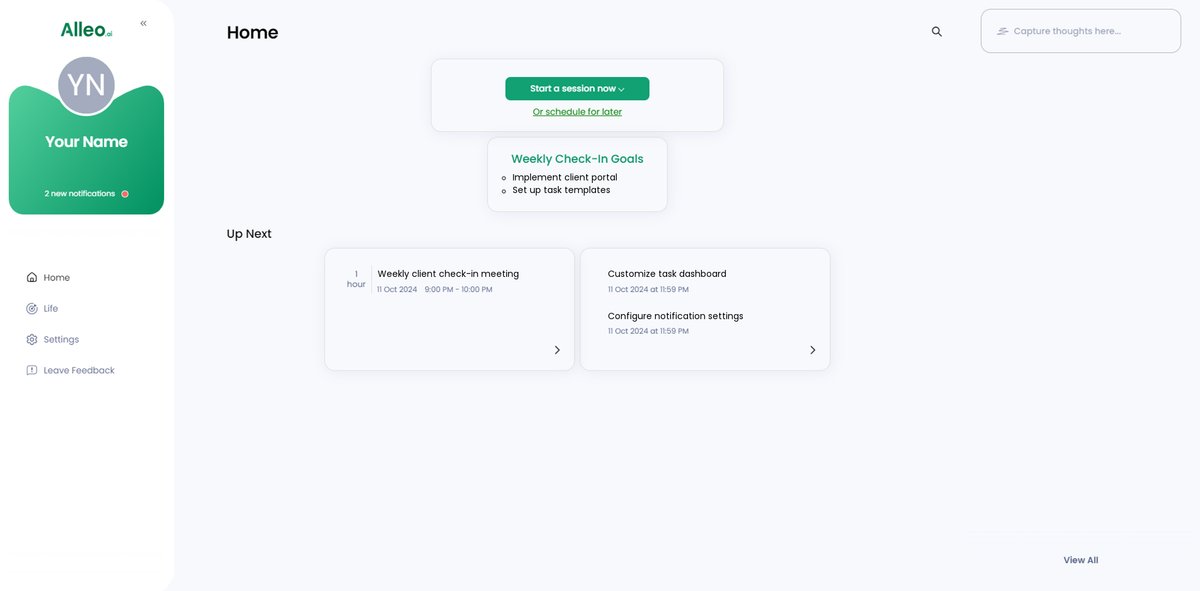
Step 5: Viewing and Managing Goals After the Session
After your coaching session, easily access and track your progress by checking the goals discussed, which will be conveniently displayed on the home page of the Alleo app, allowing you to stay focused on streamlining your client task updates and improving project management.
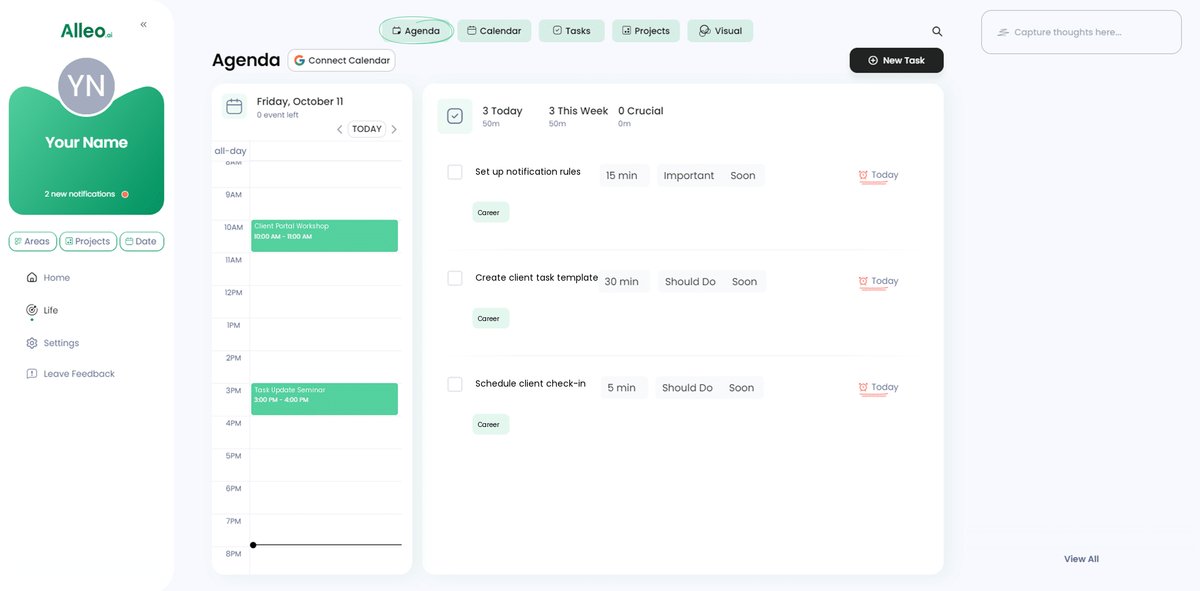
Step 6: Adding events to your calendar or app
Easily add project milestones, client meetings, and task deadlines to your calendar or app to track your progress in solving client communication challenges. With Alleo’s integrated calendar and task features, you can seamlessly manage your schedule and monitor your advancement towards streamlined client task updates.
Wrapping Up and Moving Forward
As we reach the end of our journey, let’s reflect on what we’ve covered. Keeping clients updated on task progress can be challenging, but it’s not impossible. Streamlining client project updates is crucial for efficient workflow management.
By implementing client collaboration platforms, automating progress reports, and customizing templates, you can enhance communication. Setting up notifications, using project status dashboards like Gantt charts, and holding regular check-ins will keep your clients informed and engaged with real-time project updates.
You can do this. With the right project management tools and client communication strategies, you’ll see significant improvements in your project management process.
Remember, Alleo is here to help. Our AI coach can guide you through these steps, making the process of streamlining client project updates seamless.
Start your free trial today and see the difference Alleo can make in your task tracking and project management efforts.