How to Create a Distraction-Free Home Office: 4 Fundamental Principles for Remote Workers
Can you imagine being deeply engrossed in a pivotal project, only to be jolted out of your focus by a family member’s call or a notification ping? This scenario highlights the importance of creating a distraction-free home office for remote work productivity.
As a life coach, I’ve helped many professionals navigate these challenges. I’ve seen firsthand how distractions can impact productivity and mental well-being, especially when it comes to maintaining work-life balance in remote settings.
In this article, you’ll discover actionable strategies to create a distraction-free home office. We’ll cover setting up a dedicated workspace, managing digital distractions, reducing noise with effective noise reduction strategies for home offices, and establishing a structured routine. These tips will help you optimize your home office setup and boost your remote work productivity.
Let’s dive in and explore how to design an ergonomic workspace that promotes focus and efficiency.

Understanding the Challenges of Remote Work Distractions
Many remote workers face distractions such as family interruptions, household chores, and digital temptations when creating a distraction-free home office. These distractions can disrupt your focus, making it difficult to maintain productivity and implement effective remote work productivity tips.
For instance, several clients report struggling with balancing work and household responsibilities. It’s tough to stay on track when your environment constantly pulls you in different directions, highlighting the importance of work-life balance in remote settings.
The impact on mental well-being is significant too. Constant interruptions can lead to stress and frustration, affecting your overall job satisfaction. Implementing noise reduction strategies for home offices can help mitigate these issues.
Creating a productive work environment is crucial for maintaining work quality and meeting deadlines. A dedicated, distraction-free space can make a world of difference in your remote work experience, especially when combined with ergonomic workspace design and minimalist home office decor.

A Roadmap to Creating a Distraction-Free Home Office
Overcoming this challenge requires a few key steps. Here are the main areas to focus on to make progress in creating a distraction-free home office:
- Establish a dedicated workspace with boundaries: Designate a specific area for work to minimize distractions and improve remote work productivity.
- Implement digital distraction management tools: Use apps to block distracting websites and manage your time effectively, enhancing work-life balance in remote settings.
- Create a noise-reduction strategy for your office: Invest in noise-cancelling headphones and soundproofing methods to optimize your home office setup.
- Set a structured work routine with clear breaks: Develop a consistent daily routine with set working hours and regular breaks, improving time management for remote workers.
Let’s dive in!
1: Establish a dedicated workspace with boundaries
Creating a distraction-free home office starts with establishing a dedicated workspace with boundaries, which is essential for minimizing distractions and boosting productivity.
Actionable Steps:
- Choose a specific area in your home exclusively for work purposes.
- Identify a spare room or a corner of your living room to convert into a dedicated workspace for remote work productivity.
- Set physical boundaries to signal work hours to family members.
- Use visual cues like a closed door or a “Do Not Disturb” sign during work hours to create boundaries in a home workspace.
- Keep your workspace organized and free from non-work-related items.
- Declutter your desk and only keep essential work tools within reach to maintain focus and embrace minimalist home office decor.
Explanation:
These steps help create a clear separation between your work and personal life, reducing distractions and improving focus in your home office setup.
According to Navigating Remote Work, having a dedicated workspace can significantly enhance productivity and mental well-being for remote workers.
Ensuring a clean, designated area for work helps maintain a professional mindset, allowing you to meet deadlines and achieve your work goals more efficiently in a distraction-free home office.
Key benefits of a dedicated workspace include:
- Improved focus and concentration
- Clear boundaries between work and personal life, supporting work-life balance in remote settings
- Enhanced professional image during video calls, facilitated by digital tools for remote collaboration
By establishing a dedicated workspace, you’re taking the first step toward creating a more productive and distraction-free home office environment.
2: Implement digital distraction management tools
Managing digital distractions is crucial for creating a distraction-free home office and maintaining focus and productivity in a remote work environment.
Actionable Steps:
- Use apps like Focus or RescueTime to block distracting websites and monitor your online activity, enhancing remote work productivity.
- Set specific times during the day when social media and entertainment sites are inaccessible, improving time management for remote workers.
- Create a detailed schedule with breaks using digital planners or calendar apps, essential for work-life balance in remote settings.
- Plan your day in blocks of focused work sessions followed by short breaks to maintain high productivity levels in your home office setup.
- Establish a ‘Do Not Disturb’ mode on all devices during work hours to minimize interruptions and create boundaries in a home workspace.
- Activate ‘Do Not Disturb’ on your smartphone and computer to avoid notifications during important tasks, supporting your distraction-free home office environment.
Explanation:
Implementing digital distraction management tools helps create a focused work environment, reducing the temptation to check non-work-related websites and supporting your efforts in creating a distraction-free home office.
According to Freedom, these tools can significantly enhance productivity by limiting digital interruptions in your home office setup.
By scheduling focused work sessions and activating ‘Do Not Disturb’ modes, you can maintain a steady workflow and reduce stress caused by constant digital noise, crucial for remote work productivity.
These steps will help you stay on track, making your home office a more productive and peaceful space, essential for creating a distraction-free home office environment.

3: Create a noise-reduction strategy for your office
Reducing noise distractions is crucial for maintaining focus and productivity in your home office when creating a distraction-free home office.
Actionable Steps:
- Invest in noise-cancelling headphones to block out ambient noise.
- Use noise-cancelling headphones during conference calls or deep work sessions to enhance remote work productivity.
- Choose an ideal location within your home that is naturally quieter, such as a room away from the main road.
- Set up your workspace in a less trafficked area of your home to reduce noise distractions and improve your home office setup.
- Implement soundproofing techniques, such as adding rugs, curtains, or acoustic panels.
- Install acoustic panels on your office walls to dampen external noise and create a distraction-free home office.
Explanation:
Creating a noise-reduction strategy helps minimize auditory distractions, enabling you to concentrate better and improve productivity in your home office.
According to Tricky Enough, soundproofing your workspace and using noise-cancelling headphones can significantly enhance your work environment.
By taking these steps, you’ll create a quieter, more focused workspace that supports your remote work needs and promotes work-life balance in remote settings.
Effective noise-reduction techniques for creating a distraction-free home office:
- White noise machines to mask disruptive sounds
- Sealing gaps around doors and windows
- Using noise-absorbing materials like foam panels
Reducing noise distractions makes your home office a more peaceful and productive space, helping you meet your work goals efficiently and improve time management for remote workers.

4: Set a structured work routine with clear breaks
Setting a structured work routine with clear breaks is key to maintaining productivity and avoiding burnout when creating a distraction-free home office.
Actionable Steps:
- Develop a consistent daily routine with set working hours and regular breaks for remote work productivity.
- Follow the Pomodoro technique, working for 25 minutes and taking a 5-minute break.
- Schedule specific times for household chores and personal tasks outside of working hours to maintain work-life balance in remote settings.
- Allocate 30 minutes before or after work for chores to keep them from interrupting your workday.
- Take regular physical and mental breaks to prevent burnout and maintain focus in your home office setup.
- Incorporate short stretching exercises or a quick walk during breaks to refresh and recharge.
Explanation:
Creating a structured routine helps manage your time effectively and ensures you stay focused on work tasks in your distraction-free home office.
According to Tricky Enough, establishing a routine can significantly boost productivity.
By separating work from personal tasks, you create a balanced workflow that supports both your professional and personal life in your home workspace.
Benefits of regular breaks:
- Improved mental clarity and focus
- Reduced eye strain and physical tension
- Enhanced overall work satisfaction
By following these steps, you can maintain a productive and distraction-free home office environment, setting yourself up for success in remote work.
Partner with Alleo to Create Your Ideal Home Office
We’ve explored the challenges of creating a distraction-free home office and outlined steps to overcome them. But did you know Alleo can make this journey easier and faster for remote work productivity?
With Alleo, you get an affordable AI life coach that helps you create a personalized distraction-free workspace. Setting up an account is easy, and you can start with a free 14-day trial—no credit card required. Our AI assists with home office setup ideas tailored to your needs.
Alleo helps you set up a schedule, manage distractions, and establish a routine. The AI coach provides reminders, tips, and follows up on your progress, ensuring you stay on track with creating a distraction-free home office environment.
Alleo also offers personalized advice based on your unique work habits, including time management for remote workers and strategies for maintaining work-life balance in remote settings.
Ready to get started for free and boost your remote work productivity?
Let me show you how!
Step 1: Logging In or Creating Your Alleo Account
To start your journey towards a distraction-free home office, log in to your Alleo account or create a new one in just a few clicks, setting the foundation for your personalized AI coaching experience.

Step 2: Choose Your Focus – Building Better Habits and Routines
Click on “Building better habits and routines” to start creating a structured work environment that minimizes distractions and boosts your productivity in your home office setup.

Step 3: Select “Career” as Your Focus Area
Choose the “Career” life area in Alleo to get tailored strategies for creating a distraction-free home office, boosting your productivity and work-life balance in your remote job.

Step 4: Starting a coaching session
Begin your journey with Alleo by scheduling an intake session, where you’ll discuss your home office challenges and set up a personalized plan to create a distraction-free workspace tailored to your needs.

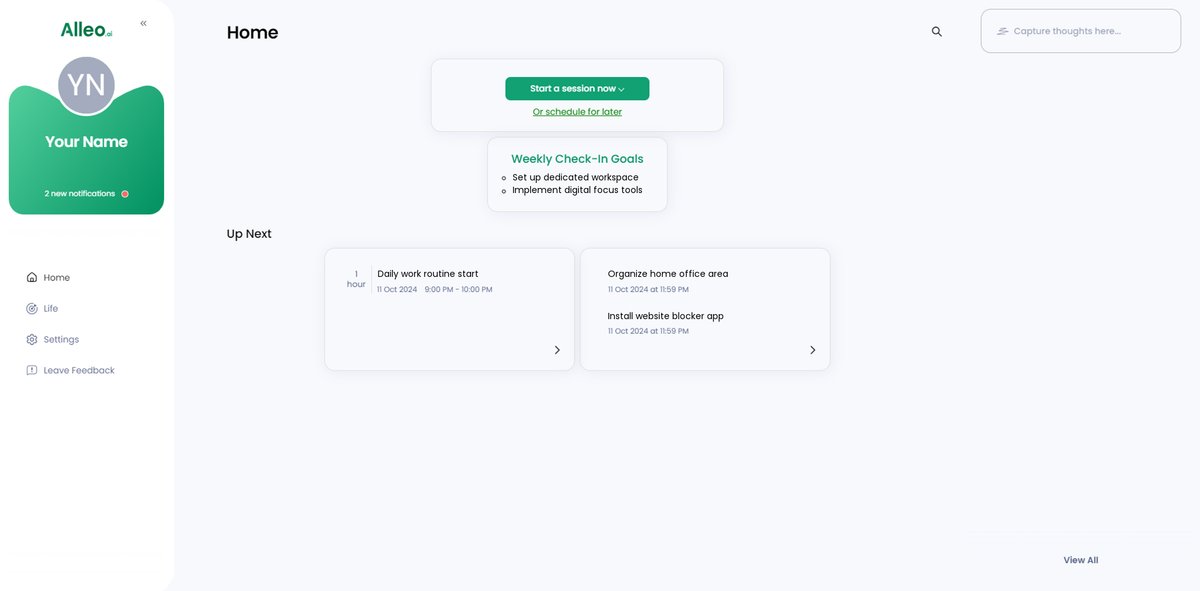
Step 5: Viewing and managing goals after the session
After your coaching session, open the Alleo app and check your home page to view and manage the goals you discussed, allowing you to track your progress in creating a distraction-free home office.
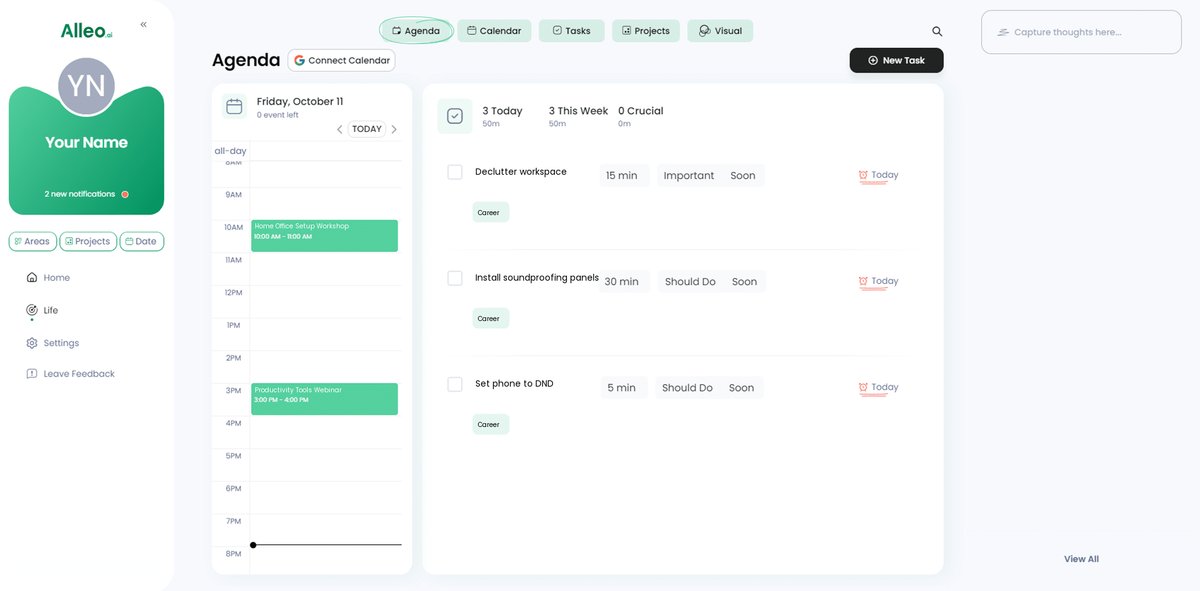
Step 6: Adding events to your calendar or app
Use the calendar and task features in Alleo to schedule your work sessions, breaks, and important deadlines, allowing you to easily track your progress in creating a distraction-free home office environment.
Wrapping Up Your Journey to a Distraction-Free Home Office
As we conclude, let’s reflect on the steps you’ve learned for creating a distraction-free home office.
You now have strategies to establish a dedicated workspace, manage digital distractions, implement noise reduction strategies for home offices, and set a structured routine for remote work productivity.
These steps are designed to boost your productivity and well-being in your home office setup.
I understand how challenging it can be to stay focused while working from home and maintaining work-life balance in remote settings.
But with persistence and these actionable tips, you’re well-equipped to create an ideal work environment with ergonomic workspace design.
Don’t forget, Alleo is here to help you achieve this goal effortlessly, offering digital tools for remote collaboration.
Try Alleo today for personalized support in creating a distraction-free home office and see the difference it can make.