How to Master Free HubSpot CRM as a Salesperson Without Company Support: The Ultimate Guide
Imagine landing a big client without any CRM support from your company. Using HubSpot CRM without company support can be a game-changer for individual salespeople.
As a life coach, I’ve helped many professionals navigate these challenges. In my experience assisting clients, I often encounter sales professionals struggling with CRM utilization independently. Setting up HubSpot CRM independently can streamline your sales pipeline management.
In this article, you’ll learn how to set up and use the free HubSpot CRM to enhance your sales process without company support. You’ll discover actionable strategies, benefits, and tools to streamline your workflow, including maximizing HubSpot CRM features for customer relationship tracking and lead management.
Let’s dive in and explore how HubSpot CRM integration with your personal sales process can boost your success.

The Struggle of Managing Leads Without CRM Support
Many sales professionals, like Alex, find it challenging to manage leads without a proper CRM. Without company-supported tools like HubSpot CRM, keeping track of potential clients and follow-ups can quickly become overwhelming for individual salespeople.
Imagine the frustration of using outdated spreadsheets and notes, leading to missed opportunities and disorganized data. This lack of structure hinders productivity and affects sales performance, especially when using HubSpot CRM without company support.
In my experience, poor lead management can significantly impact your ability to close deals. Without a reliable CRM, such as the free HubSpot CRM for sales professionals, you risk losing valuable time and resources, making it harder to achieve your sales goals.
Let’s explore how to tackle this issue effectively by maximizing HubSpot CRM features and setting up HubSpot CRM independently.

Key Steps to Independently Use Free HubSpot CRM
Overcoming this challenge of using HubSpot CRM without company support requires a few key steps. Here are the main areas to focus on to make progress in setting up HubSpot CRM independently.
- Set Up Free HubSpot CRM Account and Import Contacts: Start by creating a free HubSpot account and importing your contacts, essential for individual salespeople maximizing HubSpot CRM features.
- Use Email Integration for Efficient Communication: Integrate your email for smooth communication with leads, enhancing your sales pipeline management with free HubSpot CRM.
- Leverage Templates for Personalized Outreach: Utilize email templates to enhance your outreach efforts, improving customer relationship tracking for solo salespeople.
Let’s dive into using HubSpot CRM without company support!
1: Set up free HubSpot CRM account and import contacts
Setting up your HubSpot CRM account and importing contacts is crucial for managing leads effectively, especially when using HubSpot CRM without company support.
Actionable Steps:
- Visit the HubSpot website and sign up for a free CRM account, ideal for individual salespeople.
- Confirm your email and complete the initial setup process, setting up HubSpot CRM independently.
- Export your existing contacts from email or spreadsheets and use HubSpot’s import feature to upload them, maximizing HubSpot CRM features for lead management.
Explanation: Taking these steps ensures you have a structured system to track and manage leads. This helps you avoid missed opportunities and keeps your data organized, essential for sales pipeline management with free HubSpot CRM.
According to CRM.org, HubSpot CRM is a top pick for its user-friendly interface and essential features, making it an excellent free CRM tool for sales professionals.
Key benefits of using HubSpot CRM include:
- Centralized contact management for customer relationship tracking for solo salespeople
- Automated data entry
- Customizable dashboards for easy tracking and HubSpot CRM integration with personal sales process
Embarking on this journey will set the stage for efficient communication and personalized outreach, leveraging email marketing with free HubSpot CRM and the HubSpot CRM mobile app for salespeople.

2: Use email integration for efficient communication
Connecting your email to HubSpot CRM is crucial for seamless and effective communication with your leads, especially when using HubSpot CRM without company support.
Actionable Steps:
- Integrate your email account: Connect your personal email, whether it’s Gmail or Office 365, to HubSpot for streamlined communication and maximizing HubSpot CRM features.
- Enable email tracking: Activate tracking to monitor when a lead opens your emails, helping you gauge interest and follow up timely, which is essential for sales pipeline management with free HubSpot CRM.
- Set up automatic logging: Configure HubSpot to log all incoming and outgoing emails automatically to keep your communication history organized, a key aspect of customer relationship tracking for solo salespeople.
Explanation: These steps ensure that all your communications are tracked and logged, allowing you to manage interactions efficiently when using HubSpot CRM without company support.
This is vital because, according to HubSpot’s knowledge base, integrating email accounts significantly improves sales and communication management.
Efficient email integration will help you stay on top of your leads and maintain a professional approach, which is crucial for HubSpot CRM integration with personal sales processes.
With email integration sorted, let’s move on to leveraging templates for personalized outreach.

3: Leverage templates for personalized outreach
Using email templates can significantly enhance your outreach efforts when using HubSpot CRM without company support, making your communication more efficient and personalized.
Actionable Steps:
- Explore built-in templates: Select from HubSpot’s pre-designed email templates to save time on crafting emails from scratch, maximizing HubSpot CRM features for individual salespeople.
- Customize templates: Personalize these templates to reflect your communication style and branding, ensuring a unique touch for each recipient and integrating HubSpot CRM with your personal sales process.
- Create and save new templates: Develop and save tailored templates for various stages of your sales pipeline management with free HubSpot CRM to streamline your outreach process.
Explanation: These steps help you maintain consistent and professional communication with your leads while using HubSpot CRM without company support.
Personalizing templates ensures your messages resonate with recipients, increasing engagement rates and improving lead management using HubSpot CRM.
According to HubSpot’s knowledge base, using templates can save time and improve email effectiveness.
Efficient templating allows you to focus more on building relationships and closing deals, even when setting up HubSpot CRM independently.
Best practices for effective email templates:
- Keep subject lines clear and compelling
- Use a friendly, conversational tone
- Include a clear call-to-action
Following these steps sets the stage for successful personalized outreach, paving the way for better customer relationship tracking for solo salespeople and higher conversion rates when using HubSpot CRM without company support.

Partner with Alleo to Master HubSpot CRM
We’ve explored the challenges of using HubSpot CRM without company support. Imagine having a personal coach to guide you through every step of setting up HubSpot CRM independently.
With Alleo, this becomes a reality for individual salespeople looking to maximize HubSpot CRM features.
How Alleo Can Help:
Step 1: Goal Setting and Task Management
- Use Alleo to set specific sales goals and track progress in your HubSpot CRM for individual salespeople.
- Organize daily tasks and reminders to stay on top of your sales activities and customer relationship tracking.
Step 2: Decision-Making and Planning
- Leverage Alleo’s AI insights to make informed decisions on lead management using HubSpot CRM.
- Plan your outreach strategy with Alleo’s scheduling and habit-building features, integrating HubSpot CRM with your personal sales process.
Step 3: Personalized Coaching and Support
- Access Alleo’s personalized coaching to improve CRM utilization when using HubSpot CRM without company support.
- Receive tailored advice and tips to enhance your sales pipeline management with free HubSpot CRM.
Ready to get started for free with these CRM tools for sales professionals?
Let me show you how!
Step 1: Log In or Create Your Alleo Account
To start your journey with personalized CRM coaching, Log in to your account or create a new one to access Alleo’s AI-powered guidance for mastering HubSpot CRM.

Step 2: Choose “Building better habits and routines”
Click on “Building better habits and routines” to establish a structured approach for consistently using HubSpot CRM, helping you stay organized and efficient in managing your sales leads without company support.

Step 3: Select “Career” as Your Focus Area
Choose “Career” as your focus area in Alleo to align your CRM efforts with your professional goals, allowing you to better manage leads, improve sales performance, and advance your career in sales without relying on company support.

4: Start Your Coaching Session with Alleo
Begin your journey with Alleo by scheduling an intake session to discuss your HubSpot CRM goals and create a personalized plan for optimizing your sales process.

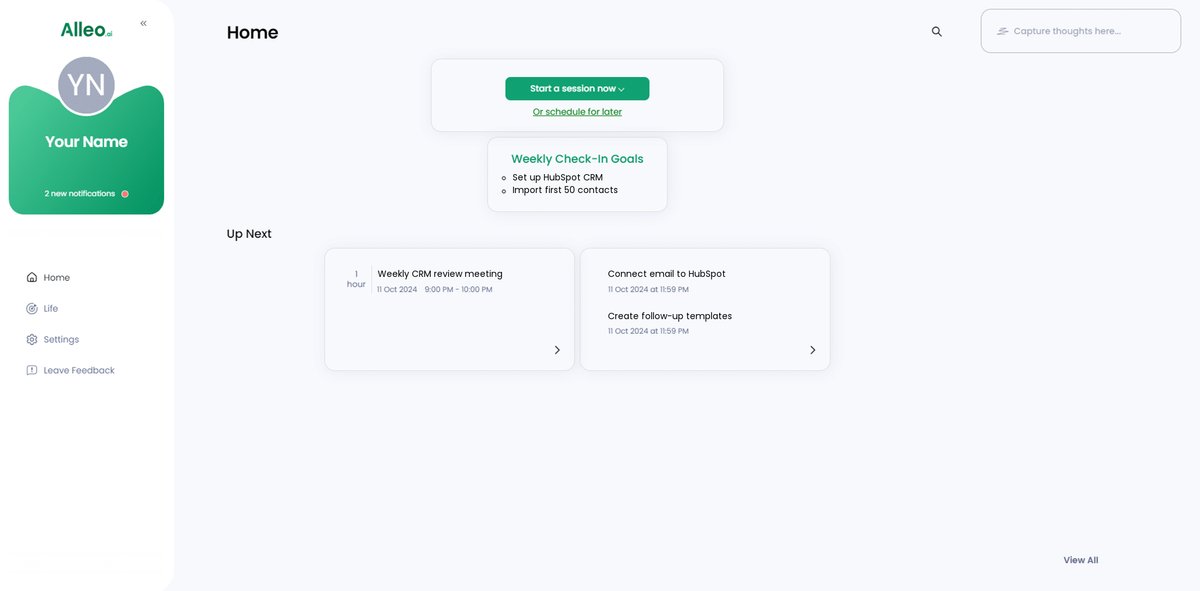
Step 5: Viewing and managing goals after the session
After your coaching session, open the Alleo app and check your home page to find the goals you discussed, allowing you to easily track and manage your progress in using HubSpot CRM independently.
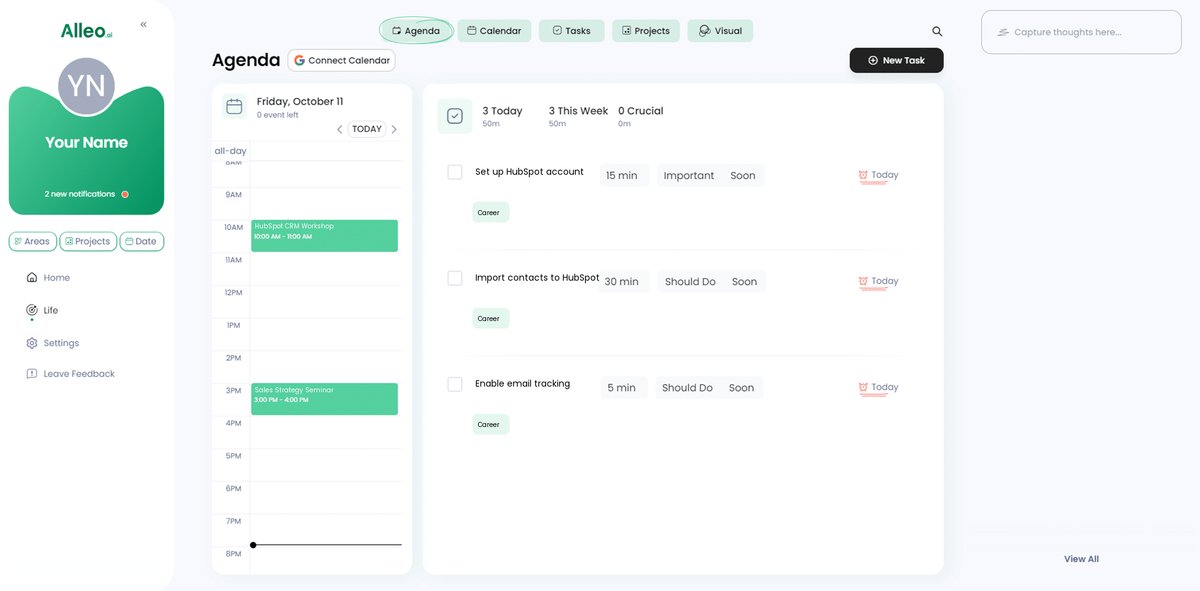
Step 6: Adding events to your calendar or app
Use Alleo’s calendar integration to add important sales events, meetings, and follow-ups, ensuring you stay on top of your schedule and can easily track your progress in solving lead management challenges.
Wrapping Up Your Journey with Free HubSpot CRM
We’ve covered a lot today, haven’t we?
Managing leads without company support is tough, but you now have the tools to succeed. By setting up your free HubSpot CRM account, integrating your email, and leveraging templates for customer relationship tracking, you’re already ahead in using HubSpot CRM without company support.
You can do this.
Remember, Alleo is here to support you. Using Alleo alongside HubSpot CRM for individual salespeople, you’ll stay organized, make better decisions, and get personalized coaching to maximize HubSpot CRM features.
Start transforming your sales process today. Take action and see the difference for yourself in sales pipeline management with free HubSpot CRM.
You’ve got this.