Master Effective Note-Taking Strategies for Remote Work: The Ultimate Guide
Are you struggling to keep your notes organized while working remotely? Effective remote note-taking strategies are essential for success in today’s virtual work environment.
As a life coach, I’ve helped many professionals tackle similar challenges with remote work productivity tips. I understand the importance of effective note-taking in boosting productivity and recall, especially when it comes to information retention in remote settings.
In this article, you’ll discover remote note-taking strategies to enhance your skills using digital note-taking tools, visual techniques like mind mapping for distributed teams, structured templates, and active note-making. These methods will help you stay organized and efficient, improving time management for remote employees.
Let’s dive into these organization techniques for virtual teams.

Understanding the Challenges of Remote Note-Taking
Working remotely presents unique challenges for keeping your notes organized. Many clients initially struggle with scattered notes and poor recall when implementing remote note-taking strategies.
This disorganization can lead to missed deadlines and overlooked tasks, impacting productivity. Effective time management for remote employees becomes crucial in such scenarios.
In my experience, people often find it difficult to maintain structured notes when working from home. Without a consistent system or digital note-taking tools, important details can easily slip through the cracks.
Moreover, remote work environments require seamless communication and collaboration. Poor note-keeping hinders this, causing confusion and inefficiency. Implementing asynchronous communication best practices and using collaborative note-taking platforms can help address these challenges in virtual teams.

Key Strategies for Effective Remote Note-Taking
Overcoming this challenge requires a few key steps. Here are the main areas to focus on to make progress with remote note-taking strategies.
- Use digital tools for organized note-taking: Select the right digital note-taking tools and utilize features like tags and synchronization for remote work productivity.
- Implement visual note-taking techniques: Use mind mapping for distributed teams, color-coding, and diagrams to enhance understanding in virtual settings.
- Create structured meeting note templates: Develop and consistently use templates to capture key points and action items, improving organization techniques for virtual teams.
- Practice active note-making and summarization: Summarize notes after meetings and review regularly for better recall, enhancing information retention in remote settings.
Let’s dive into these remote note-taking strategies!
1: Use digital tools for organized note-taking
Using digital tools for note-taking is crucial for implementing effective remote note-taking strategies and staying organized and efficient while working remotely.
Actionable Steps:
- Evaluate and select a digital note-taking tool like OneNote, Notion, or Evernote that integrates well with your workflow. These collaborative note-taking platforms can enhance remote work productivity. Set it up and use it for one week to note improvements in organization.
- Create a tagging system for your notes to enhance searchability. This organization technique for virtual teams can help track the time saved in finding information over a month.
- Set up automatic synchronization between your devices. Ensure all notes are accessible on all devices and evaluate ease of access, which is crucial for cloud-based note storage solutions.
Explanation:
These steps help you stay organized and find information quickly. Digital note-taking tools offer features that streamline note-taking, such as tags and synchronization, which are essential for remote note-taking strategies.
According to a ClickUp blog, well-organized notes ensure clear communication and prevent overlooking important details in project management. By integrating these tools into your workflow, you can improve productivity and recall, which are key for time management for remote employees.
Key benefits of digital note-taking tools:
- Enhanced searchability and organization
- Seamless synchronization across devices
- Improved collaboration with team members, supporting asynchronous communication best practices
Implementing these remote note-taking strategies will set a strong foundation for your remote note-taking approach and boost information retention in remote settings.

2: Implement visual note-taking techniques
Using visual note-taking techniques can enhance your understanding and retention of information, especially in remote work settings. These remote note-taking strategies are crucial for improving productivity and organization techniques for virtual teams.
Actionable Steps:
- Incorporate mind mapping for distributed teams to visually organize thoughts during meetings. Create mind maps to connect ideas and track complex information.
- Use color-coding to highlight key points in your notes. Develop a color-coding system for different types of information such as tasks, deadlines, and ideas, enhancing time management for remote employees.
- Integrate diagrams and symbols into your notes. Practice adding visual elements to represent information clearly, improving information retention in remote settings.
Explanation:
These remote note-taking strategies help make your notes more engaging and easier to understand. Visual techniques like mind mapping and color-coding can significantly enhance comprehension and recall, especially in asynchronous communication environments.
According to a Mural blog, visual note-taking increases productivity by making the process more fun and efficient. By incorporating these techniques, your notes will be more organized and effective, supporting remote work productivity tips.
Transitioning to the next technique will further improve your note-taking strategy.

3: Create structured meeting note templates
Creating structured meeting note templates is essential for capturing key points and action items efficiently, especially when implementing remote note-taking strategies.
Actionable Steps:
- Design a standard template that includes sections for the agenda, key points, action items, and decisions. Use this template consistently for all meetings to enhance remote work productivity.
- Train yourself to use the template for every meeting without fail. This will help you ensure completeness and consistency in your digital note-taking.
- Share the template with your team and encourage them to use it. Gather feedback to improve its effectiveness for virtual teams.
Explanation:
These steps matter because they bring consistency and clarity to your meeting notes. A structured template ensures no critical information is missed, which is crucial for remote note-taking strategies.
According to a ClickUp blog, well-organized notes ensure clear communication and prevent overlooking important details in project management. Implementing and sharing templates enhances team collaboration and productivity in remote settings.
Essential components of an effective meeting note template for remote work:
- Clear agenda and objectives
- Designated space for action items
- Section for decisions and follow-ups
By adopting these structured note templates, you will streamline your remote work processes and boost efficiency in virtual meeting minutes strategies.

4: Practice active note-making and summarization
Practicing active note-making and summarization is crucial for improving recall and staying organized in a remote work setting. These remote note-taking strategies are essential for enhancing remote work productivity.
Actionable Steps:
- Summarize key takeaways right after each virtual meeting. Spend 5 minutes summarizing the most important points and action items using digital note-taking tools.
- Schedule weekly review sessions to revisit and refine your notes. This helps keep information fresh and organized, supporting time management for remote employees.
- Connect new information with existing knowledge. Use note-making techniques to build upon past ideas and create a cohesive understanding, leveraging organization techniques for virtual teams.
Explanation:
These remote note-taking strategies matter because they enhance your ability to recall information and stay organized. Active summarization and regular reviews ensure that your notes are clear and actionable, supporting asynchronous communication best practices.
According to a Fellow blog, note-making involves building upon past ideas and rephrasing information, which improves comprehension and retention. Implementing these techniques will help you stay on top of tasks and improve productivity in remote settings.
By integrating active note-making and summarization, you’ll enhance your remote note-taking strategies and streamline your workflow, making effective use of collaborative note-taking platforms and cloud-based note storage solutions.

Partner with Alleo for Effective Remote Note-Taking
We’ve explored the challenges of effective remote note-taking strategies for remote workers and how to solve them. But did you know you can work directly with Alleo to make this journey easier and faster, enhancing your remote work productivity?
Step 1: Set up your Alleo account and create a personalized note-taking plan, incorporating digital note-taking tools and organization techniques for virtual teams.
Step 2: Leverage Alleo’s goal-setting features to establish note-taking habits. Alleo offers tailored coaching support, just like a human coach, to improve your time management for remote employees.
Step 3: Use Alleo’s AI insights to refine your remote note-taking strategies and stay organized. You’ll get text and push notifications to keep you accountable, supporting asynchronous communication best practices.
Ready to get started for free? Let me show you how to enhance your remote note-taking strategies!
Step 1: Log In or Create Your Account
To begin your journey towards better remote note-taking, log in to your existing Alleo account or create a new one to access personalized coaching and note-taking tools.

Step 2: Choose “Building better habits and routines”
Click on “Building better habits and routines” to focus on developing consistent note-taking practices that will keep you organized and productive while working remotely.

Step 3: Select “Career” as Your Focus Area
Choose “Career” as your focus area in Alleo to optimize your remote note-taking skills, enhancing your professional productivity and organization – key factors in career advancement and success in a remote work environment.

Step 4: Starting a coaching session
Begin your journey with Alleo by scheduling an intake session, where you’ll discuss your note-taking challenges and set up a personalized plan to improve your remote work organization and productivity.

Step 5: Viewing and managing goals after the session
After your coaching session, open the Alleo app to find your discussed goals conveniently displayed on the home page, allowing you to easily track and manage your progress in improving your remote note-taking skills.
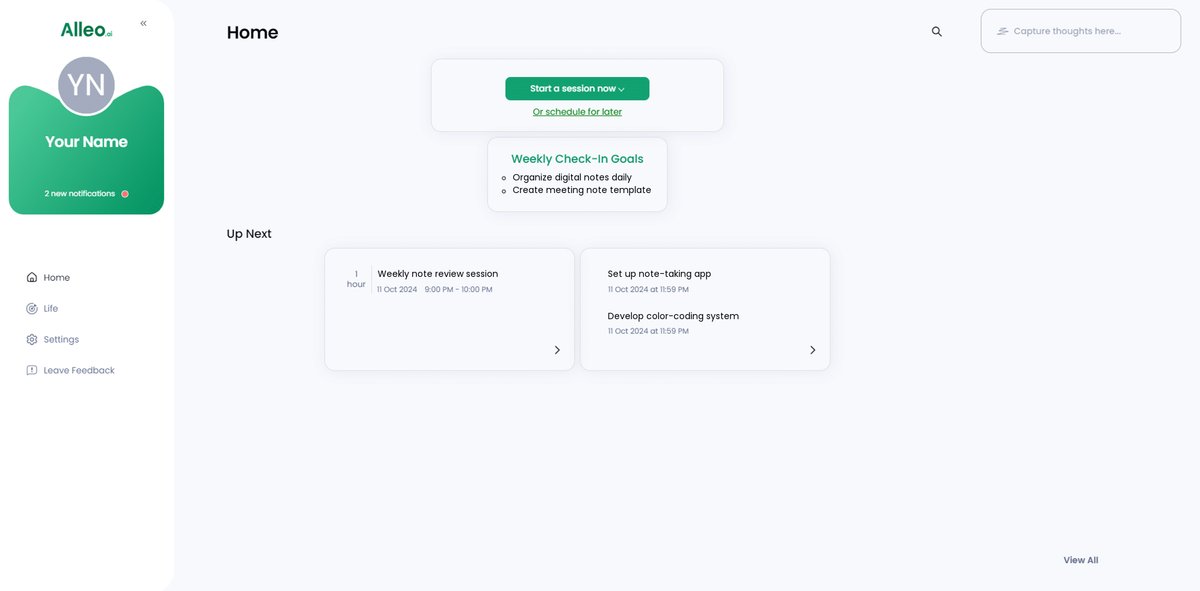
Step 6: Adding events to your calendar or app
Use Alleo’s calendar integration to schedule and track your note-taking sessions, ensuring you stay consistent with your new strategies and can easily monitor your progress in improving your remote note-taking skills.

Wrap-Up: Mastering Remote Note-Taking
We’ve covered a lot of ground on improving your remote note-taking strategies. With these organization techniques for virtual teams, you can transform your remote work experience.
Remember, digital note-taking tools can streamline your process. Visual techniques will make your notes more engaging and easier to understand, enhancing information retention in remote settings.
Structured templates keep your virtual meeting minutes organized. Active note-making ensures your notes are clear and actionable, boosting remote work productivity.
I know it can be overwhelming to implement these changes. But, take it step by step to improve your time management for remote work.
Alleo is here to help you every step of the way. Set up your personalized remote note-taking plan today.
Let’s make your remote work more productive and less stressful. Try Alleo, a collaborative note-taking platform, for free and see the difference in your remote note-taking strategies.