Master Healthy Tech Boundaries: A Comprehensive Guide for Busy Professionals
Are you feeling overwhelmed by the constant barrage of notifications and endless screen time? Setting healthy tech boundaries is crucial in today’s digital world.
As a life coach, I’ve helped many professionals navigate these challenges. In my experience, establishing clear work-life balance with technology is essential for mental and physical well-being. Mindful technology use can significantly reduce professional burnout.
In this article, you’ll find actionable steps to establish clear work hours, create tech-free zones at work, and implement digital detox strategies. These techniques, along with effective email management and time-blocking for digital tasks, will help you reclaim your time and improve your productivity. We’ll also explore screen time management tips and setting smartphone limits.
Let’s dive in to discover how setting healthy tech boundaries can transform your professional life.

Understanding the Impact of Technology Overuse
You might not realize it, but excessive technology use can drastically harm your productivity, mental health, and personal relationships. Many clients initially struggle with setting healthy tech boundaries, leading to burnout and decreased job satisfaction.
The societal pressure to always be available exacerbates these issues, making work-life balance with technology challenging.
In my experience, people often find that their mental health suffers due to the relentless influx of notifications and screen time. This constant distraction can lead to feelings of overwhelm and stress, highlighting the need for mindful technology use.
Your personal relationships might also take a hit, as you struggle to disconnect and be present with loved ones. Implementing digital detox strategies and setting smartphone limits can help address this issue.
Addressing these challenges is crucial for your well-being. Understanding the depth of the problem is the first step toward meaningful change and professional burnout prevention.

Effective Strategies for Setting Healthy Tech Boundaries
Overcoming this challenge of setting healthy tech boundaries requires a few key steps. Here are the main areas to focus on to make progress:
- Establish clear work hours and communicate them: Set specific work times and inform your team to maintain work-life balance with technology.
- Create a tech-free zone: Designate areas without digital devices to foster relaxation and implement tech-free zones at work.
- Implement a daily digital detox ritual: Disconnect from technology at set times daily as part of your digital detox strategies.
- Use app blockers during focus time: Install productivity apps for professionals to limit distractions and enhance productivity.
- Set up mindful notification management: Customize notifications to prioritize essential alerts only, promoting mindful technology use.
Let’s dive in to explore these strategies for setting healthy tech boundaries!
1: Establish clear work hours and communicate them
Creating clear work hours is essential for maintaining a healthy work-life balance and setting healthy tech boundaries.
Actionable Steps:
- Set specific start and end times for your workday and stick to them consistently, implementing screen time management tips.
- Communicate your work hours to your team and clients to manage expectations effectively, promoting mindful technology use.
- Use calendar tools to block out non-work hours and set auto-responses for after-hours messages, utilizing productivity apps for professionals.
Explanation: Establishing clear work hours helps you disconnect from work and focus on personal time, reducing stress and burnout. This is a key aspect of setting healthy tech boundaries.
When you communicate these hours, it sets boundaries and expectations with your team, enhancing your overall productivity and mental well-being. This practice can be part of a broader digital detox strategy.
According to Business.com, clear boundaries are crucial for maintaining a balanced and healthy lifestyle.
Taking this step will help you create a structured routine and improve your overall work-life balance with technology.
2: Create a tech-free zone in your home or office
Creating a tech-free zone in your home or office is vital for setting healthy tech boundaries and reducing distractions while enhancing relaxation.
Actionable Steps:
- Designate a specific area in your home or office where no digital devices are allowed, effectively creating tech-free zones at work or home.
- Furnish this space with relaxing items such as books, plants, and comfortable seating to encourage unplugged activities and promote mindful technology use.
- Establish rules for this tech-free zone and communicate them to family members or colleagues as part of your digital detox strategies.
Explanation: Establishing a tech-free zone helps you disconnect from digital distractions, promoting mindfulness and relaxation. This practice can enhance your mental well-being and productivity, contributing to work-life balance with technology.
According to Los Angeles MFT Therapist, creating boundaries around technology use is crucial for maintaining mental health. By implementing these steps, you’ll create a more balanced and focused environment.
Benefits of a tech-free zone include:
- Reduced stress and anxiety, aiding in professional burnout prevention
- Improved sleep quality through better screen time management
- Enhanced face-to-face interactions, supporting work-life balance
Taking this approach will help you cultivate a healthier relationship with technology and assist in setting healthy tech boundaries.
3: Implement a daily digital detox ritual
Incorporating a daily digital detox ritual is essential for setting healthy tech boundaries and maintaining a balance between technology use and personal well-being.
Actionable Steps:
- Set aside a specific time each day, such as during meals or before bedtime, to disconnect from all digital devices and practice screen time management.
- Engage in alternative activities during this time, such as reading, meditating, or exercising, to promote mindful technology use.
- Gradually increase the duration of your digital detox periods to build a sustainable habit and improve work-life balance with technology.
Explanation: Establishing a daily digital detox ritual helps you disconnect from technology, reducing stress and enhancing your well-being. It’s an effective strategy for setting healthy tech boundaries.
According to the Freelancers Union, digital detoxes can significantly reduce stress and prevent burnout.
By following these steps, you’ll create a healthier relationship with technology and improve your overall mental health while setting healthy tech boundaries.
Taking this approach will help you cultivate mindfulness and set a positive example for others in professional burnout prevention.
4: Use app blockers during focus time
Using app blockers during focus time is essential for setting healthy tech boundaries and boosting productivity.
Actionable Steps:
- Identify distracting apps and install blockers: Determine which apps are most disruptive and use blockers to limit their use during work hours, enhancing your digital detox strategies.
- Schedule focus times and activate app blockers: Plan dedicated focus periods in your calendar and enable app blockers to ensure uninterrupted work, improving your work-life balance with technology.
- Monitor and adjust settings: Regularly review your productivity and tweak app blocker settings to maintain optimal focus and refine your screen time management tips.
Explanation: Implementing app blockers can significantly enhance your productivity by reducing digital distractions. By scheduling focus times and using app blockers, you create an environment conducive to deep work and practice mindful technology use.
According to EdSource, reducing screen time boosts productivity and physical well-being. This approach helps you stay on task and achieve your work goals more efficiently while setting healthy tech boundaries.
Key benefits of using app blockers:
- Increased focus and concentration
- Higher quality work output
- Better time management
Taking this step will help you maintain a healthier balance between work and technology use, contributing to professional burnout prevention.

5: Set up mindful notification management
Managing notifications thoughtfully is crucial for setting healthy tech boundaries and maintaining focus while minimizing distractions.
Actionable Steps:
- Customize notification settings: Adjust notification settings on your devices to receive only essential alerts, supporting work-life balance with technology.
- Implement do-not-disturb modes: Activate do-not-disturb modes during critical work periods or personal time to avoid interruptions and practice mindful technology use.
- Review and adjust regularly: Periodically review and tweak your notification settings to ensure they align with your current priorities and needs, incorporating screen time management tips.
Explanation: Reducing notification overload helps you stay focused and reduces stress. By customizing your settings and using do-not-disturb modes, you create a more productive environment and support setting healthy tech boundaries.
According to E-Resident, intentional use of technology is key to achieving a sustainable work-life balance. Regularly adjusting your settings ensures they continue to support your goals and well-being.
Strategies for effective notification management:
- Group notifications by app or priority
- Set specific notification times for non-urgent apps, incorporating time-blocking for digital tasks
- Use silent mode for non-essential notifications, aiding in professional burnout prevention
Taking these steps will help you manage technology use more effectively and maintain healthy tech boundaries.

Transform Your Tech Boundaries with Alleo
We’ve explored the challenges of setting healthy tech boundaries and how solving them can improve your life. Did you know you can work directly with Alleo to make this journey of digital detox strategies simpler?
First, sign up for an Alleo account. Create a personalized plan tailored to your needs, focusing on work-life balance with technology.
Alleo’s AI coach will guide you through the process, offering full coaching sessions like a human coach would, including screen time management tips and mindful technology use strategies.
The coach will follow up on your progress and handle any changes. Stay accountable with text and push notifications, helping you with setting smartphone limits and email management techniques.
Alleo provides affordable, tailored coaching support for setting healthy tech boundaries, including a free 14-day trial, no credit card required.
Ready to get started for free? Let me show you how to transform your tech boundaries and prevent professional burnout!
Step 1: Log In or Create Your Alleo Account
To begin your journey towards healthier tech boundaries, log in to your existing Alleo account or create a new one in just a few clicks.

Step 2: Choose “Building better habits and routines”
Click on “Building better habits and routines” to start creating a personalized plan for setting healthy tech boundaries and improving your work-life balance, directly addressing the challenges discussed in the article.

Step 3: Select “Personal” as Your Focus Area
Choose “Personal” as your focus area to address technology overuse and establish healthier boundaries. This selection will help you develop strategies to create tech-free zones, implement digital detox rituals, and manage notifications more effectively, ultimately improving your work-life balance and overall well-being.

Step 4: Starting a Coaching Session
Begin your journey with Alleo by scheduling an intake session, where you’ll discuss your tech boundary goals and create a personalized plan to improve your digital well-being.

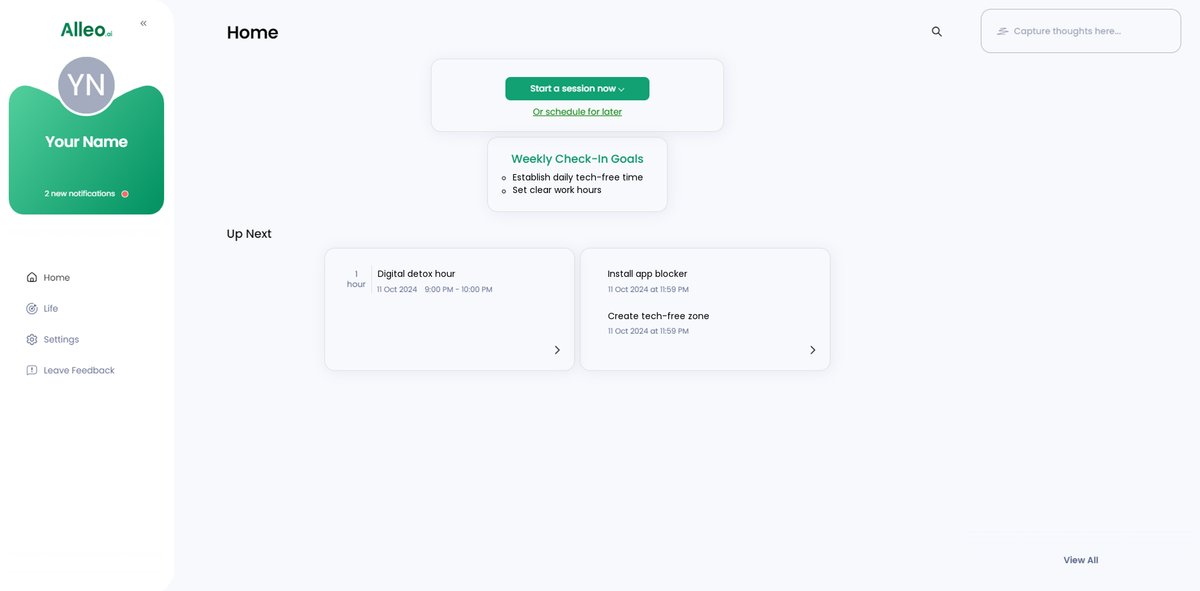
Step 5: Viewing and managing goals after the session
After your coaching session on setting healthy tech boundaries, check the Alleo app’s home page to view and manage the goals you discussed, allowing you to track your progress and stay accountable to your digital wellness plan.
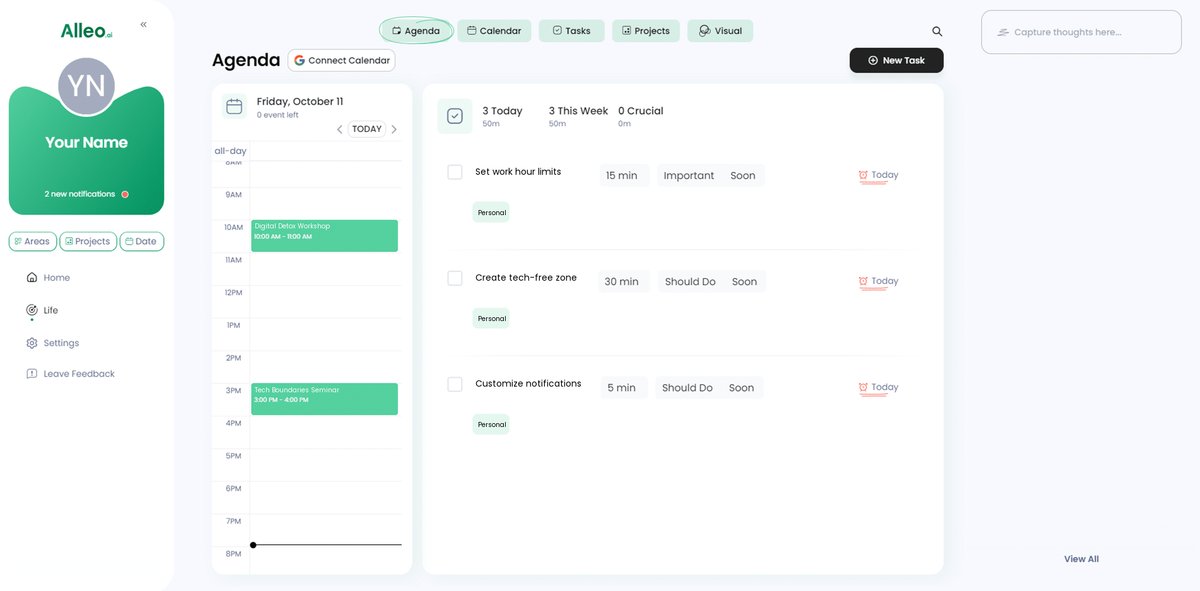
Step 6: Adding events to your calendar or app
Use Alleo’s calendar and task features to schedule and track your tech boundary activities, such as digital detox times and tech-free zone periods, allowing you to monitor your progress in solving your technology overuse problem.
Wrapping Up Your Journey to Healthy Tech Boundaries
As we conclude, let’s reflect on the vital steps we’ve discussed to set healthy tech boundaries and enhance your work-life balance with technology.
By establishing clear work hours, creating tech-free zones at work, and implementing daily digital detox strategies, you can reclaim your time and well-being.
Remember, using productivity apps for professionals and managing notifications mindfully will further enhance your productivity and assist with screen time management.
I understand how challenging it can be to make these changes, but taking the first step in setting healthy tech boundaries is crucial.
Why not let Alleo assist you in this journey towards mindful technology use?
Try Alleo for free and experience the difference it can make in your work-life balance and professional burnout prevention.
Take control of your technology use, practice setting smartphone limits, and prioritize your well-being today.