3 Proven Methods for Tech-Savvy Parents to Balance Family Time with Gadget Knowledge
Are you struggling to balance family time and tech while keeping up with the latest gadgets and technology trends? Mastering digital parenting strategies can be challenging.
As a life coach, I’ve helped many parents navigate these challenges. I understand how overwhelming it can be to manage parenting responsibilities, implement smart device boundaries, and stay updated on technology trends.
In this article, you’ll discover strategies to balance tech-savviness with family time. We’ll explore setting daily tech-free blocks for unplugged family activities, using parental controls and monitoring, and exploring educational technology for families together.
Let’s dive into these tech-life balance tips.

The Balancing Act: Parenting and Technology
Balancing family time and tech can feel like juggling flaming swords. Many new parents struggle to keep their children entertained while ensuring their gadgets are safe and educational, often seeking digital parenting strategies.
In my experience, the pressure to make informed tech purchases for children can be overwhelming. You want the best for your kids, but the sheer volume of options for family-friendly tech habits can be paralyzing.
Moreover, several clients often find that managing screen time and ensuring age-appropriate content adds another layer of stress. The fear of negative impacts from excessive gadget use is real, highlighting the need for smart device boundaries (source).
These challenges in balancing family time and tech are common, but there are solutions to achieve a tech-life balance.

Steps to Balance Tech-Savviness with Family Time
Overcoming this challenge of balancing family time and tech requires a few key steps. Here are the main areas to focus on to make progress in achieving a tech-life balance:
- Set daily tech-free family time blocks: Dedicate specific times each day for unplugged family activities without devices, promoting digital wellness for families.
- Use parental controls for age-appropriate content: Implement tools to ensure children access suitable content, a crucial aspect of digital parenting strategies.
- Explore educational apps and games together: Discover and use educational technology for families as part of smart device boundaries.
Let’s dive into these screen time management techniques!
1: Set daily tech-free family time blocks
Establishing daily tech-free family time blocks is crucial for creating meaningful connections and balancing family time and tech use.
Actionable Steps:
- Schedule a consistent tech-free hour each day. Use a family calendar to mark these times, promoting smart device boundaries.
- Engage in interactive family activities during tech-free hours. Plan unplugged family activities like board games, storytelling, or outdoor play.
- Reflect on the benefits of tech-free time. Hold a weekly family meeting to discuss how it’s impacting family connections and overall tech-life balance.
Explanation: Setting tech-free hours helps reinforce family bonds, reducing the negative impact of excessive gadget use and improving digital wellness for families.
According to research, limiting screen time can improve children’s mental health and family relationships. Learn more about the benefits of reducing screen time from this source.
Here are some activities you can try during tech-free time as part of your digital parenting strategies:
- Family game nights
- Nature walks or hikes
- Cooking or baking together
- Reading aloud as a family
Let’s move on to the next strategy for balancing tech-savviness with family time and implementing effective screen time management.
2: Use parental controls for age-appropriate content
Ensuring your children access age-appropriate content is crucial for their development and safety when balancing family time and tech.
Actionable Steps:
- Set up parental control settings on all devices. Use built-in controls or apps like Qustodio or Bark to filter content and manage screen time.
- Educate children about the importance of age-appropriate content. Have open discussions about online safety for kids and content suitability.
- Monitor and adjust controls as children grow. Review and update restrictions as children mature and their digital parenting strategies evolve.
Explanation: These steps help create a safer online environment for your children, allowing you to manage what they see and experience while promoting smart device boundaries.
According to National University, consistent limits on technology use are recommended for children aged 5-18. By implementing these controls, you can ensure your children’s online activities are safe and suitable for their age, contributing to overall digital wellness for families.
Transitioning to the next strategy, we will explore the use of educational apps and games together as part of family-friendly tech habits.

3: Explore educational apps and games together
Exploring educational apps and games together can turn screen time into a valuable bonding and learning experience, helping in balancing family time and tech use.
Actionable Steps:
- Research and select high-quality educational apps and games. Use resources like Common Sense Media to find suitable apps for smart device boundaries.
- Dedicate time to play and learn together. Set aside specific times each week for family app exploration sessions, promoting tech-life balance tips.
- Encourage children to share their learning experiences. Create a space like a family blog or journal for children to document and share what they learn, enhancing digital parenting strategies.
Explanation: These steps matter because they transform screen time into an opportunity for shared growth and education. According to Xplora, using technology to encourage learning and physical activity can foster a more balanced approach to tech use and support screen time management.
Benefits of exploring educational apps together include:
- Strengthening parent-child bonds through family-friendly tech habits
- Enhancing digital literacy skills and online safety for kids
- Promoting collaborative learning with educational technology for families
This approach will help you leverage technology positively while creating lasting family memories and maintaining digital wellness for families.
Enhance Your Parenting Balance with Alleo
We’ve explored the challenges of balancing family time and tech-savviness, along with practical digital parenting strategies to tackle them. But did you know you can work directly with Alleo to make this journey of screen time management even easier?
Setting up an account with Alleo is simple. Create a personalized plan with our AI coach to meet your unique needs for balancing family time and tech use.
Alleo helps you:
- Schedule tech-free family time for unplugged family activities
- Set up parental controls and monitoring
- Find the best educational technology for families
Our coach follows up on your progress in developing family-friendly tech habits, handles changes to smart device boundaries, and keeps you accountable with text and push notifications to maintain your tech-life balance.
Ready to get started for free? Let me show you how to improve your digital wellness for families!
Step 1: Log In or Create Your Account
To start balancing your family’s tech use with Alleo, log in to your account or create a new one in just a few clicks.

Step 2: Choose “Building better habits and routines”
Select “Building better habits and routines” to create a structured approach for balancing tech use and family time, helping you establish consistent tech-free periods and educational tech sessions that align with your family’s needs.

Step 3: Select “Personal” as Your Focus Area
Choose “Personal” as your life area to address balancing tech use and family time, allowing Alleo’s AI coach to provide tailored strategies for managing screen time, implementing parental controls, and fostering meaningful family connections.

Step 4: Starting a Coaching Session
Begin your journey with Alleo by scheduling an initial intake session, where our AI coach will help you create a personalized plan to balance tech use and family time, tailored to your specific needs and goals.

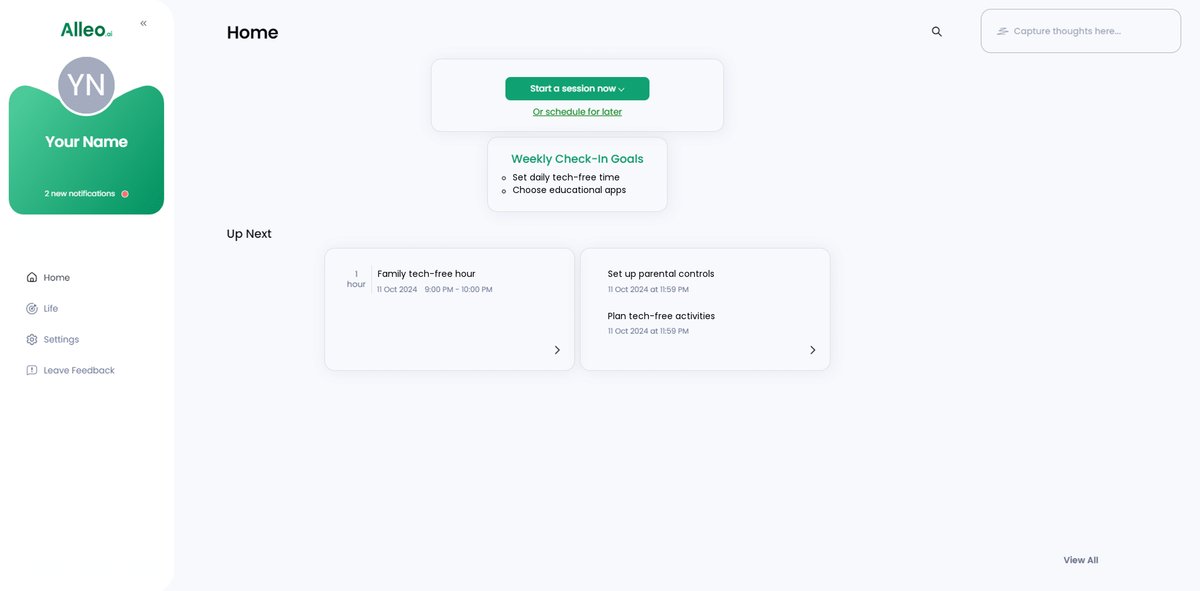
Step 5: Viewing and Managing Goals After the Session
After your coaching session, open the Alleo app to view and manage the tech-family balance goals you discussed on the home page, allowing you to track progress and make adjustments as needed.
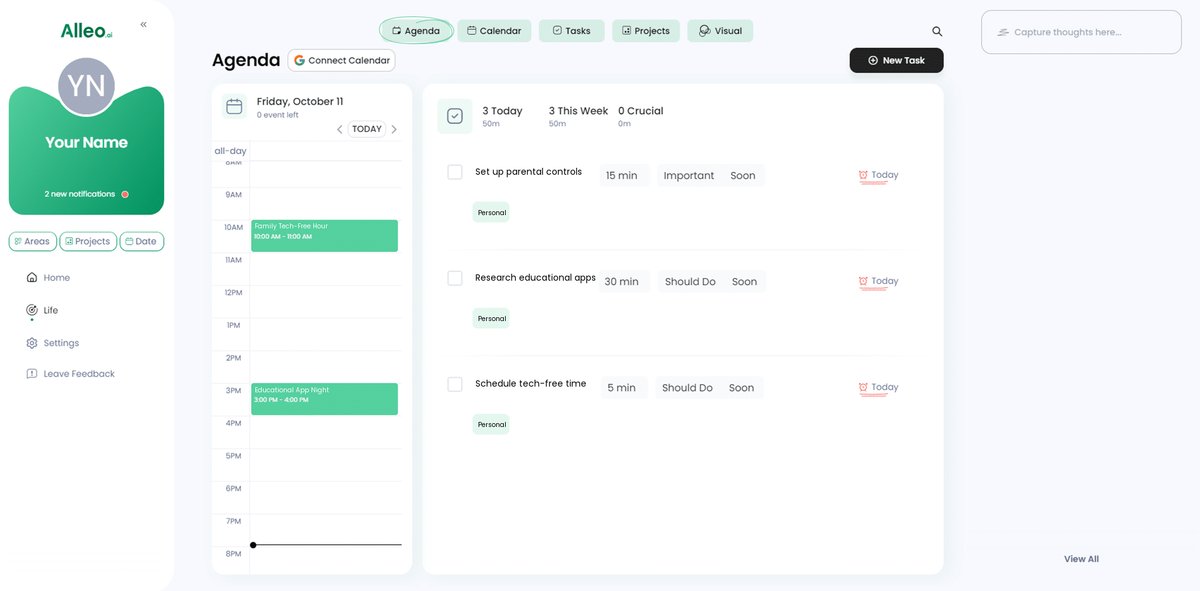
Step 6: Adding events to your calendar or app
Use the calendar and task features in the Alleo app to schedule your tech-free family time blocks and track your progress in balancing tech-savviness with quality family time.
Finding Harmony Between Tech and Family Time
Balancing family time and tech can be challenging, but it’s achievable with mindful digital parenting strategies. Smart device boundaries and tech-life balance tips are key to success.
Remember, setting tech-free family time blocks helps create meaningful connections and promotes unplugged family activities. Using parental controls and monitoring safeguards your children’s online experiences and ensures online safety for kids.
Exploring educational technology for families together turns screen time into bonding time. These screen time management steps can make a big difference in achieving digital wellness for families.
You’ve got this!
Try Alleo for personalized support in achieving a balanced family tech life. Our AI coach is here to help with family-friendly tech habits.
Create your free account today and start your journey to a more harmonious family life while balancing family time and tech.