How to Summarize Your Nonprofit Budget for Grant Applications: 5 Essential Steps
Are you struggling to summarize your nonprofit budget for grants? You’re not alone.
Meet Sarah, a nonprofit leader who spent countless hours trying to condense her organization’s finances into a concise format for a key grant application. She needed to master simplified budget presentation techniques to meet grant application financial requirements.
As a life coach, I’ve helped many nonprofit leaders navigate these challenges. In my experience, summarizing complex financial data into a single figure can be daunting, especially when it comes to creating a budget narrative for nonprofits.
In this article, you’ll learn step-by-step strategies to create a clear and concise budget summary for grant applications. We’ll cover calculating your total annual revenue and expenses, using audited financial statements, and exploring key components of a nonprofit budget summary. You’ll discover cost-effective budget summarization methods and how to showcase financial transparency in grant proposals.
Let’s dive in and explore how to effectively summarize your nonprofit budget for grants.

Understanding the Challenges of Summarizing Nonprofit Budgets
Let’s dive deeper into the common issues nonprofits face when trying to summarize nonprofit budgets for grants. Nonprofits often have intricate budgets with multiple funding sources and expenses, making it challenging to create effective nonprofit budget templates.
This complexity makes it hard to summarize financial data into a single figure for grant applications, often requiring simplified budget presentation techniques.
Additionally, there are often no clear guidelines on whether to use revenue, expenses, or another figure when addressing grant application financial requirements. This lack of clarity can lead to missing out on crucial grants.
Moreover, I often hear from clients that a poorly prepared budget summary can impact their chances of securing funding, emphasizing the importance of financial transparency in grant proposals.
Therefore, creating a clear, well-prepared budget summary that includes key components of a nonprofit budget summary is essential for your nonprofit’s success in the grant application process.

Roadmap to Summarizing Your Nonprofit’s Budget for Grant Applications
Overcoming this challenge requires a few key steps. Here are the main areas to focus on to summarize your nonprofit budget for grants effectively:
- Calculate total annual revenue and expenses: Gather all financial records and sum up all revenue sources and expenses for your nonprofit budget.
- Use most recent audited financial statement: Locate and review your latest audited financial statement to meet grant application financial requirements.
- Create a simplified one-page budget summary: Draft a one-page summary with key financial figures using simplified budget presentation techniques.
- Highlight key budget categories and percentages: Identify major nonprofit expense categories for grants and calculate their percentages.
- Include a brief narrative explaining the budget: Write a short budget narrative for nonprofits that explains the key figures and categories.
Let’s dive in to explore these key components of a nonprofit budget summary!
1: Calculate total annual revenue and expenses
To summarize your nonprofit budget for grants, start by calculating your total annual revenue and expenses. This is a crucial step in creating a simplified budget presentation for grant applications.
Actionable Steps:
- Gather all financial records for the past fiscal year: Collect income statements, balance sheets, and cash flow statements, ensuring all documents are from the same time period. These are key components of a nonprofit budget summary.
- Sum up all revenue sources: Combine revenue from donations, grants, services, and other sources. Verify the total matches the records. This step helps identify various revenue sources in nonprofit budgets.
- Sum up all expenses: Include operational costs, salaries, program expenses, and overhead. Cross-check with financial statements to ensure accuracy. This process helps categorize nonprofit expense categories for grants.
Explanation: Taking these steps is essential to provide an accurate picture of your nonprofit’s financial health and meet grant application financial requirements.
A clear understanding of your total revenue and expenses will help you craft a compelling budget narrative for nonprofits in your grant applications.
According to the NIH Grants Policy Statement, detailed financial information is crucial for compliance and successful grant applications.
Key benefits of accurate financial calculations:
- Builds credibility with grant committees
- Helps identify areas for financial improvement
- Provides a solid foundation for budget projections
With these calculations, you’re now ready to use your most recent audited financial statement to further refine your budget summary, ensuring financial transparency in grant proposals.

2: Use most recent audited financial statement
Using your most recent audited financial statement can provide a reliable benchmark when you summarize nonprofit budget for grants.
Actionable Steps:
- Locate the most recent audited financial statement: Retrieve the document from your financial department or auditor. Confirm it is the latest version.
- Review the statement for key components of a nonprofit budget summary: Identify total revenue, total expenses, and net assets. Make sure these figures are highlighted.
- Compare these figures with your current calculations: Adjust your totals if necessary to match the audited figures, ensuring you meet grant application financial requirements.
Explanation: These steps ensure your budget summary is accurate and credible.
Audited financial statements help establish trust with grant committees and demonstrate financial transparency in grant proposals.
According to the Moses Taylor Foundation, a clear financial history is crucial for securing funding.
With these figures, you’re now prepared to create a simplified one-page budget summary that is both clear and concise, using cost-effective budget summarization methods.

3: Create a simplified one-page budget summary
Creating a simplified one-page budget summary is crucial for presenting your nonprofit’s financial data clearly and concisely when summarizing nonprofit budget for grants.
Actionable Steps:
- Draft a basic layout: Use nonprofit budget templates or create a custom layout in a document editor. Ensure the layout fits on one page.
- Include key financial figures: Add total revenue, total expenses, and net income/loss. Confirm all figures are accurate and up-to-date, addressing grant application financial requirements.
- Add a brief overview of financial health: Write a budget narrative for nonprofits summarizing the financial status. Keep the summary concise and to the point.
Explanation: These simplified budget presentation techniques matter because a clear, concise budget summary makes your financial data more accessible to grant committees.
According to the Moses Taylor Foundation, a well-prepared budget summary is essential for securing funding.
With a simplified one-page budget summary, you’re ready to highlight key components of a nonprofit budget summary and percentages.
4: Highlight key budget categories and percentages
Highlighting key budget categories and percentages is crucial for providing a clear picture of your nonprofit’s financial structure to grant committees when you summarize nonprofit budget for grants.
Actionable Steps:
- Identify major budget categories: List out categories like program expenses, administrative costs, and fundraising. Ensure all major components of a nonprofit budget summary are covered.
- Calculate the percentage of the total budget each category represents: Use simple formulas to find percentages. Double-check calculations for accuracy, following nonprofit budget templates.
- Visualize the data: Create a pie chart or bar graph to represent the budget breakdown. Ensure the visual aids are clear and easy to understand, utilizing simplified budget presentation techniques.
Explanation: These steps matter because they provide a clear snapshot of your nonprofit’s financial priorities and allocation, meeting grant application financial requirements.
According to the Moses Taylor Foundation, a well-prepared budget summary is essential for securing funding.
Visual aids make complex data more accessible, helping grant committees quickly understand your financial health and nonprofit expense categories for grants.
Essential elements of effective budget visualization:
- Clear labels for each category
- Consistent color scheme for easy interpretation
- Legend explaining any symbols or abbreviations used
With these key budget categories and percentages highlighted, you can now include a brief budget narrative for nonprofits to explain your budget.

5: Include a brief narrative explaining the budget
Including a brief narrative explaining the budget helps grant committees understand your financial story and effectively summarize nonprofit budget for grants.
Actionable Steps:
- Draft a concise narrative: Write a paragraph explaining the key figures and categories. Keep it under 200 words, focusing on simplified budget presentation techniques.
- Highlight financial strengths: Mention surplus, reserves, and strong revenue sources in nonprofit budgets to emphasize stability.
- Address financial challenges: Briefly explain any significant deficits or financial plans. Keep explanations solution-focused, addressing key components of a nonprofit budget summary.
Explanation: These steps matter because a clear narrative can make complex financial data more relatable. It helps grant committees quickly grasp your financial situation and meets grant application financial requirements.
According to the Moses Taylor Foundation, a well-prepared budget summary is essential for securing funding.
Key components of an effective budget narrative for nonprofits:
- Context for significant financial changes
- Explanation of unique funding situations
- Future financial goals and strategies
By including a brief narrative, you make it easier for grant committees to understand your budget and improve financial transparency in grant proposals.
Next, let’s explore how Alleo can assist in this process.

Streamline Your Nonprofit Budgeting with Alleo
We’ve explored the challenges of summarizing nonprofit budgets for grants. Solving them can secure crucial funding, and now you can work with Alleo to make this process easier and create simplified budget presentations for grant applications.
Set up an account and create a personalized plan with Alleo. Our AI coach provides tailored support, helping you gather financial records and create accurate summaries that include key components of a nonprofit budget summary for grant proposals.
Alleo tracks your progress and sends reminders for upcoming audits, ensuring you maintain financial transparency in grant proposals.
Stay accountable with text and push notifications. Alleo ensures you meet your goals and deadlines, including proper budget formatting for grant applications.
Ready to get started for free? Let me show you how to summarize nonprofit budgets for grants effectively!
Step 1: Log In or Create Your Alleo Account
To begin your journey towards clearer nonprofit budget summaries, log in to your existing Alleo account or create a new one if you’re a first-time user.

Step 2: Choose Your Focus Area
Select “Setting and achieving personal or professional goals” to align your nonprofit’s financial objectives with your grant application strategy. This focus will help you create a clear, goal-oriented budget summary that appeals to grant committees.

Step 3: Select “Finances” as Your Focus Area
Choose “Finances” as your focus area in Alleo to receive tailored guidance on creating clear budget summaries for your nonprofit grant applications, helping you streamline the process and increase your chances of securing funding.

4. Starting a coaching session
Begin your journey with Alleo by scheduling an intake session, where you’ll work with our AI coach to set up a personalized plan for summarizing your nonprofit’s budget for grant applications.

Step 5: Viewing and managing goals after the session
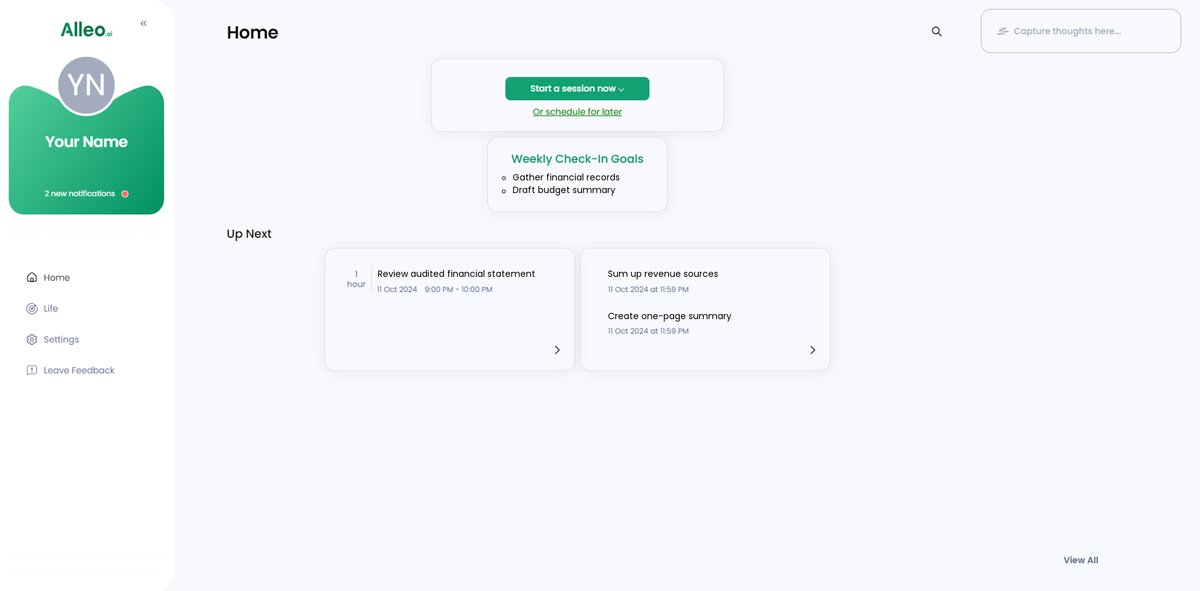
After your coaching session on budget summarization, check the Alleo app’s home page to view and manage the financial goals you discussed, keeping you on track with your nonprofit’s budget clarity objectives.
6: Adding events to your calendar or app
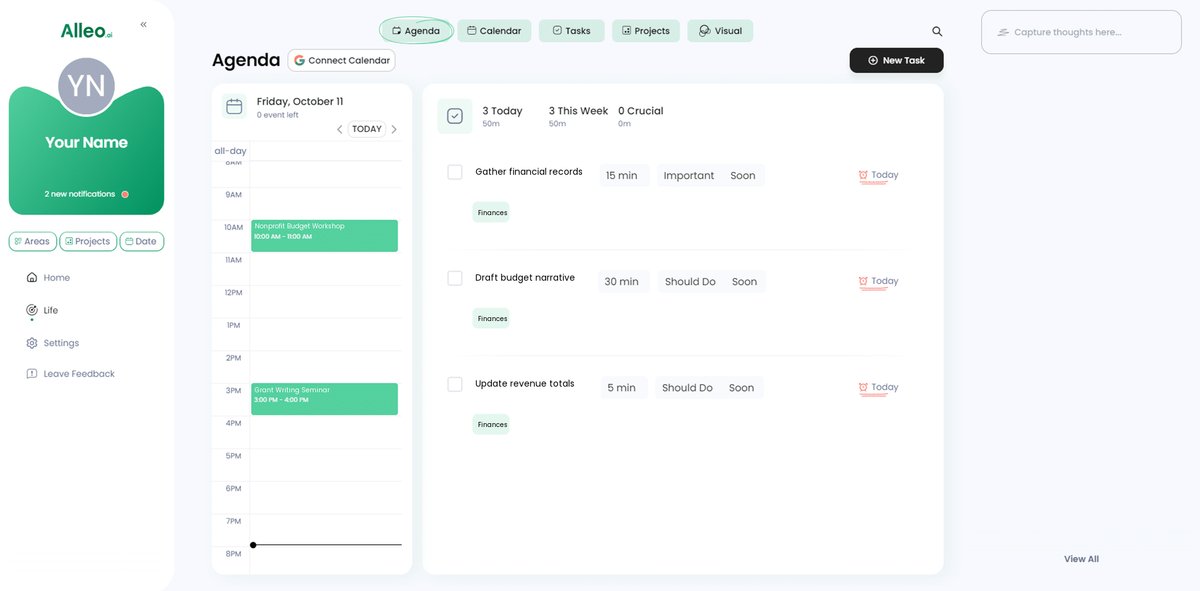
Use Alleo’s calendar and task features to track your progress in creating your nonprofit’s budget summary, adding key dates like financial record gathering and audit deadlines to stay organized and on schedule.
Bringing It All Together: Your Path to Clear Budget Summaries
Creating a clear budget summary to summarize nonprofit budget for grants can seem overwhelming. I know it can be challenging to condense complex financial data into a concise format, especially when considering grant application financial requirements.
Remember, you’re not alone in this journey. Many nonprofit leaders face the same hurdles when creating budget narratives for nonprofits.
By following the steps outlined, you can create a strong budget summary using simplified budget presentation techniques. This will increase your chances of securing funding by addressing key components of a nonprofit budget summary.
Take it one step at a time. Start by gathering financial records and using audited statements to ensure financial transparency in grant proposals.
And don’t forget, Alleo is here to help. Our AI coach can guide you through every step, from budget formatting for grant applications to identifying nonprofit expense categories for grants.
Try Alleo for free today. Achieve clarity and confidence in your nonprofit’s budget, including revenue sources in nonprofit budgets and cost-effective budget summarization methods.