How to Build Confidence for Virtual Presentations: A Young Professional’s Guide to Success
Have you ever felt your heart race at the thought of presenting over Zoom to your colleagues? Building confidence for virtual presentations is crucial in today’s remote work environment.
As a life coach, I’ve helped many professionals navigate these challenges. In my experience, helping clients stand out in competitive industries, I often encounter similar issues related to virtual presentation skills and overcoming stage fright online.
In this post, you’ll discover proven strategies to build confidence for virtual presentations. We’ll cover practical tips and tools to help you shine during online meetings, including remote communication tips and techniques for engaging virtual audiences.
Let’s dive in and explore effective ways to enhance your professional presence on video calls.

Understanding the Challenges of Virtual Presentations
Navigating virtual presentations is a common struggle when building confidence for virtual presentations. Many young professionals face stage fright, technical glitches, and the challenge of engaging a remote audience, which are crucial aspects of virtual presentation skills.
These issues can be daunting and impact your confidence, making overcoming stage fright online a key concern for public speaking for young professionals.
In my experience, several clients initially struggle with the lack of immediate feedback from their audience. This can lead to feelings of isolation and self-doubt, affecting their professional presence on video calls.
Moreover, technical difficulties, such as poor internet connection or unfamiliarity with software, can add to the stress, highlighting the importance of preparation strategies for online presentations.
Overall, these challenges make virtual presentations a significant hurdle for many young professionals, emphasizing the need for effective remote communication tips and confidence-building techniques.

Key Steps to Building Confidence for Virtual Presentations
Overcoming this challenge requires a few key steps. Here are the main areas to focus on to make progress in building confidence for virtual presentations.
- Practice in Supportive Virtual Environments: Join virtual public speaking groups and simulate real presentation scenarios to enhance your virtual presentation skills.
- Master Virtual Presentation Tools and Technology: Learn to use tools like Zoom and Microsoft Teams effectively, improving your remote communication skills.
- Develop Clear, Concise Talking Points: Outline your key points and practice delivering them to boost your professional presence on video calls.
- Use Deep Breathing to Manage Nervousness: Incorporate deep breathing exercises into your routine as a confidence-building technique for overcoming stage fright online.
- Join Professional Development Webinars: Attend webinars on public speaking and presentation skills to enhance your ability to engage virtual audiences.
Let’s dive in to these strategies for building confidence for virtual presentations!
1: Practice in supportive virtual environments
Practicing in supportive virtual environments is crucial for building confidence for virtual presentations.
Actionable Steps:
- Join a virtual public speaking group like Toastmasters for regular practice and feedback on your virtual presentation skills.
- Participate in online role-playing scenarios with peers to simulate real presentation environments and overcome stage fright online.
- Schedule regular practice sessions using video conferencing tools to familiarize yourself with the setup and improve your professional presence on video calls.
Explanation:
These steps help you gain experience and receive constructive feedback in a low-pressure setting. Practicing regularly in a supportive environment boosts your confidence and prepares you for real-world scenarios, enhancing your remote communication tips arsenal.
For example, joining a group such as Toastmasters provides a platform to hone your skills and receive invaluable feedback from peers, which is essential for building confidence for virtual presentations.
Remember, practice makes perfect, so keep pushing your boundaries to improve your virtual presentation skills.

2: Master virtual presentation tools and technology
To build confidence for virtual presentations, it’s crucial to master virtual presentation tools and technology.
Actionable Steps:
- Take an online course or watch tutorials: Enroll in courses or watch tutorials on platforms like Zoom and Microsoft Teams to enhance your virtual presentation skills.
- Conduct tech rehearsals: Perform tech rehearsals before your presentation to ensure everything runs smoothly, boosting your confidence for virtual presentations.
- Set up a professional workspace: Create a distraction-free and professional virtual presentation space at home to improve your professional presence on video calls.
Explanation:
Mastering these tools can help you focus on delivering your message effectively, without being sidetracked by technical issues. This is a key confidence-building technique for virtual presentations.
Being familiar with your presentation setup reduces stress and makes you look more professional. For further guidance on building confidence for virtual presentations, check out this resource on managing virtual presentations.
Taking these steps helps you present confidently and efficiently in any virtual setting, improving your remote communication skills and engaging virtual audience effectively.

3: Develop clear, concise talking points
Developing clear, concise talking points is vital for building confidence for virtual presentations and delivering them effectively.
Actionable Steps:
- Use a mind-mapping tool: Outline your key points to ensure a logical flow. This helps structure your thoughts clearly, enhancing your virtual presentation skills.
- Write bullet points: Create bullet points for each slide to keep your presentation focused and easy to follow, a crucial confidence-building technique for online presentations.
- Practice with a timer: Deliver your talking points with a timer to stay within your allotted time, improving your professional presence on video calls.
Explanation:
These steps help you organize your content and maintain clarity, which is crucial for engaging your virtual audience. Clear talking points allow you to present confidently and avoid rambling, essential for overcoming stage fright online.
For more tips on public speaking, check out this resource.
Key benefits of clear talking points include:
- Improved audience engagement in virtual presentations
- Enhanced message retention
- Increased presenter confidence for young professionals
Clear talking points are the backbone of any successful virtual presentation, helping you stay on track and convey your message effectively while building confidence for virtual presentations.

4: Use deep breathing to manage nervousness
Using deep breathing techniques is essential for managing nervousness during virtual presentations and building confidence for virtual presentations.
Actionable Steps:
- Learn deep breathing techniques: Practice methods like the 4-7-8 technique to calm your nerves before and during presentations, enhancing your virtual presentation skills.
- Incorporate mindfulness meditation: Make mindfulness meditation a regular part of your routine to reduce overall anxiety levels and improve your professional presence on video calls.
- Include short breathing exercises: Add quick breathing exercises to your pre-presentation routine to stay focused and centered, helping overcome stage fright online.
Explanation:
These steps matter because managing nervousness helps you stay composed and confident. Deep breathing techniques can significantly reduce anxiety and improve your performance, which are crucial confidence-building techniques for virtual presentations.
For more insights, check out this resource on public speaking tips. By incorporating these practices, you’ll be better prepared to handle the pressures of virtual presentations and enhance your remote communication skills.
Building these habits will enhance your presentation skills and boost your confidence in any virtual meeting, improving your ability to engage virtual audiences effectively.
5: Join professional development webinars
Joining professional development webinars can significantly enhance your virtual presentation skills and boost your confidence for virtual presentations.
Actionable Steps:
- Attend webinars focused on public speaking and presentation skills: Look for webinars that offer practical tips and techniques to improve your presentations and overcome stage fright online.
- Engage in Q&A sessions: Participate in Q&A sessions during webinars to practice speaking spontaneously in a low-pressure environment, enhancing your professional presence on video calls.
- Network with other attendees: Connect with other participants to share experiences and build a support system for improving remote communication tips.
Explanation:
These steps are crucial because they provide a structured way to learn and practice new skills. Webinars offer insights from experts and an opportunity to interact with peers, helping you build confidence for virtual presentations.
For instance, the ASME Career Development webinars are a great resource for improving presentation skills and engaging virtual audiences.
Key advantages of professional development webinars:
- Access to expert knowledge on virtual presentation skills
- Opportunity for real-time interaction and practicing body language in virtual meetings
- Exposure to diverse perspectives on confidence-building techniques
Engaging in these activities will help you gain confidence and improve your virtual presentation abilities, especially beneficial for public speaking for young professionals.
Taking these steps will help you feel more prepared and confident in any virtual setting, enhancing your preparation strategies for online presentations and use of effective visual aids for virtual presentations.
Transform Your Virtual Presentation Skills with Alleo
We’ve explored the challenges of building confidence for virtual presentations and how solving them benefits your career. Did you know you can work directly with Alleo to make this journey easier and faster for developing your virtual presentation skills?
With Alleo, you get tailored coaching support to overcome these challenges and enhance your professional presence on video calls. The Alleo AI coach provides affordable, personalized coaching sessions, just like a human coach, focusing on confidence-building techniques for remote communication.
You can start with a free 14-day trial, requiring no credit card, to begin improving your public speaking for young professionals in virtual settings.
Here’s how it works:
- Sign up for Alleo: Create an account on our website to start building confidence for virtual presentations.
- Personalize your plan: Tailor your coaching to focus on virtual presentation skills and overcoming stage fright online.
- Work with your coach: Receive full coaching sessions, tips, and feedback on body language in virtual meetings and engaging virtual audiences.
- Stay accountable: Get follow-ups and reminders through text and push notifications to maintain your preparation strategies for online presentations.
Ready to get started for free and enhance your effective visual aids for virtual presentations?
Let me show you how!
Step 1: Log In or Create Your Account
To begin your journey towards confident virtual presentations, log in to your Alleo account or create a new one to access personalized AI coaching tailored to your presentation skills needs.

Step 2: Choose “Building better habits and routines”
Select “Building better habits and routines” to develop a strong foundation for confident virtual presentations, helping you establish consistent practice schedules and pre-presentation rituals that will boost your performance and reduce anxiety.

Step 3: Select “Career” as Your Focus Area
Choose “Career” as your focus area to directly address your virtual presentation challenges, aligning with the blog’s emphasis on professional development and allowing Alleo’s AI coach to provide tailored strategies for boosting your confidence in online meetings and presentations.

Step 4: Starting a coaching session
Begin your journey with Alleo by scheduling an initial intake session, where you’ll discuss your virtual presentation goals and create a personalized coaching plan to boost your confidence and skills.

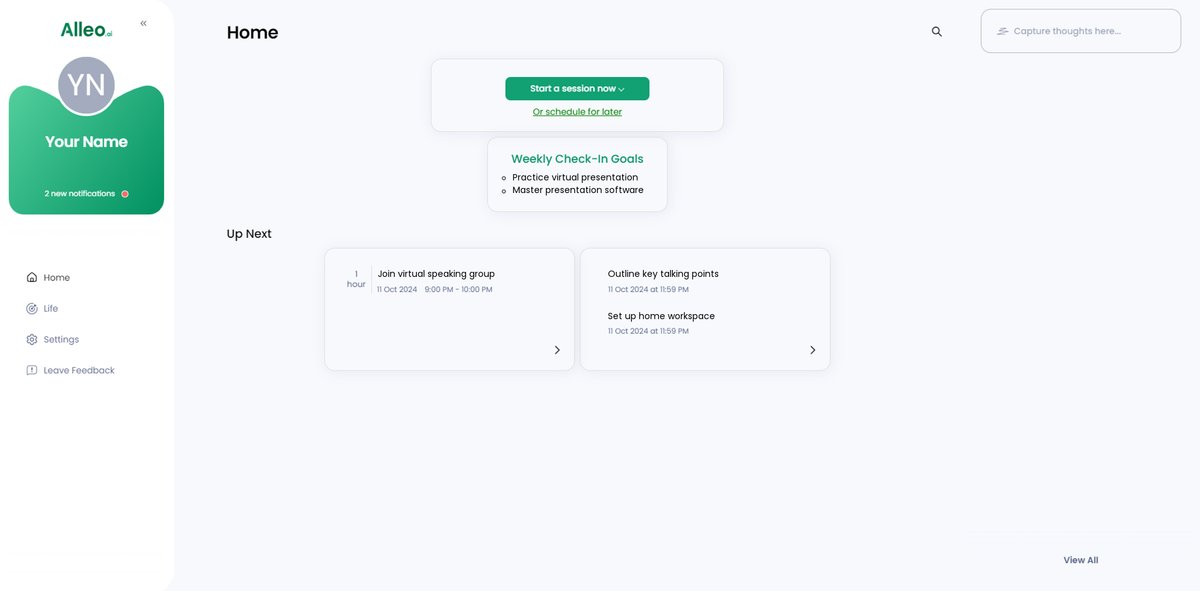
Step 5: Viewing and managing goals after the session
After your coaching session on virtual presentation skills, check the Alleo app’s home page to view and manage the goals you discussed, allowing you to track your progress and stay accountable as you work on building your confidence for online meetings.
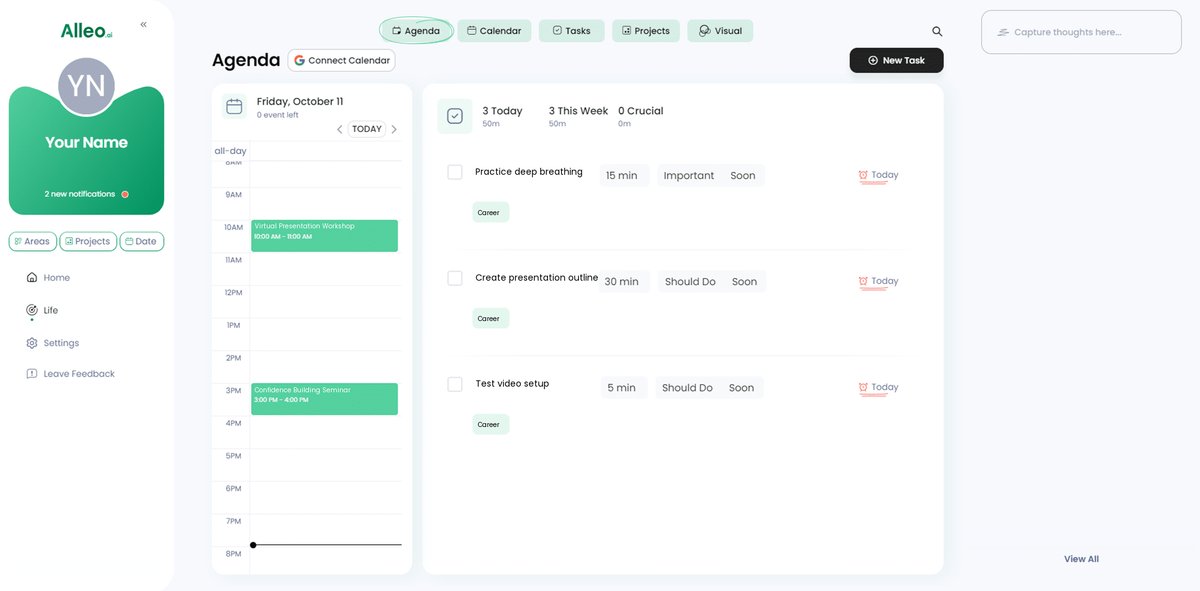
Step 6: Adding events to your calendar or app
To track your progress in building confidence for virtual presentations, use the Alleo app’s calendar and task features to schedule practice sessions, webinars, and breathing exercises, helping you stay organized and accountable on your journey to becoming a more confident presenter.
Wrapping Up: Build Your Confidence for Virtual Presentations
It’s clear that building confidence for virtual presentations is crucial for young professionals.
By practicing in supportive environments, mastering technology, developing clear talking points, and managing nervousness, you can overcome common challenges and enhance your virtual presentation skills.
Remember, professional development webinars offer additional insights and a great way to connect with like-minded individuals, helping you improve your remote communication techniques.
You have the power to transform your virtual presentation skills and boost your professional presence on video calls.
Give yourself the chance to shine in any online meeting by honing your body language in virtual meetings and learning strategies for engaging virtual audiences.
With Alleo, you get personalized coaching and support tailored to your needs, including confidence-building techniques for virtual presentations.
Start your free 14-day trial and begin your journey toward confident virtual presentations today, mastering preparation strategies for online presentations.
You’ve got this!